 Translate



Autopropage function does not work although autopropagate option is activated. What can I do?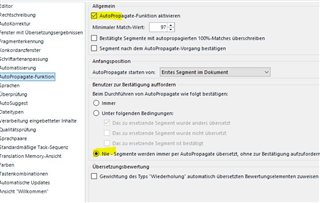
Generated Image Alt-Text
[edited by: Trados AI at 1:51 AM (GMT 0) on 29 Feb 2024]


Autopropage function does not work although autopropagate option is activated. What can I do?
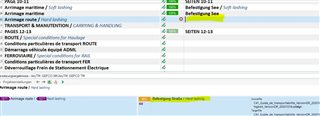
To add to Jerzy Czopik's reply, have you misunderstood what is meant by 'autopropagation'? Your screenshot doesn't show a first instance of the segment you have highlighted. Do you think that 'autopropagation' is when a TM match is added to a segment? If so, that is (pre)translation and is governed by your Project settings pre-translate settings via Batch tasks or Project settings>Language pairs>All language Pairs>Batch Processing>Pre-translate Files and/or the settings under File>Options>Automation.
Autopropagation is when a segment you confirm auto-updates any further 100% matches of that segment in the document you're working on (single document or virtual merge) - either from the start of the document or from where you confirmed depending on the setting (you have Erste Segment in Dokument set in your autopropagate setting above).
I hope I'm not confusing things here...
All the best,
Ali 
To add to Jerzy Czopik's reply, have you misunderstood what is meant by 'autopropagation'? Your screenshot doesn't show a first instance of the segment you have highlighted. Do you think that 'autopropagation' is when a TM match is added to a segment? If so, that is (pre)translation and is governed by your Project settings pre-translate settings via Batch tasks or Project settings>Language pairs>All language Pairs>Batch Processing>Pre-translate Files and/or the settings under File>Options>Automation.
Autopropagation is when a segment you confirm auto-updates any further 100% matches of that segment in the document you're working on (single document or virtual merge) - either from the start of the document or from where you confirmed depending on the setting (you have Erste Segment in Dokument set in your autopropagate setting above).
I hope I'm not confusing things here...
All the best,
Ali

