Language Switch in a TM

Hello guys ...
Can You help me please?

I have got a TM from a collegue of mine, and this TM seems to be from ENG to RUS ... BUT ... at a certain point, Ithe two languages are switched each-other ... I do not know why but, I don't really care ... My point is: can You suggest the correct and better way to do that?

Here is a screenshot ... ... Ok, I forgot to catch the RIGHT part of the screen but, trust me ... in the right-upper part there is Russian, and after that English ...
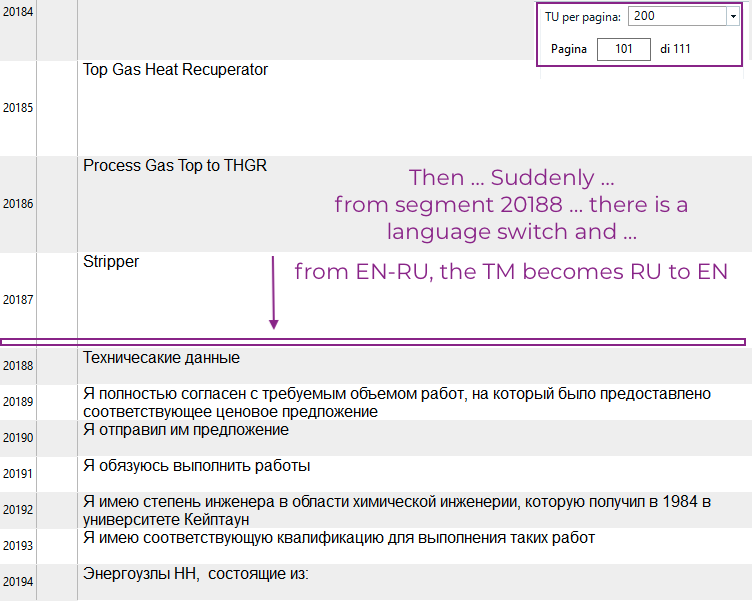
Screenshot of Trados Studio showing a Translation Memory (TM) with a language switch error. English text is labeled as Russian and vice versa starting from segment 20188.


Many thanks.
Pietro


Generated Image Alt-Text
[edited by: Trados AI at 1:58 AM (GMT 0) on 29 Feb 2024]

emoji
Parents
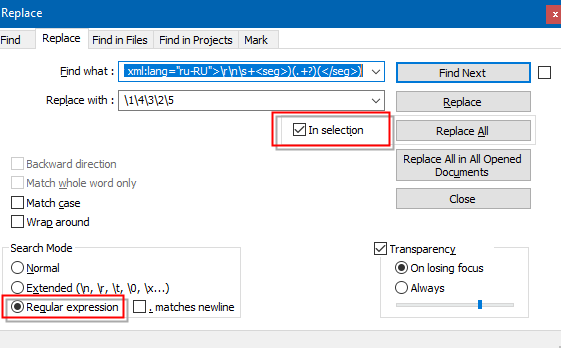
  • I think a bit of regex will make its magic:

    1. In Trados Studio, export the TM to TMX
    2. Install Notepad++ or any decent editor.
    3. Open the TMX with Notepad++. Be patient…
    4. In Notepad++, go to the end of the file and select the wrong text. Find the TU corresponding to the segment 20188 and then select until the end of the file.
    5. Press CTRL+H to bring the Replace dialog box up.
    6. Tick In selection check box.
    7. In Find what paste this regex:
      (<tuv xml:lang="en-US">\r\n\s+<seg>)(.+?)(</seg>\r\n\s+</tuv>\r\n\s+<tuv xml:lang="ru-RU">\r\n\s+<seg>)(.+?)(</seg>)
    8. In Replace with, paste this regex:
      \1\4\3\2\5
    9. Tick the Regular Expression radio button
    10. Press Replace button to replace 1 by 1, or Replace All button to replace all in the selected text.

    Notepad++ Replace dialog box with regex code entered in 'Find what' and 'Replace with' fields. 'In selection' and 'Regular expression' options are checked.

    ☛ You may need to change the language codes (en-US or/and ru-RU) to match the exact language combination of your TM.

    ☛ Don't forget to tick In selection check box or Notepad++ will replace all the TUs.

    Once the replacement is done:

    • save the TMX
    • create a new empty TM in Trados Studio
    • import the TMX to the new TM
    • check it that everything looks good!
    emoji


    Generated Image Alt-Text
    [edited by: Trados AI at 1:58 AM (GMT 0) on 29 Feb 2024]
  • Hello Jesus!

    Soooo ... Such a magic stuff ...
    Althought ... I am not sure things are going well ... so, even before to try an import I'd like to ask you tour opinion ...

    1.
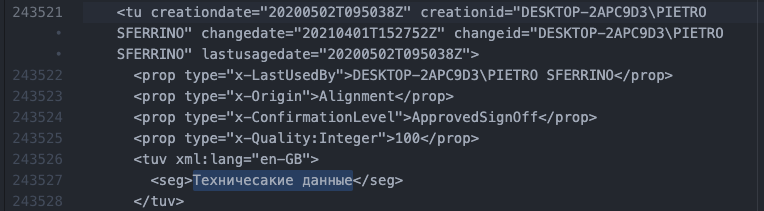
    I have found the place where languages are interchanged ... between <tu> tag at row 243521 (wich ends with the </tuv> tag at row 243528

    Screenshot of Trados Studio XML code with tags for creation date, last usage date, and segment text in English 'Technical data'.

    2.
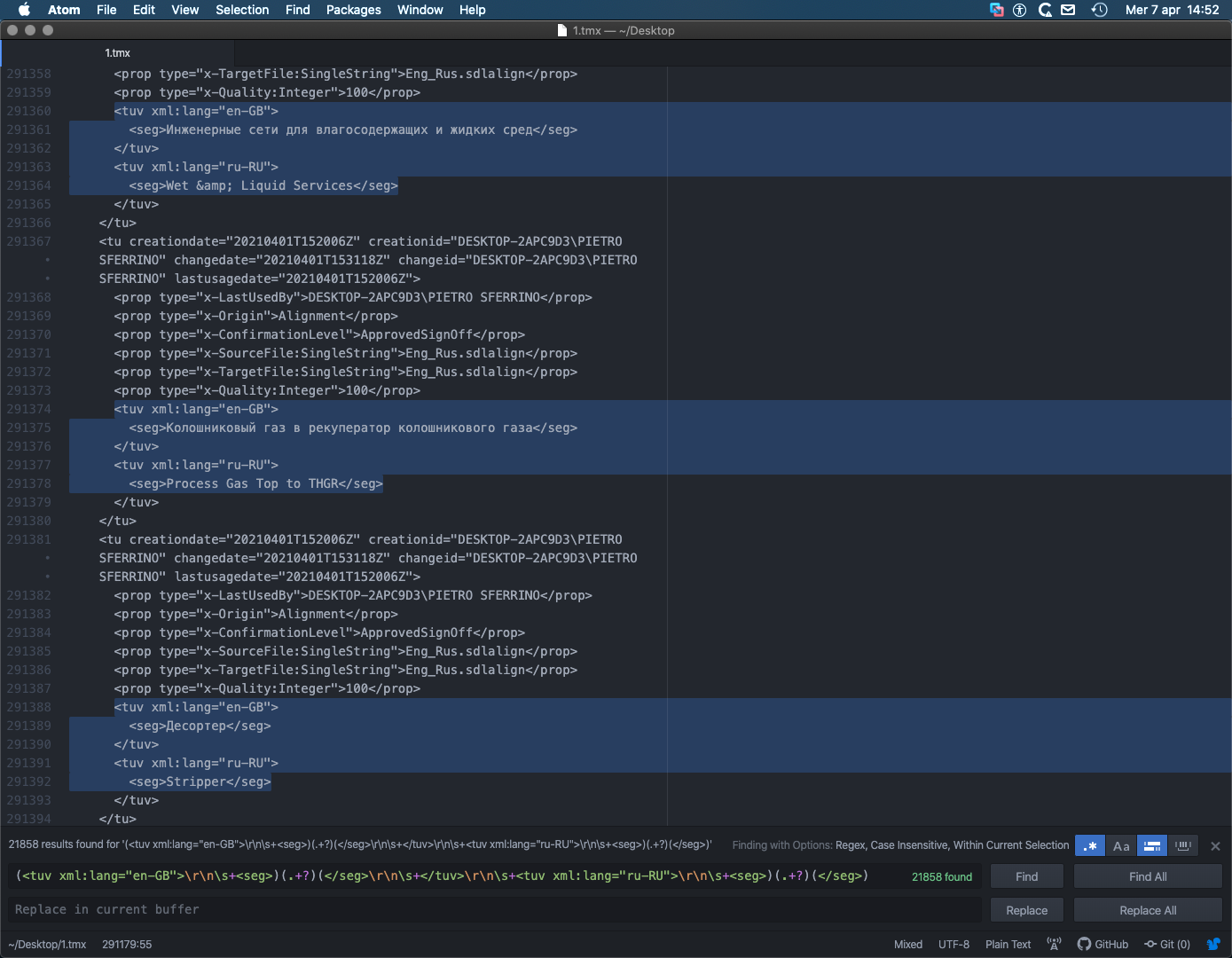
    went down to the end of the file, and done as You wrote ...

    Screenshot of Trados Studio XML code with multiple segments including 'Gas Services' and 'Process Gas Top to THGR' in English and Russian.

    3.

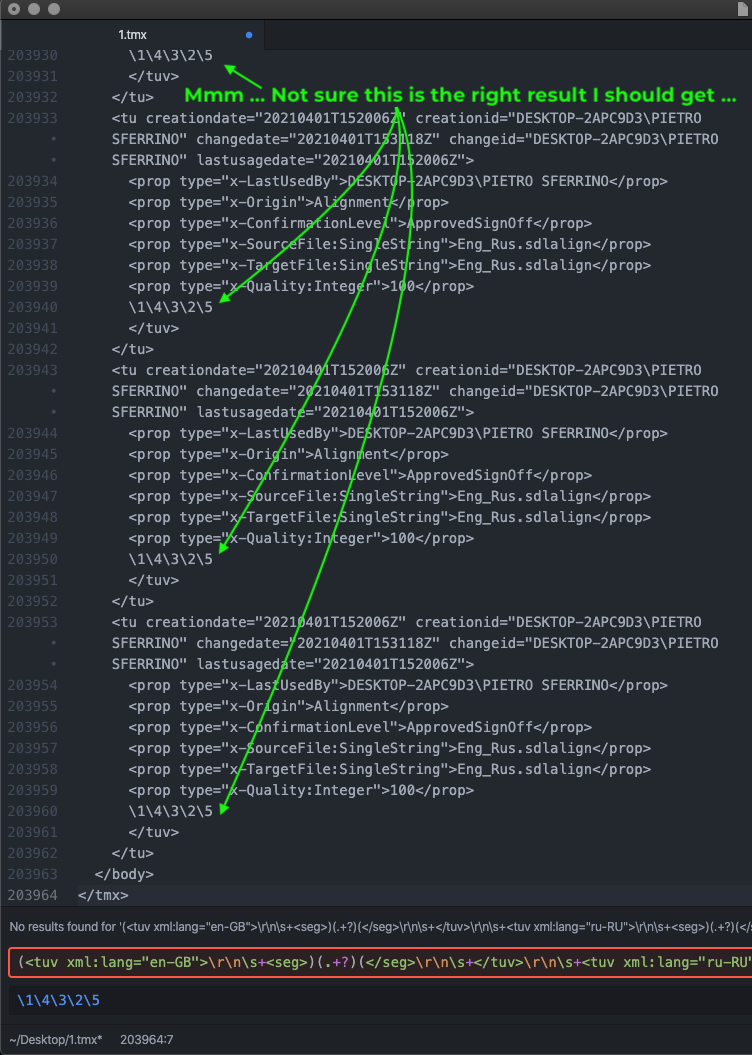
    Now, MY BIG DOUBT IS ... What is that /1/2/3/4/5 I get on the results ... ???

    It simply seems to me I have lost my segments ...

    Screenshot of Trados Studio XML code with a highlighted error message 'Not sure this is the right result I should get' and segments with misplaced numbers '12345'.

    Hope You can help.
    All this is really SUPER interesting ... But I wish it will work too! Slight smileSlight smileSlight smile

    Many thanks.
    Pietro Slight smile

    emoji


    Generated Image Alt-Text
    [edited by: Trados AI at 1:58 AM (GMT 0) on 29 Feb 2024]
Reply
  • Hello Jesus!

    Soooo ... Such a magic stuff ...
    Althought ... I am not sure things are going well ... so, even before to try an import I'd like to ask you tour opinion ...

    1.
    I have found the place where languages are interchanged ... between <tu> tag at row 243521 (wich ends with the </tuv> tag at row 243528

    Screenshot of Trados Studio XML code with tags for creation date, last usage date, and segment text in English 'Technical data'.

    2.
    went down to the end of the file, and done as You wrote ...

    Screenshot of Trados Studio XML code with multiple segments including 'Gas Services' and 'Process Gas Top to THGR' in English and Russian.

    3.

    Now, MY BIG DOUBT IS ... What is that /1/2/3/4/5 I get on the results ... ???

    It simply seems to me I have lost my segments ...

    Screenshot of Trados Studio XML code with a highlighted error message 'Not sure this is the right result I should get' and segments with misplaced numbers '12345'.

    Hope You can help.
    All this is really SUPER interesting ... But I wish it will work too! Slight smileSlight smileSlight smile

    Many thanks.
    Pietro Slight smile

    emoji


    Generated Image Alt-Text
    [edited by: Trados AI at 1:58 AM (GMT 0) on 29 Feb 2024]
Children