 Translate



Dear All,
I'd be grateful if anyone can help with the above error.
Whenever I open Trados, I get the same error "Failed to initialize view 'TranscreateManager_View'.
I've re-installed, repaired it, with no luck.
Thank you in advance.
Nidal

Dear All,
I'd be grateful if anyone can help with the above error.
Whenever I open Trados, I get the same error "Failed to initialize view 'TranscreateManager_View'.
I've re-installed, repaired it, with no luck.
Thank you in advance.
Nidal


Hi Nidal Monzer
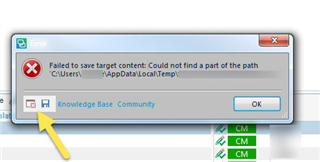
Could you please give us a bit more details about the issue? Please save the error by clicking on the disc icon and, then saving to your desktop and including this in communications with SDL.
These 'error stacks' helps us locate the issues and provide solutions much quicker generally.
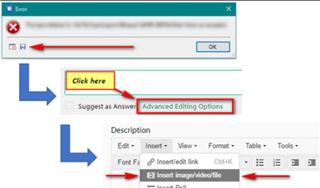
You can also post the full 'error stack':
Regards,
Oana Nagy | QA Engineer | RWS Group

I experienced the same issue after installing the plugin "TranscreateManager"
After installing "TranscreateManage", Trados Studio does not run.
<SDLErrorDetails time="22-Apr-21 6:03:16 AM">
<ErrorMessage>Failed to initialize view 'TranscreateManager_View'.</ErrorMessage>
<Exception>
<Type>Sdl.Desktop.Platform.StudioException, Sdl.Desktop.Platform, Version=16.0.0.0, Culture=neutral, PublicKeyToken=c28cdb26c445c888</Type>
<HelpLink />
<Source>Sdl.Desktop.Platform</Source>
<HResult>-2146233088</HResult>
<StackTrace><
at Sdl.Core.PluginFramework.Integration.ExtensionBuilderFactory.Build[TResult](IExtension extension, ExtensionArguments arguments, Boolean useCache)
at Sdl.Core.PluginFramework.Integration.ExtensionBuilderFactory.<>c__DisplayClass4_0`2.<Build>b__0(IExtension extension)
at System.Linq.Enumerable.WhereSelectEnumerableIterator`2.MoveNext()
at System.Collections.Generic.List`1..ctor(IEnumerable`1 collection)
at System.Linq.Enumerable.ToList[TSource](IEnumerable`1 source)
at Sdl.Core.PluginFramework.Integration.ExtensionBuilderFactory.Build[TAttribute,TResult](ExtensionArguments arguments, Boolean useCache)
at Sdl.Core.PluginFramework.Integration.ExtensionsFactory.Create[TAttribute,TResult](ExtensionArguments arguments, Boolean useCache)
at Sdl.Desktop.Platform.Implementation.ViewRegistry.InitializeIntegrationControllers()
at Sdl.Desktop.Platform.Implementation.ViewRegistryOperator.InitializeIntegrationControllers()
at Sdl.Desktop.Platform.Implementation.StudioWindow.Init(IEventAggregator eventAggregator)
at Sdl.Desktop.Platform.Implementation.Studio.CreateWindowInternal(Boolean setActive, IEventAggregator eventAggregator)
at Sdl.Desktop.Platform.Implementation.Studio.Run(ISplashScreen splashScreen, IEventAggregator eventAggregator)
at Sdl.TranslationStudio.Application.Launcher.RunApplication()]]></StackTrace>
<InnerException>
<Type>System.IO.FileNotFoundException, mscorlib, Version=4.0.0.0, Culture=neutral, PublicKeyToken=b77a5c561934e089</Type>
<FileName>Sdl.Reports.Viewer.API, Version=2.0.0.0, Culture=neutral, PublicKeyToken=a6f9048fb51b33ed</FileName>
<FusionLog>WRN: Assembly binding logging is turned OFF.
To enable assembly bind failure logging, set the registry value [HKLM\Software\Microsoft\Fusion!EnableLog] (DWORD) to 1.
Note: There is some performance penalty associated with assembly bind failure logging.
To turn this feature off, remove the registry value [HKLM\Software\Microsoft\Fusion!EnableLog].
</FusionLog>
<HelpLink />
<Source>Trados.Transcreate</Source>
<HResult>-2147024894</HResult>
<StackTrace><![CDATA[ at Trados.Transcreate.TranscreateViewController.Initialize(IViewContext context)
at Sdl.Desktop.IntegrationApi.AbstractViewController.Sdl.Desktop.IntegrationApi.Internal.IViewController.Initialize(IViewContext context)
at Sdl.Desktop.IntegrationApi.Internal.Adaptors.InternalDockingViewAdaptor.OnInit(IViewSite site, ISettingsGroup settings)
at Sdl.Desktop.Platform.AbstractView.Init(IViewSite site, ISettingsGroup settings)
at Sdl.Desktop.Platform.Implementation.StudioWindow.EnsureViewSite(IViewReference viewReference)]]></StackTrace>
</InnerException>
</Exception>
<Environment>
<ProductName>SDL Trados Studio</ProductName>
<ProductVersion>Studio16</ProductVersion>
<EntryAssemblyFileVersion>16.1.4.4184</EntryAssemblyFileVersion>
<OperatingSystem>Microsoft Windows 10 Home</OperatingSystem>
<ServicePack>NULL</ServicePack>
<OperatingSystemLanguage>1033</OperatingSystemLanguage>
<CodePage>1252</CodePage>
<LoggedOnUser>LAPTOP-M6HIV23O\aryal</LoggedOnUser>
<DotNetFrameWork>4.0.30319.42000</DotNetFrameWork>
<ComputerName>LAPTOP-M6HIV23O</ComputerName>
<ConnectedToNetwork>True</ConnectedToNetwork>
<PhysicalMemory>33471796 MB</PhysicalMemory>
</Environment>
</SDLErrorDetails>
I experienced the same issue after installing the plugin "TranscreateManager"
After installing "TranscreateManage", Trados Studio does not run.
<SDLErrorDetails time="22-Apr-21 6:03:16 AM">
<ErrorMessage>Failed to initialize view 'TranscreateManager_View'.</ErrorMessage>
<Exception>
<Type>Sdl.Desktop.Platform.StudioException, Sdl.Desktop.Platform, Version=16.0.0.0, Culture=neutral, PublicKeyToken=c28cdb26c445c888</Type>
<HelpLink />
<Source>Sdl.Desktop.Platform</Source>
<HResult>-2146233088</HResult>
<StackTrace><
at Sdl.Core.PluginFramework.Integration.ExtensionBuilderFactory.Build[TResult](IExtension extension, ExtensionArguments arguments, Boolean useCache)
at Sdl.Core.PluginFramework.Integration.ExtensionBuilderFactory.<>c__DisplayClass4_0`2.<Build>b__0(IExtension extension)
at System.Linq.Enumerable.WhereSelectEnumerableIterator`2.MoveNext()
at System.Collections.Generic.List`1..ctor(IEnumerable`1 collection)
at System.Linq.Enumerable.ToList[TSource](IEnumerable`1 source)
at Sdl.Core.PluginFramework.Integration.ExtensionBuilderFactory.Build[TAttribute,TResult](ExtensionArguments arguments, Boolean useCache)
at Sdl.Core.PluginFramework.Integration.ExtensionsFactory.Create[TAttribute,TResult](ExtensionArguments arguments, Boolean useCache)
at Sdl.Desktop.Platform.Implementation.ViewRegistry.InitializeIntegrationControllers()
at Sdl.Desktop.Platform.Implementation.ViewRegistryOperator.InitializeIntegrationControllers()
at Sdl.Desktop.Platform.Implementation.StudioWindow.Init(IEventAggregator eventAggregator)
at Sdl.Desktop.Platform.Implementation.Studio.CreateWindowInternal(Boolean setActive, IEventAggregator eventAggregator)
at Sdl.Desktop.Platform.Implementation.Studio.Run(ISplashScreen splashScreen, IEventAggregator eventAggregator)
at Sdl.TranslationStudio.Application.Launcher.RunApplication()]]></StackTrace>
<InnerException>
<Type>System.IO.FileNotFoundException, mscorlib, Version=4.0.0.0, Culture=neutral, PublicKeyToken=b77a5c561934e089</Type>
<FileName>Sdl.Reports.Viewer.API, Version=2.0.0.0, Culture=neutral, PublicKeyToken=a6f9048fb51b33ed</FileName>
<FusionLog>WRN: Assembly binding logging is turned OFF.
To enable assembly bind failure logging, set the registry value [HKLM\Software\Microsoft\Fusion!EnableLog] (DWORD) to 1.
Note: There is some performance penalty associated with assembly bind failure logging.
To turn this feature off, remove the registry value [HKLM\Software\Microsoft\Fusion!EnableLog].
</FusionLog>
<HelpLink />
<Source>Trados.Transcreate</Source>
<HResult>-2147024894</HResult>
<StackTrace><![CDATA[ at Trados.Transcreate.TranscreateViewController.Initialize(IViewContext context)
at Sdl.Desktop.IntegrationApi.AbstractViewController.Sdl.Desktop.IntegrationApi.Internal.IViewController.Initialize(IViewContext context)
at Sdl.Desktop.IntegrationApi.Internal.Adaptors.InternalDockingViewAdaptor.OnInit(IViewSite site, ISettingsGroup settings)
at Sdl.Desktop.Platform.AbstractView.Init(IViewSite site, ISettingsGroup settings)
at Sdl.Desktop.Platform.Implementation.StudioWindow.EnsureViewSite(IViewReference viewReference)]]></StackTrace>
</InnerException>
</Exception>
<Environment>
<ProductName>SDL Trados Studio</ProductName>
<ProductVersion>Studio16</ProductVersion>
<EntryAssemblyFileVersion>16.1.4.4184</EntryAssemblyFileVersion>
<OperatingSystem>Microsoft Windows 10 Home</OperatingSystem>
<ServicePack>NULL</ServicePack>
<OperatingSystemLanguage>1033</OperatingSystemLanguage>
<CodePage>1252</CodePage>
<LoggedOnUser>LAPTOP-M6HIV23O\aryal</LoggedOnUser>
<DotNetFrameWork>4.0.30319.42000</DotNetFrameWork>
<ComputerName>LAPTOP-M6HIV23O</ComputerName>
<ConnectedToNetwork>True</ConnectedToNetwork>
<PhysicalMemory>33471796 MB</PhysicalMemory>
</Environment>
</SDLErrorDetails>
