 Translate



Dear All,
I'd be grateful if anyone can help with the above error.
Whenever I open Trados, I get the same error "Failed to initialize view 'TranscreateManager_View'.
I've re-installed, repaired it, with no luck.
Thank you in advance.
Nidal

Dear All,
I'd be grateful if anyone can help with the above error.
Whenever I open Trados, I get the same error "Failed to initialize view 'TranscreateManager_View'.
I've re-installed, repaired it, with no luck.
Thank you in advance.
Nidal


Hi Oana,
Thank you for your reply.
Here it is.file:///C:/Users/Nidal/Desktop/sdlerror-2021416-11h30m57s.sdlerror.xml.
I couldn't do it as you said, maybe this will help.
Best
Nidal
Hi Nidal Monzer,
it does not help us, as that is the path in your PC, so we can't see the details.
Can you please highlight the whole of the error message then paste it here, instead?
Also, can you please confirm if you have the plugin "Trados Transcreate" installed?
Regards,
Oana Nagy | QA Engineer | RWS Group
Not to mention that I can't find the Trados Translate anywhere, except the downloaded file from SDL Website. It's not in the plugins folder.
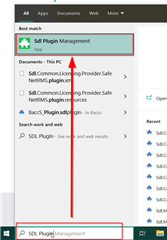
On the bottom taskbar of your Windows, go to "Search" ( the magnifying glass on the left corner,next to the Windows icon) and start typing "SDL Plugin Management".
Oana Nagy | QA Engineer | RWS Group

Thank you, Oana.
I solved the issue. I searched for the plugin by name and it showed all the locations of the plugin. I deleted all of them, restarted my computer and now I'm able to open my Trados again. But the funny is I don't have SDL Plugin Management App. I guess I should download it from the App Store, right?
Anyways, thank you very much for your support.
Best
Nidal
Hi Nidal Monzer,
Following-up on this, please download and install "Reports Viewer Plus", that is needed for Transcreate to work correctly:
https://appstore.sdl.com/language/app/reports-viewer-plus/1120/
You can see the details here , as well, please feel free to check:
Let us know if all is well!
Regards,
Oana Nagy | QA Engineer | RWS Group
I can tell you that this window is useless if I have many plugins installed -- it is not possible to scroll down or change the size of the typeface. In my case, if I am searching for a plugin "below" RWS Moravia LTGEAR Plugin I can't get there.

I can tell you that this window is useless if I have many plugins installed
You are absolutely right! I think the developer, and the QA team only checked this against a small number and didn't even think about scrolling! It is a much better feature with their updates, but without the ability to scroll it's useless.
So the solution, if you can't start Studio where you can use the integrated appstore, is to manually remove the plugins from these folders as needed:
c:\Users\[USERNAME]\AppData\Roaming\SDL\SDL Trados Studio\16\Plugins\Packages\
c:\Users\[USERNAME]\AppData\Roaming\SDL\SDL Trados Studio\16\Plugins\Unpacked\
c:\Users\[USERNAME]\AppData\Local\SDL\SDL Trados Studio\16\Plugins\Packages\
c:\Users\[USERNAME]\AppData\Local\SDL\SDL Trados Studio\16\Plugins\Unpacked\
c:\ProgramData\SDL\SDL Trados Studio\16\Plugins\Packages\
c:\ProgramData\SDL\SDL Trados Studio\16\Plugins\Unpacked\
Paul Filkin | RWS
Design your own training!
You've done the courses and still need to go a little further, or still not clear?
Tell us what you need in our Community Solutions Hub
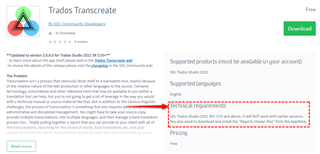
Thanks Paul; I know -- I just wanted to point out the problem of the Plugin Management window. Anyway, the problem with the Transcreate Manager was solved by what Oana told us above: I installed the Reports Viewer Plus (which I had intended to install anyway). I had not read the wiki article when I installed Transcreate Manager. But I think many problems would be avoided if this requirement was also mentioned in the presentation of the app instead of only indirectly.
Or maybe like this?
Paul Filkin | RWS
Design your own training!
You've done the courses and still need to go a little further, or still not clear?
Tell us what you need in our Community Solutions Hub

Sorry -- I'm a bit blind sometimes... It seems I tend to not read the parts on Technical Requirements, since they seldom say anything more than the more or less "usual" (or even nothing at all). This was a lesson to me!
Hi Oana and Paul
I'm having problems with this plugin as well, and it's impossible for me to work on Trados Studio! I've tried all the tips suggested so far but nothing's worked. I can't find the SDL Plugin Management in my computer, but I managed to locate the plugin folder and deleted it. After that, I restarted the computer, and the problem is still there. I also reinstalled Studio, and nothing!
The XML document reads like this:
<SDLErrorDetails time="28/05/2021 10:08:30">
<ErrorMessage>Failed to initialize view 'TranscreateManager_View'.</ErrorMessage>
<Exception>
<Type>Sdl.Desktop.Platform.StudioException, Sdl.Desktop.Platform, Version=16.0.0.0, Culture=neutral, PublicKeyToken=c28cdb26c445c888</Type>
<HelpLink />
<Source>Sdl.Desktop.Platform</Source>
<HResult>-2146233088</HResult>
<StackTrace><
at Sdl.Core.PluginFramework.Integration.ExtensionBuilderFactory.Build[TResult](IExtension extension, ExtensionArguments arguments, Boolean useCache)
at Sdl.Core.PluginFramework.Integration.ExtensionBuilderFactory.<>c__DisplayClass4_0`2.<Build>b__0(IExtension extension)
at System.Linq.Enumerable.WhereSelectEnumerableIterator`2.MoveNext()
at System.Collections.Generic.List`1..ctor(IEnumerable`1 collection)
at System.Linq.Enumerable.ToList[TSource](IEnumerable`1 source)
at Sdl.Core.PluginFramework.Integration.ExtensionBuilderFactory.Build[TAttribute,TResult](ExtensionArguments arguments, Boolean useCache)
at Sdl.Core.PluginFramework.Integration.ExtensionsFactory.Create[TAttribute,TResult](ExtensionArguments arguments, Boolean useCache)
at Sdl.Desktop.Platform.Implementation.ViewRegistry.InitializeIntegrationControllers()
at Sdl.Desktop.Platform.Implementation.ViewRegistryOperator.InitializeIntegrationControllers()
at Sdl.Desktop.Platform.Implementation.StudioWindow.Init(IEventAggregator eventAggregator)
at Sdl.Desktop.Platform.Implementation.Studio.CreateWindowInternal(Boolean setActive, IEventAggregator eventAggregator)
at Sdl.Desktop.Platform.Implementation.Studio.Run(ISplashScreen splashScreen, IEventAggregator eventAggregator, IPluginLoaderService pluginLoaderService)
at Sdl.TranslationStudio.Application.Launcher.RunApplication()]]></StackTrace>
<InnerException>
<Type>System.IO.FileNotFoundException, mscorlib, Version=4.0.0.0, Culture=neutral, PublicKeyToken=b77a5c561934e089</Type>
<FileName>Sdl.Reports.Viewer.API, Version=2.0.0.0, Culture=neutral, PublicKeyToken=a6f9048fb51b33ed</FileName>
<FusionLog>WRN: Assembly binding logging is turned OFF.
To enable assembly bind failure logging, set the registry value [HKLM\Software\Microsoft\Fusion!EnableLog] (DWORD) to 1.
Note: There is some performance penalty associated with assembly bind failure logging.
To turn this feature off, remove the registry value [HKLM\Software\Microsoft\Fusion!EnableLog].
</FusionLog>
<HelpLink />
<Source>Trados.Transcreate</Source>
<HResult>-2147024894</HResult>
<StackTrace><![CDATA[ at Trados.Transcreate.TranscreateViewController.Initialize(IViewContext context)
at Sdl.Desktop.IntegrationApi.AbstractViewController.Sdl.Desktop.IntegrationApi.Internal.IViewController.Initialize(IViewContext context)
at Sdl.Desktop.IntegrationApi.Internal.Adaptors.InternalDockingViewAdaptor.OnInit(IViewSite site, ISettingsGroup settings)
at Sdl.Desktop.Platform.AbstractView.Init(IViewSite site, ISettingsGroup settings)
at Sdl.Desktop.Platform.Implementation.StudioWindow.EnsureViewSite(IViewReference viewReference)]]></StackTrace>
</InnerException>
</Exception>
<Environment>
<ProductName>SDL Trados Studio</ProductName>
<ProductVersion>Studio16</ProductVersion>
<EntryAssemblyFileVersion>16.1.5.4270</EntryAssemblyFileVersion>
<OperatingSystem>Microsoft Windows 10 Home</OperatingSystem>
<ServicePack>NULL</ServicePack>
<OperatingSystemLanguage>2057</OperatingSystemLanguage>
<CodePage>1252</CodePage>
<LoggedOnUser>CARINA-PC\New User</LoggedOnUser>
<DotNetFrameWork>4.0.30319.42000</DotNetFrameWork>
<ComputerName>CARINA-PC</ComputerName>
<ConnectedToNetwork>True</ConnectedToNetwork>
<PhysicalMemory>16631704 MB</PhysicalMemory>
</Environment>
</SDLErrorDetails>
Look forward to hearing from you ASAP! I need to quote a job to a client, and I'm going on holiday tomorrow!!! This is a matter of urgency now!
Kind regards,
Carina
Hi Oana and Paul
I'm having problems with this plugin as well, and it's impossible for me to work on Trados Studio! I've tried all the tips suggested so far but nothing's worked. I can't find the SDL Plugin Management in my computer, but I managed to locate the plugin folder and deleted it. After that, I restarted the computer, and the problem is still there. I also reinstalled Studio, and nothing!
The XML document reads like this:
<SDLErrorDetails time="28/05/2021 10:08:30">
<ErrorMessage>Failed to initialize view 'TranscreateManager_View'.</ErrorMessage>
<Exception>
<Type>Sdl.Desktop.Platform.StudioException, Sdl.Desktop.Platform, Version=16.0.0.0, Culture=neutral, PublicKeyToken=c28cdb26c445c888</Type>
<HelpLink />
<Source>Sdl.Desktop.Platform</Source>
<HResult>-2146233088</HResult>
<StackTrace><
at Sdl.Core.PluginFramework.Integration.ExtensionBuilderFactory.Build[TResult](IExtension extension, ExtensionArguments arguments, Boolean useCache)
at Sdl.Core.PluginFramework.Integration.ExtensionBuilderFactory.<>c__DisplayClass4_0`2.<Build>b__0(IExtension extension)
at System.Linq.Enumerable.WhereSelectEnumerableIterator`2.MoveNext()
at System.Collections.Generic.List`1..ctor(IEnumerable`1 collection)
at System.Linq.Enumerable.ToList[TSource](IEnumerable`1 source)
at Sdl.Core.PluginFramework.Integration.ExtensionBuilderFactory.Build[TAttribute,TResult](ExtensionArguments arguments, Boolean useCache)
at Sdl.Core.PluginFramework.Integration.ExtensionsFactory.Create[TAttribute,TResult](ExtensionArguments arguments, Boolean useCache)
at Sdl.Desktop.Platform.Implementation.ViewRegistry.InitializeIntegrationControllers()
at Sdl.Desktop.Platform.Implementation.ViewRegistryOperator.InitializeIntegrationControllers()
at Sdl.Desktop.Platform.Implementation.StudioWindow.Init(IEventAggregator eventAggregator)
at Sdl.Desktop.Platform.Implementation.Studio.CreateWindowInternal(Boolean setActive, IEventAggregator eventAggregator)
at Sdl.Desktop.Platform.Implementation.Studio.Run(ISplashScreen splashScreen, IEventAggregator eventAggregator, IPluginLoaderService pluginLoaderService)
at Sdl.TranslationStudio.Application.Launcher.RunApplication()]]></StackTrace>
<InnerException>
<Type>System.IO.FileNotFoundException, mscorlib, Version=4.0.0.0, Culture=neutral, PublicKeyToken=b77a5c561934e089</Type>
<FileName>Sdl.Reports.Viewer.API, Version=2.0.0.0, Culture=neutral, PublicKeyToken=a6f9048fb51b33ed</FileName>
<FusionLog>WRN: Assembly binding logging is turned OFF.
To enable assembly bind failure logging, set the registry value [HKLM\Software\Microsoft\Fusion!EnableLog] (DWORD) to 1.
Note: There is some performance penalty associated with assembly bind failure logging.
To turn this feature off, remove the registry value [HKLM\Software\Microsoft\Fusion!EnableLog].
</FusionLog>
<HelpLink />
<Source>Trados.Transcreate</Source>
<HResult>-2147024894</HResult>
<StackTrace><![CDATA[ at Trados.Transcreate.TranscreateViewController.Initialize(IViewContext context)
at Sdl.Desktop.IntegrationApi.AbstractViewController.Sdl.Desktop.IntegrationApi.Internal.IViewController.Initialize(IViewContext context)
at Sdl.Desktop.IntegrationApi.Internal.Adaptors.InternalDockingViewAdaptor.OnInit(IViewSite site, ISettingsGroup settings)
at Sdl.Desktop.Platform.AbstractView.Init(IViewSite site, ISettingsGroup settings)
at Sdl.Desktop.Platform.Implementation.StudioWindow.EnsureViewSite(IViewReference viewReference)]]></StackTrace>
</InnerException>
</Exception>
<Environment>
<ProductName>SDL Trados Studio</ProductName>
<ProductVersion>Studio16</ProductVersion>
<EntryAssemblyFileVersion>16.1.5.4270</EntryAssemblyFileVersion>
<OperatingSystem>Microsoft Windows 10 Home</OperatingSystem>
<ServicePack>NULL</ServicePack>
<OperatingSystemLanguage>2057</OperatingSystemLanguage>
<CodePage>1252</CodePage>
<LoggedOnUser>CARINA-PC\New User</LoggedOnUser>
<DotNetFrameWork>4.0.30319.42000</DotNetFrameWork>
<ComputerName>CARINA-PC</ComputerName>
<ConnectedToNetwork>True</ConnectedToNetwork>
<PhysicalMemory>16631704 MB</PhysicalMemory>
</Environment>
</SDLErrorDetails>
Look forward to hearing from you ASAP! I need to quote a job to a client, and I'm going on holiday tomorrow!!! This is a matter of urgency now!
Kind regards,
Carina
First of all:
Look forward to hearing from you ASAP! I need to quote a job to a client, and I'm going on holiday tomorrow!!! This is a matter of urgency now!
You do not need this plugin to be able to quote your client. It's not going to bring you anything in terms of quoting that you could not achieve right now by analysing the files you would prepare in readiness for conversion to a transcreate project.
You also mentioned this:
I managed to locate the plugin folder and deleted it.
Did you check and delete all content from all of these?
c:\Users\[USERNAME]\AppData\Roaming\SDL\SDL Trados Studio\16\Plugins\Packages\
c:\Users\[USERNAME]\AppData\Roaming\SDL\SDL Trados Studio\16\Plugins\Unpacked\
c:\Users\[USERNAME]\AppData\Local\SDL\SDL Trados Studio\16\Plugins\Packages\
c:\Users\[USERNAME]\AppData\Local\SDL\SDL Trados Studio\16\Plugins\Unpacked\
c:\ProgramData\SDL\SDL Trados Studio\16\Plugins\Packages\
c:\ProgramData\SDL\SDL Trados Studio\16\Plugins\Unpacked\
Have you installed the Report Viewer Plus?
https://appstore.sdl.com/language/app/reports-viewer-plus/1120/
This is a pre-requisite for the transcreate app as noted in the app record and in the wiki.
Paul Filkin | RWS
Design your own training!
You've done the courses and still need to go a little further, or still not clear?
Tell us what you need in our Community Solutions Hub
Hi Paul,
You do not need this plugin to be able to quote your client. It's not going to bring you anything in terms of quoting that you could not achieve right now by analysing the files you would prepare in readiness for conversion to a transcreate project.
Many thanks for your reply. I can't open Studio at all, so I can't analyse the file to quote the client!
However, everything is now sorted. Thank you! I'm able to breathe again!
Have a good day 
Carina