


Sdl Trados

Hello Alll,

I have issue wiht displaying SDLPROJ and SDLXLIFF in their normal format/colour
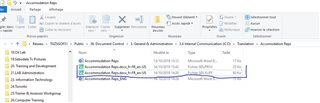
Screenshot of a Windows file explorer showing SDLPROJ and SDLXLIFF files highlighted in green instead of their normal colors, indicating an issue with file association in Trados Studio.

On picture above, you notice that all PROJ file and SXLII files are have the same colour, green.

When I double click on this XLIFF file, it does not open directly for translation, it just opens as the welcome page of sdl

Is there anything that can be done?


Generated Image Alt-Text
[edited by: Trados AI at 2:20 AM (GMT 0) on 29 Feb 2024]
emoji
Parents
  • You are not supposed to double click any sdlxliff files to open them for translation. The only correct way to do that is to open them from within Studio from the files view.

    Every time you open a file per double click in Studio you are creating a new project, which is not the way the Studio process has been designed.

    _________________________________________________________

    When asking for help here, please be as accurate as possible. Please always remember to give the exact version of product used and all possible error messages received. The better you describe your problem, the better help you will get.

    Want to learn more about Trados Studio? Visit the Community Hub. Have a good idea to make Trados Studio better? Publish it here.

Reply
  • You are not supposed to double click any sdlxliff files to open them for translation. The only correct way to do that is to open them from within Studio from the files view.

    Every time you open a file per double click in Studio you are creating a new project, which is not the way the Studio process has been designed.

    _________________________________________________________

    When asking for help here, please be as accurate as possible. Please always remember to give the exact version of product used and all possible error messages received. The better you describe your problem, the better help you will get.

    Want to learn more about Trados Studio? Visit the Community Hub. Have a good idea to make Trados Studio better? Publish it here.

Children