
 Translate



The new Studio version has a new icon. I'd like to explore it, but when I click it I get this error message:
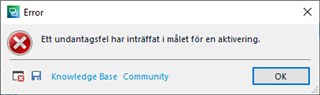
In English, it says something like: "An exception error has occurred in the target of an activation" which is of course (or as usual) incomprehensible.
What does it mean, and what can I do to avoid it? (I've tried clicking both the Knowledge Base and the Community link, but could not find anything useful there.)
Or could the icon relate to one of (the few) plugins I have installed? If so, which one? (There is none with a name that would suggest this icon.)
Generated Image Alt-Text
[edited by: Trados AI at 2:18 AM (GMT 0) on 29 Feb 2024]


