When confirming a segment, programm closes with error message "Object reference not set to an instance of an object"

Hello,

I'm working on a single document project with a word file, using SDL Trados Studio 2021 SR1 16.1.4.4184

I can't confirm any segments and save as an xliff-file. If I press "ctl" and "return", the programme immediately closes and an error message appears, saying "Object reference not set to an instance of an object" .

I have looked through the forum but could not find a solution that worked for me yet, so would very much appreciate any help!

Thank you very much in advance!

Jennifer

Parents
  • Hello ,

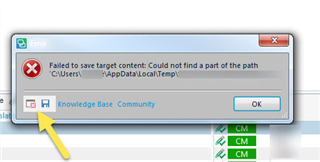
    Could you please give us a bit more details about the issue? Please save the error by clicking on the disc icon and, then saving to your desktop and including this in communications with RWS.

    These 'error stacks' helps us locate the issues and provide solutions much quicker generally.

    Error dialog box in Trados Studio showing 'Failed to save target content: Could not find a part of the path C:UsersAppDataLocalTemp'. An arrow points to the 'OK' button.

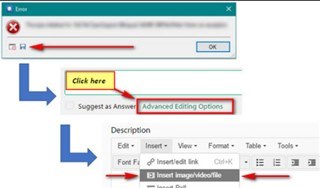
    You can also post the full 'error stack':

    Screenshot of Trados Studio with an error dialog box. Arrows point to 'Click here' and 'Advanced Editing Options' with a red box highlighting the latter.

    Regards,

    Oana Nagy | QA Engineer | RWS Group

    emoji


    Generated Image Alt-Text
    [edited by: Trados AI at 2:57 AM (GMT 0) on 29 Feb 2024]
  • <SDLErrorDetails time="14.05.2021 15:40:37">
      <ErrorMessage>Der Objektverweis wurde nicht auf eine Objektinstanz festgelegt.</ErrorMessage>
      <Exception>
        <Type>System.NullReferenceException, mscorlib, Version=4.0.0.0, Culture=neutral, PublicKeyToken=b77a5c561934e089</Type>
        <HelpLink />
        <Source>Sdl.Verification.TermVerifier</Source>
        <HResult>-2147467261</HResult>
        <StackTrace><![CDATA[   bei Sdl.Verification.TermVerifier.TermVerifierProcessing.HasTargetEntry(ITermRecognitionHit sourceHit)
       bei Sdl.Verification.TermVerifier.TermVerifierProcessing.CheckTermUsage()
       bei Sdl.Verification.TermVerifier.TermVerifierProcessing.Verify(ISegment Source, ISegment Target, Boolean sourceHasRevisions, Boolean targetHasRevisions)
       bei Sdl.Verification.TermVerifier.TermVerifierMain.ProcessParagraphUnit(IParagraphUnit paragraphUnit)
       bei Sdl.FileTypeSupport.Framework.Core.Utilities.BilingualApi.BilingualContentHandlerAdapter.ProcessParagraphUnit(IParagraphUnit paragraphUnit)
       bei Sdl.FileTypeSupport.Framework.Core.Utilities.BilingualApi.BilingualContentHandlerAdapter.ProcessParagraphUnit(IParagraphUnit paragraphUnit)
       bei Sdl.FileTypeSupport.Framework.Core.Utilities.BilingualApi.BilingualContentHandlerAdapter.ProcessParagraphUnit(IParagraphUnit paragraphUnit)
       bei Sdl.FileTypeSupport.Framework.Integration.AbstractBilingualProcessorContainer.ProcessParagraphUnit(IParagraphUnit paragraphUnit)
       bei Sdl.FileTypeSupport.Framework.BilingualApi.AbstractBilingualContentProcessor.ProcessParagraphUnit(IParagraphUnit paragraphUnit)
       bei Sdl.FileTypeSupport.Framework.Integration.LocationMarkerLocator.ProcessParagraphUnit(IParagraphUnit paragraphUnit)
       bei Sdl.FileTypeSupport.Framework.Integration.AbstractBilingualProcessorContainer.ProcessParagraphUnit(IParagraphUnit paragraphUnit)
       bei Sdl.FileTypeSupport.Framework.Integration.FileExtractor.ProcessParagraphUnit(IParagraphUnit paragraphUnit)
       bei Sdl.TranslationStudio.Editor.TranslationEditor.SingleParagraphUnitBilingualParser.ParseNext()
       bei Sdl.FileTypeSupport.Framework.Integration.FileExtractor.ParseNext()
       bei Sdl.FileTypeSupport.Framework.Integration.MultiFileConverter.ParseNext()
       bei Sdl.FileTypeSupport.Framework.Integration.MultiFileConverter.Parse()
       bei Sdl.TranslationStudio.Editor.TranslationEditor.SegmentVerifier.Verify(ISegmentContainerNode segmentContainerNode, IParagraphUnitContainerNode paragraphContainerNode, IFileContainerNode fileContainerNode)
       bei Sdl.TranslationStudio.Editor.TranslationEditor.TranslatableDocument.VerifySegment(ISegmentContainerNode segmentContainerNode, IParagraphUnitContainerNode paragraphContainerNode, IFileContainerNode fileContainerNode)
       bei Sdl.TranslationStudio.Editor.TranslationEditor.SideBySideDocumentEditingView.VerifySegment()
       bei Sdl.TranslationStudio.Editor.TranslationEditor.Actions.AbstractConfirmSegmentAction.ExecuteActiveSegment()
       bei Sdl.TranslationStudio.Editor.TranslationEditor.Actions.AbstractConfirmSegmentAction.Execute()
       bei Sdl.Desktop.Platform.Implementation.CommandBars.ActionService.<>c__DisplayClass30_0.<ExecuteAction>b__0()
       bei Sdl.Desktop.Logger.Log.Resources(Object message, Action action)
       bei Sdl.Desktop.Platform.Implementation.CommandBars.ActionService.ExecuteAction(IAction action, ActionOrigin origin, Boolean allowToggle)
       bei Sdl.Desktop.Platform.Implementation.CommandBars.ActionService.ExecuteActionForShortcut(Keys shortcut)
       bei Sdl.Desktop.Platform.WinForms.StudioWindowForm.OnPreviewKeyDown(Keys keys)
       bei Sdl.Desktop.Platform.WinForms.GlobalKeysMessageFilter.PreFilterMessage(Message& m)
       bei System.Windows.Forms.Application.ThreadContext.ProcessFilters(MSG& msg, Boolean& modified)
       bei System.Windows.Forms.Application.ThreadContext.PreTranslateMessage(MSG& msg)
       bei System.Windows.Forms.Application.ThreadContext.System.Windows.Forms.UnsafeNativeMethods.IMsoComponent.FPreTranslateMessage(MSG& msg)
       bei System.Windows.Forms.Application.ComponentManager.System.Windows.Forms.UnsafeNativeMethods.IMsoComponentManager.FPushMessageLoop(IntPtr dwComponentID, Int32 reason, Int32 pvLoopData)
       bei System.Windows.Forms.Application.ThreadContext.RunMessageLoopInner(Int32 reason, ApplicationContext context)
       bei System.Windows.Forms.Application.ThreadContext.RunMessageLoop(Int32 reason, ApplicationContext context)
       bei Sdl.TranslationStudio.Application.Launcher.RunApplication()]]></StackTrace>
      </Exception>
      <Environment>
        <ProductName>SDL Trados Studio</ProductName>
        <ProductVersion>Studio16</ProductVersion>
        <EntryAssemblyFileVersion>16.1.4.4184</EntryAssemblyFileVersion>
        <OperatingSystem>Microsoft Windows 10 Home</OperatingSystem>
        <ServicePack>NULL</ServicePack>
        <OperatingSystemLanguage>1033</OperatingSystemLanguage>
        <CodePage>1252</CodePage>
        <LoggedOnUser>DESKTOP-RUHUKL4\jenni</LoggedOnUser>
        <DotNetFrameWork>4.0.30319.42000</DotNetFrameWork>
        <ComputerName>DESKTOP-RUHUKL4</ComputerName>
        <ConnectedToNetwork>True</ConnectedToNetwork>
        <PhysicalMemory>4074704 MB</PhysicalMemory>
      </Environment>
    </SDLErrorDetails>

    Dear Oana Nagy,

    Thank you for your reply!
    Does this show the information you need?

  • Hi ,

    Please update Studio to the latest release, then try again.

    You can do that by pressing the orange bell at the top right corner in the software or from Help tab>Check for updates.

    Check if upgrading to the latest release solves it.

    Regards,

    PS: Also, are you using a plugin for verification?

    Oana Nagy | QA Engineer | RWS Group

  • Hi Oana Nagy,
    Thank you for your help. I have updated the programme but the problem remains. I have not installed any extra plugins yet.
    The problem only occured with this document and remained after I had started a new project with the same document. It already occured in the second translatable segment, so the damage for me was not big and I could find another way.

    I have recently also had issues with a certain termbase that I used to translate that file, so I wonder if there might have been a connection; however, working with the termbase seems to work alright again in a project with a different file.

    Best regards!

Reply
  • Hi Oana Nagy,
    Thank you for your help. I have updated the programme but the problem remains. I have not installed any extra plugins yet.
    The problem only occured with this document and remained after I had started a new project with the same document. It already occured in the second translatable segment, so the damage for me was not big and I could find another way.

    I have recently also had issues with a certain termbase that I used to translate that file, so I wonder if there might have been a connection; however, working with the termbase seems to work alright again in a project with a different file.

    Best regards!

Children