Error message: "Exception has been thrown by the target of an invocation"

Hi

I work on Trados 2021 .

I am trying to upgrade TMs, but when I click on the button I get the following error message: "Exception has been thrown by the target of an invocation".

Any ideas as to why and how I can resolve this?

Many thanks in advance :)  

Parents Reply Children
  • Just adding to the post as it seems we have the same issue after the upgrade to CU6. 

    Here is the error code: 

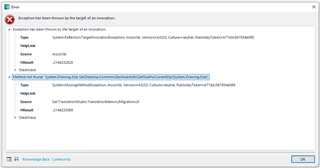
    Exception has been thrown by the target of an invocation. System.Reflection.TargetInvocationException, mscorlib, Version=4.0.0.0, Culture=neutral, PublicKeyToken=b77a5c561934e089 mscorlib -2146232828

    at System.RuntimeTypeHandle.CreateInstance(RuntimeType type, Boolean publicOnly, Boolean noCheck, Boolean& canBeCached, RuntimeMethodHandleInternal& ctor, Boolean& bNeedSecurityCheck) at System.RuntimeType.CreateInstanceSlow(Boolean publicOnly, Boolean skipCheckThis, Boolean fillCache, StackCrawlMark& stackMark) at System.RuntimeType.CreateInstanceDefaultCtor(Boolean publicOnly, Boolean skipCheckThis, Boolean fillCache, StackCrawlMark& stackMark) at System.Activator.CreateInstance[Tc__DisplayClass30_0.b__0() at Sdl.Desktop.Logger.Log.Resources(Object message, Action action) at Sdl.Desktop.Platform.Implementation.CommandBars.ActionService.ExecuteAction(IAction action, ActionOrigin origin, Boolean allowToggle) at Sdl.Desktop.Platform.WinForms.IgCommandBarAction.Execute() at Sdl.Desktop.Platform.WinForms.IgCommandBarAction._lazyButtonTool_ToolClick(Object sender, ToolClickEventArgs e) at Infragistics.Win.UltraWinToolbars.ToolBase.OnToolClick(ToolClickEventArgs e) at Infragistics.Win.UltraWinToolbars.UltraToolbarsManager.OnToolClick(ToolClickEventArgs e) at Infragistics.Win.UltraWinToolbars.UltraToolbarsManager.FireEvent(ToolbarEventIds id, EventArgs e) at Infragistics.Win.UltraWinToolbars.ToolBase.OnToolClick() at Infragistics.Win.UltraWinToolbars.ButtonToolUIElement.DoClickProcessing(MouseEventArgs e) at Infragistics.Win.UltraWinToolbars.ButtonToolUIElement.OnMouseUp(MouseEventArgs e) at Infragistics.Win.ControlUIElementBase.ProcessMouseUpHelper(Object sender, MouseEventArgs e) at Infragistics.Win.ControlUIElementBase.ProcessMouseUp(Object sender, MouseEventArgs e) at Infragistics.Win.Utilities.ProcessEvent(Control control, ProcessEvent eventToProcess, EventArgs e) at Infragistics.Win.UltraWinToolbars.UltraToolbarsDockArea.OnMouseUp(MouseEventArgs e) at System.Windows.Forms.Control.WmMouseUp(Message& m, MouseButtons button, Int32 clicks) at System.Windows.Forms.Control.WndProc(Message& m) at System.Windows.Forms.Control.ControlNativeWindow.OnMessage(Message& m) at System.Windows.Forms.Control.ControlNativeWindow.WndProc(Message& m) at System.Windows.Forms.NativeWindow.Callback(IntPtr hWnd, Int32 msg, IntPtr wparam, IntPtr lparam)]]>

    System.MissingMethodException, mscorlib, Version=4.0.0.0, Culture=neutral, PublicKeyToken=b77a5c561934e089 Sdl.TranslationStudio.TranslationMemoryMigration.UI -2146233069

    at Sdl.TranslationStudio.TranslationMemoryMigration.UI.OutputTranslationMemoriesControl..ctor() at Sdl.TranslationStudio.TranslationMemoryMigration.UI.OutputTranslationMemoriesWizardPage..ctor()

    SDL Trados Studio Studio16 16.1.6.4276 Microsoft Windows 10 Pro NULL 2057 1250 LOCAL\simon 4.0.30319.42000 wbk-8002 True 16616664 MB

  • Hi ,

    Thank you for the details of your error. 

    Please try a Studio repair following the steps from this article:

    https://gateway.rws.com/csm?id=kb_article_view&sysparm_article=KB0039395 

    Let me know if that does the trick!

    Regards,

    Oana Nagy | QA Engineer | RWS Group

  • Hi Oana

    I used all the weapons you suggested and it just doesn't help.  Freshstart, renaming folders. Always the same story. Upgrade Translation memories just crashes with the error.

    Do you have any other idea? 

    I'll just go and unistall studio SR1 CU6 now and install SR CU4, to see if I still have this problem.

    Error dialog box in Trados Studio showing 'Exception has been thrown by the target of an invocation' with details including 'System.Reflection.TargetInvocationException' and 'mscorlib'.

    emoji


    Generated Image Alt-Text
    [edited by: Trados AI at 2:42 AM (GMT 0) on 29 Feb 2024]
  • Hi ,

    Are you using the dedicated plugin for upgrading your TMs? It's called SDL Trados Compatibility and MIgration Power Pack, you can install it from within Studio, through the AppStore Integration, on the top left corner, if you use the latest CU6.

    Please try it and let me know if it works!

    Oana Nagy | QA Engineer | RWS Group

  • Hi Oana, 

    Yes, I'm using also the  SDL Trados Compatibility and Migration Power Pack with my Studio Installation. 
    I wish you have mentioned it earlier as it would save me some time spent on checking the suggestions in your first two hints. ;-)

    It seems the plugin need to be updated (as it mentions Studio 2021 SR1 CU5 ot higher). 

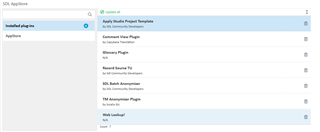
    The issue here is that the Power Pack is not a plugin and therefore is not detected there as such or as a component that needs update. (see the image bellow). 
    So, your suggestion to update is through AppStore integration doesn't work and my suggestion is to click the link to the web AppStore and download it from here: 
    https://appstore.sdl.com/language/app/sdl-trados-compatibility-and-migration-power-pack/1101/ 

    Screenshot of SDL Trados Studio showing the 'Installed plug-ins' section with a list of plugins. The SDL Trados Compatibility and Migration Power Pack is listed without an update option.

    Furthermore it seems that Studio itself is not aware of its presence and so when I checked for application updates, it didn't show any warnings there either. 

    As a troubleshooting for this kind of issues, you need to include, the suggestion to updated the PowerPack if the user has CU5 or higher.  ;-)

    Thank you and kind regards, 

    Simon

    emoji


    Generated Image Alt-Text
    [edited by: Trados AI at 2:42 AM (GMT 0) on 29 Feb 2024]
  • Please note that we have just updated the WorldServer Compatibility Pack for this same error message.  So if you are using that one I suggest you upgrade that as well.

    Paul Filkin | RWS

    Design your own training!
    You've done the courses and still need to go a little further, or still not clear? 
    Tell us what you need in our Community Solutions Hub