Error message: "Exception has been thrown by the target of an invocation"

Hi

I work on Trados 2021 .

I am trying to upgrade TMs, but when I click on the button I get the following error message: "Exception has been thrown by the target of an invocation".

Any ideas as to why and how I can resolve this?

Many thanks in advance :)  

Parents
  • Hi ,

    This message usually means that there are updates not processed yet, may be Studio, Multiterm or even your OS.

    Please check that Studio 2021 SR1 is updated to the latest: 16.1.6.4276 > https://gateway.rws.com/csm?id=kb_article_view&sysparm_article=KB0027380 

    Multitern SR1: 16.1.1.541 

    If the issue persists, please send us the full error message:

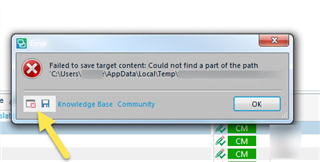
    Error dialog box in Trados Studio showing 'Failed to save target content: Could not find a part of the path C:UsersUsernameAppDataLocalTemp'.

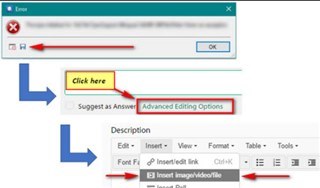
    Screenshot of a forum post with arrows pointing to 'Click here' and 'Advanced Editing Options' buttons.

    Oana Nagy | QA Engineer | RWS Group

    emoji


    Generated Image Alt-Text
    [edited by: Trados AI at 2:42 AM (GMT 0) on 29 Feb 2024]
  • Just adding to the post as it seems we have the same issue after the upgrade to CU6. 

    Here is the error code: 

    Exception has been thrown by the target of an invocation. System.Reflection.TargetInvocationException, mscorlib, Version=4.0.0.0, Culture=neutral, PublicKeyToken=b77a5c561934e089 mscorlib -2146232828

    at System.RuntimeTypeHandle.CreateInstance(RuntimeType type, Boolean publicOnly, Boolean noCheck, Boolean& canBeCached, RuntimeMethodHandleInternal& ctor, Boolean& bNeedSecurityCheck) at System.RuntimeType.CreateInstanceSlow(Boolean publicOnly, Boolean skipCheckThis, Boolean fillCache, StackCrawlMark& stackMark) at System.RuntimeType.CreateInstanceDefaultCtor(Boolean publicOnly, Boolean skipCheckThis, Boolean fillCache, StackCrawlMark& stackMark) at System.Activator.CreateInstance[Tc__DisplayClass30_0.b__0() at Sdl.Desktop.Logger.Log.Resources(Object message, Action action) at Sdl.Desktop.Platform.Implementation.CommandBars.ActionService.ExecuteAction(IAction action, ActionOrigin origin, Boolean allowToggle) at Sdl.Desktop.Platform.WinForms.IgCommandBarAction.Execute() at Sdl.Desktop.Platform.WinForms.IgCommandBarAction._lazyButtonTool_ToolClick(Object sender, ToolClickEventArgs e) at Infragistics.Win.UltraWinToolbars.ToolBase.OnToolClick(ToolClickEventArgs e) at Infragistics.Win.UltraWinToolbars.UltraToolbarsManager.OnToolClick(ToolClickEventArgs e) at Infragistics.Win.UltraWinToolbars.UltraToolbarsManager.FireEvent(ToolbarEventIds id, EventArgs e) at Infragistics.Win.UltraWinToolbars.ToolBase.OnToolClick() at Infragistics.Win.UltraWinToolbars.ButtonToolUIElement.DoClickProcessing(MouseEventArgs e) at Infragistics.Win.UltraWinToolbars.ButtonToolUIElement.OnMouseUp(MouseEventArgs e) at Infragistics.Win.ControlUIElementBase.ProcessMouseUpHelper(Object sender, MouseEventArgs e) at Infragistics.Win.ControlUIElementBase.ProcessMouseUp(Object sender, MouseEventArgs e) at Infragistics.Win.Utilities.ProcessEvent(Control control, ProcessEvent eventToProcess, EventArgs e) at Infragistics.Win.UltraWinToolbars.UltraToolbarsDockArea.OnMouseUp(MouseEventArgs e) at System.Windows.Forms.Control.WmMouseUp(Message& m, MouseButtons button, Int32 clicks) at System.Windows.Forms.Control.WndProc(Message& m) at System.Windows.Forms.Control.ControlNativeWindow.OnMessage(Message& m) at System.Windows.Forms.Control.ControlNativeWindow.WndProc(Message& m) at System.Windows.Forms.NativeWindow.Callback(IntPtr hWnd, Int32 msg, IntPtr wparam, IntPtr lparam)]]>

    System.MissingMethodException, mscorlib, Version=4.0.0.0, Culture=neutral, PublicKeyToken=b77a5c561934e089 Sdl.TranslationStudio.TranslationMemoryMigration.UI -2146233069

    at Sdl.TranslationStudio.TranslationMemoryMigration.UI.OutputTranslationMemoriesControl..ctor() at Sdl.TranslationStudio.TranslationMemoryMigration.UI.OutputTranslationMemoriesWizardPage..ctor()

    SDL Trados Studio Studio16 16.1.6.4276 Microsoft Windows 10 Pro NULL 2057 1250 LOCAL\simon 4.0.30319.42000 wbk-8002 True 16616664 MB

  • Hi ,

    Thank you for the details of your error. 

    Please try a Studio repair following the steps from this article:

    https://gateway.rws.com/csm?id=kb_article_view&sysparm_article=KB0039395 

    Let me know if that does the trick!

    Regards,

    Oana Nagy | QA Engineer | RWS Group

  • Hi Oana

    I used all the weapons you suggested and it just doesn't help.  Freshstart, renaming folders. Always the same story. Upgrade Translation memories just crashes with the error.

    Do you have any other idea? 

    I'll just go and unistall studio SR1 CU6 now and install SR CU4, to see if I still have this problem.

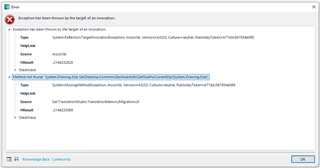
    Error dialog box in Trados Studio showing 'Exception has been thrown by the target of an invocation' with details including 'System.Reflection.TargetInvocationException' and 'mscorlib'.

    emoji


    Generated Image Alt-Text
    [edited by: Trados AI at 2:42 AM (GMT 0) on 29 Feb 2024]
Reply Children