Customizing segmentation of PO file

Hello Community!

I am working on a PO file where some MSGID fields contain multiple very very long series of sentences and paragraphs. So far, studio recognizes separate sentences within certain tags and segments the file, but I'd like to further refine this to force a segmentation when certain codes are present (example: </p> or \n)

Here's an simplified example of a segment in the PO file (bearing in mind that some msgid content represents several pages of text) : 

<p class="MsoNormal"><strong><span style="font-size: 11.0pt; font-family: 'Lucida Grande'; mso-bidi-font-family: 'Lucida Grande'; color: #123456;">TITLE TO BE TRANSLATED</span></strong></p>
<p class="MsoNormal"><span style="font-size: 11.0pt; font-family: 'Lucida Grande'; mso-bidi-font-family: 'Lucida Grande'; color: #123456;">SENTENCE 1 TO BE TRANSLATED. SENTENCE 2 TO BE TRANSLATED.</span></p>

Studio's sentenced based segmentation will split this in 2 segments (creating placeholder tags for each string of code within <>), with the split occurring between sentence 1 and sentence 1. (because of the period?)

I'd like to add a rule of sort to recognize </p> and/or \n as markers for segmentation. IS this possible? I've checked out this post (https://community.sdl.com/product-groups/translationproductivity/f/studio/25104/po-portable-object-file-segmentation-on-a-sentence-basis?ReplySortBy=CreatedDate&ReplySortOrder=Ascending) and didn't find an answer really. 
I feel like this one might be helpful, but I don't know how to adapt it to my PO file.
https://community.sdl.com/product-groups/translationproductivity/f/studio/12708/how-to-fix-very-large-segments-in-studio-in-xliff-projects-from-wordpress-wpml?ReplyFilter=Answers&ReplySortBy=Answers&ReplySortOrder=Descending

Would appreciate any help with this! 

Kindly, 

Marie

  • It is possible:

    Trados Studio interface showing two segments of text, 'Sentence to be translated' highlighted in purple, indicating they are recognized as paragraphs.

    I guessed your file looked something like this?

    simple.po

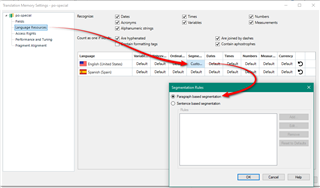
    I achieved this by using a TM that has paragraph segmentation which forces the normal sentence rules to be ignored in favour of what Trados considers a paragraph.  So just use a TM when you create your project that has paragraph segmentation rules:

    Trados Studio Translation Memory settings window with red arrows pointing to 'Segmentation Rules' and 'Paragraph-based segmentation' options.

    Paul Filkin | RWS

    Design your own training!
    You've done the courses and still need to go a little further, or still not clear? 
    Tell us what you need in our Community Solutions Hub

    emoji


    Generated Image Alt-Text
    [edited by: Trados AI at 2:55 AM (GMT 0) on 29 Feb 2024]
  • Hi Paul! Thanks a lot for all this!

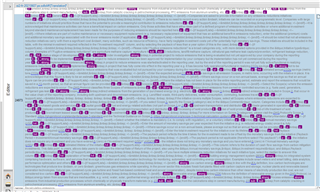
    I've tried using the paragraph segmentation - and it actually made matters worst. Here's a photo of just one of problematic segments. (What happens is that studio considers each MSGTR as single segment.)

    Screenshot of Trados Studio showing paragraph segmentation with each MSGTR considered as a single segment, resulting in a cluttered and hard to manage text.

    The sentence based segmentation works better - but I still end up with segments looking like this:

    Close-up view of Trados Studio interface displaying sentence-based segmentation with segments still appearing cluttered and unmanageable.

    Ideally, I'd like to continue using the sentence-based segmentation, which already breaks down the strings from the PO file into more manageable segments, and enhance the feature to define \n, and even </p> as break characters in the segmentation rules, much in the way a period or a hard break is handled in regular text documents. Is it possible?

    I tried the following from one of your earlier posts: 

    Before break:

    .[\n]+

    After break

    .

    But it didn't work. Disappointed

    There's gotta be a way to make this work - am I wrong in thinking the answer lies in a clever regex segmentation rule? 

    Marie

    emoji


    Generated Image Alt-Text
    [edited by: Trados AI at 2:55 AM (GMT 0) on 29 Feb 2024]