 Translate



I open the XML file. It asks source and target language. Then open process, window is blank. No source cells in the left

RWS Community
I open the XML file. It asks source and target language. Then open process, window is blank. No source cells in the left
There is no "the XML file". XML files have very individual settings, so it is not possible to include them all in Studio installation. What you need is to define individual file type settings for "your XML file".
_________________________________________________________
When asking for help here, please be as accurate as possible. Please always remember to give the exact version of product used and all possible error messages received. The better you describe your problem, the better help you will get.
Want to learn more about Trados Studio? Visit the Community Hub. Have a good idea to make Trados Studio better? Publish it here.

As I am only a translator, I do not know to adjust XML settings as a software guru. Better not deal in XML files,
Thank You

Or ask someone to prepare it for you.
_________________________________________________________
When asking for help here, please be as accurate as possible. Please always remember to give the exact version of product used and all possible error messages received. The better you describe your problem, the better help you will get.
Want to learn more about Trados Studio? Visit the Community Hub. Have a good idea to make Trados Studio better? Publish it here.
This would be a translation for Foxit. I asked them to give an Excel file in 2 columns so that I could complete translation.
Thank you

As I am only a translator, I do not know to adjust XML settings as a software guru
Most XML files are fairly simple to prepare. You'd do yourself a favour if you spent a little time learning how to handle this. There is no such thing as a "simple translator" today... you need to be multiskilled!!
Paul Filkin | RWS
Design your own training!
You've done the courses and still need to go a little further, or still not clear?
Tell us what you need in our Community Solutions Hub
if it is so easy, I would expect Trados to do it :)
It is easy and Trados can do it. But what Trados can’t do is read minds… unfortunately ;-). So you are provided with an excellent set of tools that you need to use to handle the files you get in the way they need to be handled.
If you send me the file I’ll happily show you? Send to pfilkin@sdl.com
Paul Filkin | RWS
Design your own training!
You've done the courses and still need to go a little further, or still not clear?
Tell us what you need in our Community Solutions Hub
Thanks for sending me the file.
It's actually a very good example of how NOT to prepare XML for translators, but you can still handle it... albeit with a few small problems to overcome.
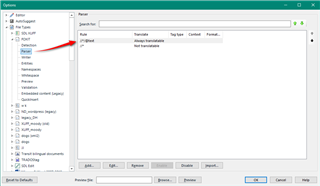
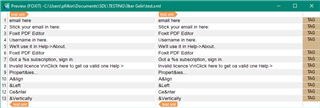
So that gets you access to all the translatable text. However, there is a problem because the text is also full of variables (& for example) and control characters (\r\n). Not insurmountable but it is a pain because you cannot use the embedded content processor for content coming from an attribute. You can also see it comes from the attribute because of the TAG document structure here:

So you can either just work around this carefully as you translate, or you'll have to use something like the Data Protection Suite from the appstore to protect these characters as you work.
So in some ways a very simple problem as everything is in one attribute, but in other ways it's been made a little complex because of the additional content that as been placed in there.
I put the filetype I created here... might give you ahead start.
I also used an old XML filetype for this so it should be ok for whatever version of Trados Studio you have... unless you're using a really ancient one!
Paul Filkin | RWS
Design your own training!
You've done the courses and still need to go a little further, or still not clear?
Tell us what you need in our Community Solutions Hub
