

XML files

I open the XML file. It asks source and target language. Then open process, window is blank. No source cells in the left

Parents
  • Thanks for sending me the file.

    It's actually a very good example of how NOT to prepare XML for translators, but you can still handle it... albeit with a few small problems to overcome.
    1. All the translatable text is in the attributes. This is very poor practice even though it does happen a lot.  Attributes should really be used to provide additional information/instructions about the element and should not contain the translatable text itself.  This is why Trados Studio could not extract the text out of the box because it has no clue that you actually want to translate it.
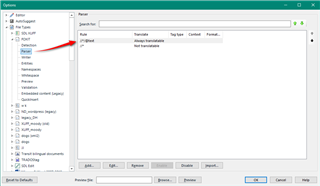
    2. .Not the end of the world though, and least everything seems to be in just one attribute... the "text" attribute.  So you have to create a custom XML filetype and use one rule telling Trados to extract the text from the "text" attribute in every element (as they are different elements) in your file.  Like this:
      //*/@text
      This is a simple XPath expression that says extract all the text attributes (@text) in every element (//* - * is a wildcard).  You put it here:
      Trados Studio screenshot showing the File Types options menu with a red arrow pointing to the 'XML' option.
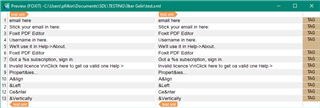
    3. Now if I open the test file (I made a shorter version with anonymised text):
      Preview of XML file in Trados Studio with translatable text in attributes, including placeholder text 'email here' and 'write us in help-About'.

    So that gets you access to all the translatable text.  However, there is a problem because the text is also full of variables (& for example) and control characters (\r\n).  Not insurmountable but it  is a pain because you cannot use the embedded content processor for content coming from an attribute.  You can also see it comes from the attribute because of the TAG document structure here:

    Close-up of a 'TAG' document structure in Trados Studio indicating the text attribute from which the translation should be extracted.

    So you can either just work around this carefully as you translate, or you'll have to use something like the Data Protection Suite from the appstore to protect these characters as you work.

    So in some ways a very simple problem as everything is in one attribute, but in other ways it's been made a little complex because of the additional content that as been placed in there.

    I put the filetype I created here... might give you ahead start.

    foxit_v1.zip

    I also used an old XML filetype for this so it should be ok for whatever version of Trados Studio you have... unless you're using a really ancient one!

    Paul Filkin | RWS Group

    ________________________
    Design your own training!

    You've done the courses and still need to go a little further, or still not clear? 
    Tell us what you need in our Community Solutions Hub

    emoji


    Generated Image Alt-Text
    [edited by: Trados AI at 3:05 AM (GMT 0) on 29 Feb 2024]
Reply
  • Thanks for sending me the file.

    It's actually a very good example of how NOT to prepare XML for translators, but you can still handle it... albeit with a few small problems to overcome.

    1. All the translatable text is in the attributes. This is very poor practice even though it does happen a lot.  Attributes should really be used to provide additional information/instructions about the element and should not contain the translatable text itself.  This is why Trados Studio could not extract the text out of the box because it has no clue that you actually want to translate it.
    2. .Not the end of the world though, and least everything seems to be in just one attribute... the "text" attribute.  So you have to create a custom XML filetype and use one rule telling Trados to extract the text from the "text" attribute in every element (as they are different elements) in your file.  Like this:
      //*/@text
      This is a simple XPath expression that says extract all the text attributes (@text) in every element (//* - * is a wildcard).  You put it here:
      Trados Studio screenshot showing the File Types options menu with a red arrow pointing to the 'XML' option.
    3. Now if I open the test file (I made a shorter version with anonymised text):
      Preview of XML file in Trados Studio with translatable text in attributes, including placeholder text 'email here' and 'write us in help-About'.

    So that gets you access to all the translatable text.  However, there is a problem because the text is also full of variables (& for example) and control characters (\r\n).  Not insurmountable but it  is a pain because you cannot use the embedded content processor for content coming from an attribute.  You can also see it comes from the attribute because of the TAG document structure here:

    Close-up of a 'TAG' document structure in Trados Studio indicating the text attribute from which the translation should be extracted.

    So you can either just work around this carefully as you translate, or you'll have to use something like the Data Protection Suite from the appstore to protect these characters as you work.

    So in some ways a very simple problem as everything is in one attribute, but in other ways it's been made a little complex because of the additional content that as been placed in there.

    I put the filetype I created here... might give you ahead start.

    foxit_v1.zip

    I also used an old XML filetype for this so it should be ok for whatever version of Trados Studio you have... unless you're using a really ancient one!

    Paul Filkin | RWS Group

    ________________________
    Design your own training!

    You've done the courses and still need to go a little further, or still not clear? 
    Tell us what you need in our Community Solutions Hub

    emoji


    Generated Image Alt-Text
    [edited by: Trados AI at 3:05 AM (GMT 0) on 29 Feb 2024]
Children
No Data