Out of Memory when generating a Preview in Studio 2021

I am working on a project in Studio 2021 made on many small files. When I try to generate a preview, I get an "Out of Memory" error. I tried working on the same project in Studio Professional 2019 (I have both versions on my pc) and there the problem was gone and the preview worked smoothly. Is this a setting issue?

Thanks

  • Hello  ,

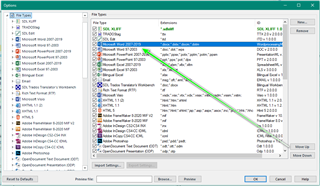
    As it works in 2019- please try the following resolution- Moving the filter as described (File Options)

    Trados Studio screenshot showing File Options with the filter list. The Microsoft Word 2007-2019 filter is highlighted and placed first above the Word 97-2003 filter.

    You need to ensure the 2007-2019 filter is placed first ahead of Word 97-2003

    You might also need to remove the project and reload into Studio.

    If you still have an issue- please let us know the size of the project.

    Oana Nagy | QA Engineer | RWS Group

    emoji


    Generated Image Alt-Text
    [edited by: Trados AI at 3:06 AM (GMT 0) on 29 Feb 2024]
  • Hello Steven,

    2007-2019 is already on the second place in my list. And anyway, the files are xml. In Studio 2019 it works fine, with the same order of file types (I have never touched this setting).

  • Hello Steven,

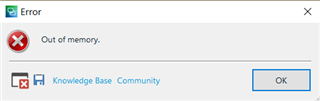
    I tried the solutions in the article, but they do not solve the problem. Still getting this error message. It is a different project now.

    Error dialog box with a red cross icon displaying the message 'Out of memory.' with options for Knowledge Base and Community below, and an OK button.

    Studio doesn't crash, it keeps working normally, but the preview wouldn't work.

    emoji


    Generated Image Alt-Text
    [edited by: Trados AI at 3:06 AM (GMT 0) on 29 Feb 2024]
  • Hello <

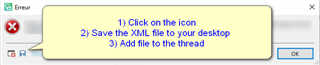
    Please post the full error stack- this could help us identify the problem.

    Error message in Trados Studio with steps: 1) Click on the icon, 2) Save the XML file to your desktop, 3) Add file to the thread.

    Oana Nagy | QA Engineer | RWS Group

    emoji


    Generated Image Alt-Text
    [edited by: Trados AI at 3:06 AM (GMT 0) on 29 Feb 2024]
  • Here are the error details:

    <SDLErrorDetails time="29.06.2021 9:34:04">
    <ErrorMessage>Out of memory.</ErrorMessage>
    <Exception>
    <Type>System.OutOfMemoryException, mscorlib, Version=4.0.0.0, Culture=neutral, PublicKeyToken=b77a5c561934e089</Type>
    <HelpLink />
    <Source>System.Drawing</Source>
    <HResult>-2147024882</HResult>
    <StackTrace><![CDATA[ at System.Drawing.Image.FromFile(String filename, Boolean useEmbeddedColorManagement)
    at Sdl.FileTypeSupport.Native.Xml.Preview.XmlNavigablePreviewFileTweaker.Tweak(INativeOutputFileProperties outputFileProperties)
    at Sdl.FileTypeSupport.Framework.Core.Utilities.NativeApi.AbstractFilePostTweaker.TweakFilePostWriting(INativeOutputFileProperties outputFileProperties)
    at Sdl.FileTypeSupport.Framework.Integration.FileGenerator.ExecuteTweakers(PostGenerationMessageReporterAdapter messageAdapter)
    at Sdl.FileTypeSupport.Framework.Integration.FileGenerator.RunPostWritingOperations()
    at Sdl.FileTypeSupport.Framework.Integration.FileGenerator.FileComplete()
    at Sdl.FileTypeSupport.Framework.Integration.AbstractBilingualProcessorContainer.FileComplete()
    at Sdl.FileTypeSupport.Framework.Integration.MultiFileConverter.FileComplete()
    at Sdl.FileTypeSupport.Framework.BilingualApi.AbstractBilingualContentProcessor.FileComplete()
    at Sdl.FileTypeSupport.Framework.Integration.AbstractBilingualProcessorContainer.FileComplete()
    at Sdl.FileTypeSupport.Bilingual.Tmfc.TmfcReaderImpl.vv_Visit(TmfcReaderImpl* , FrameworkFileContainerField* field)
    at FrameworkFileContainerField.vv_AcceptFrameworkVisitor(FrameworkFileContainerField* , FrameworkFieldVisitor* visitor)
    at Sdl.FileTypeSupport.Bilingual.Tmfc.TmfcReaderImpl.vv_VisitStartEndField(TmfcReaderImpl* , StartEndField* startEnd)
    at Sdl.FileTypeSupport.Bilingual.Tmfc.TmfcReaderImpl.b_VisitNext(TmfcReaderImpl* )
    at Sdl.FileTypeSupport.Bilingual.Tmfc.TmfcReader.ParseNext()
    at Sdl.FileTypeSupport.Framework.Integration.FileExtractor.ParseNext()
    at Sdl.FileTypeSupport.Framework.Integration.MultiFileConverter.ParseNext()
    at Sdl.FileTypeSupport.Framework.Integration.MultiFileConverter.Parse()
    at Sdl.TranslationStudio.Editor.Previews.GeneratePreviewJobRequest.CreatePreviewFile(IFileTypeManager fm, IAbstractGenerator generator, GenerateType generateType)
    at Sdl.TranslationStudio.Editor.Previews.GeneratePreviewJobRequest.Execute(IJobExecutionContext context)
    at Sdl.Desktop.Platform.Implementation.Services.Job.<_worker_DoWork>b__47_0()
    at Sdl.Desktop.Logger.Log.Resources(Object message, Action action)
    at Sdl.Desktop.Platform.Implementation.Services.Job._worker_DoWork(Object sender, DoWorkEventArgs e)
    at System.ComponentModel.BackgroundWorker.OnDoWork(DoWorkEventArgs e)
    at System.ComponentModel.BackgroundWorker.WorkerThreadStart(Object argument)]]></StackTrace>
    </Exception>
    <Environment>
    <ProductName>SDL Trados Studio</ProductName>
    <ProductVersion>Studio16</ProductVersion>
    <EntryAssemblyFileVersion>16.1.6.4276</EntryAssemblyFileVersion>
    <OperatingSystem>Microsoft Windows 10 Home</OperatingSystem>
    <ServicePack>NULL</ServicePack>
    <OperatingSystemLanguage>1031</OperatingSystemLanguage>
    <CodePage>1252</CodePage>
    <LoggedOnUser>DESKTOP-EDUHGEB\User</LoggedOnUser>
    <DotNetFrameWork>4.0.30319.42000</DotNetFrameWork>
    <ComputerName>DESKTOP-EDUHGEB</ComputerName>
    <ConnectedToNetwork>True</ConnectedToNetwork>
    <PhysicalMemory>8252776 MB</PhysicalMemory>
    </Environment>
    </SDLErrorDetails>

    Thanks,

    Yiftah