Out of Memory when generating a Preview in Studio 2021

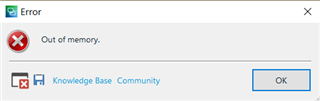
I am working on a project in Studio 2021 made on many small files. When I try to generate a preview, I get an "Out of Memory" error. I tried working on the same project in Studio Professional 2019 (I have both versions on my pc) and there the problem was gone and the preview worked smoothly. Is this a setting issue?

Thanks

Parents Reply Children
  • Hello <

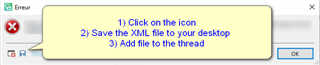
    Please post the full error stack- this could help us identify the problem.

    Error message in Trados Studio with steps: 1) Click on the icon, 2) Save the XML file to your desktop, 3) Add file to the thread.

    Oana Nagy | QA Engineer | RWS Group

    emoji


    Generated Image Alt-Text
    [edited by: Trados AI at 3:06 AM (GMT 0) on 29 Feb 2024]
  • Here are the error details:

    <SDLErrorDetails time="29.06.2021 9:34:04">
    <ErrorMessage>Out of memory.</ErrorMessage>
    <Exception>
    <Type>System.OutOfMemoryException, mscorlib, Version=4.0.0.0, Culture=neutral, PublicKeyToken=b77a5c561934e089</Type>
    <HelpLink />
    <Source>System.Drawing</Source>
    <HResult>-2147024882</HResult>
    <StackTrace><![CDATA[ at System.Drawing.Image.FromFile(String filename, Boolean useEmbeddedColorManagement)
    at Sdl.FileTypeSupport.Native.Xml.Preview.XmlNavigablePreviewFileTweaker.Tweak(INativeOutputFileProperties outputFileProperties)
    at Sdl.FileTypeSupport.Framework.Core.Utilities.NativeApi.AbstractFilePostTweaker.TweakFilePostWriting(INativeOutputFileProperties outputFileProperties)
    at Sdl.FileTypeSupport.Framework.Integration.FileGenerator.ExecuteTweakers(PostGenerationMessageReporterAdapter messageAdapter)
    at Sdl.FileTypeSupport.Framework.Integration.FileGenerator.RunPostWritingOperations()
    at Sdl.FileTypeSupport.Framework.Integration.FileGenerator.FileComplete()
    at Sdl.FileTypeSupport.Framework.Integration.AbstractBilingualProcessorContainer.FileComplete()
    at Sdl.FileTypeSupport.Framework.Integration.MultiFileConverter.FileComplete()
    at Sdl.FileTypeSupport.Framework.BilingualApi.AbstractBilingualContentProcessor.FileComplete()
    at Sdl.FileTypeSupport.Framework.Integration.AbstractBilingualProcessorContainer.FileComplete()
    at Sdl.FileTypeSupport.Bilingual.Tmfc.TmfcReaderImpl.vv_Visit(TmfcReaderImpl* , FrameworkFileContainerField* field)
    at FrameworkFileContainerField.vv_AcceptFrameworkVisitor(FrameworkFileContainerField* , FrameworkFieldVisitor* visitor)
    at Sdl.FileTypeSupport.Bilingual.Tmfc.TmfcReaderImpl.vv_VisitStartEndField(TmfcReaderImpl* , StartEndField* startEnd)
    at Sdl.FileTypeSupport.Bilingual.Tmfc.TmfcReaderImpl.b_VisitNext(TmfcReaderImpl* )
    at Sdl.FileTypeSupport.Bilingual.Tmfc.TmfcReader.ParseNext()
    at Sdl.FileTypeSupport.Framework.Integration.FileExtractor.ParseNext()
    at Sdl.FileTypeSupport.Framework.Integration.MultiFileConverter.ParseNext()
    at Sdl.FileTypeSupport.Framework.Integration.MultiFileConverter.Parse()
    at Sdl.TranslationStudio.Editor.Previews.GeneratePreviewJobRequest.CreatePreviewFile(IFileTypeManager fm, IAbstractGenerator generator, GenerateType generateType)
    at Sdl.TranslationStudio.Editor.Previews.GeneratePreviewJobRequest.Execute(IJobExecutionContext context)
    at Sdl.Desktop.Platform.Implementation.Services.Job.<_worker_DoWork>b__47_0()
    at Sdl.Desktop.Logger.Log.Resources(Object message, Action action)
    at Sdl.Desktop.Platform.Implementation.Services.Job._worker_DoWork(Object sender, DoWorkEventArgs e)
    at System.ComponentModel.BackgroundWorker.OnDoWork(DoWorkEventArgs e)
    at System.ComponentModel.BackgroundWorker.WorkerThreadStart(Object argument)]]></StackTrace>
    </Exception>
    <Environment>
    <ProductName>SDL Trados Studio</ProductName>
    <ProductVersion>Studio16</ProductVersion>
    <EntryAssemblyFileVersion>16.1.6.4276</EntryAssemblyFileVersion>
    <OperatingSystem>Microsoft Windows 10 Home</OperatingSystem>
    <ServicePack>NULL</ServicePack>
    <OperatingSystemLanguage>1031</OperatingSystemLanguage>
    <CodePage>1252</CodePage>
    <LoggedOnUser>DESKTOP-EDUHGEB\User</LoggedOnUser>
    <DotNetFrameWork>4.0.30319.42000</DotNetFrameWork>
    <ComputerName>DESKTOP-EDUHGEB</ComputerName>
    <ConnectedToNetwork>True</ConnectedToNetwork>
    <PhysicalMemory>8252776 MB</PhysicalMemory>
    </Environment>
    </SDLErrorDetails>

    Thanks,

    Yiftah