Translate



I had an horrific issue this morning, and fortunately managed to solve it after some long minutes of panic.
I share how I solved it here, in case it may help.
I was in the middle of a very complex 12,000 words file, and, when I wanted to open it this morning, it did not open. I rather had that messagebox:
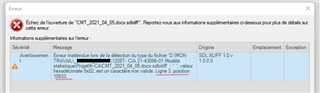
In French:
"Échec de l'ouverture de <file>.
Erreur inattendue lors de la détection du type de fichier … valeur hexadécimale 0x02 est un caractère non valide. Ligne 3, position 10533"
After making a backup copy of the sdlxliff file, I opened it in Notepad++ and went directly to line 3 – actually, it's about thousands characters "lines":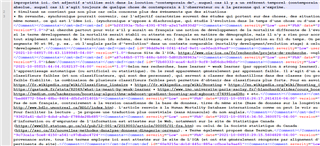
I rapidly saw that lines 1-3 where those that contain my numerous comments, and not the translation units.
I then positioned my cursor at the beginning of line 3 and selected the following option (maybe Reach… in English):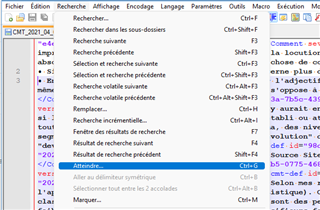
which opened the box below:
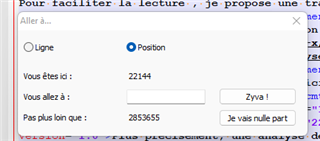
So, my cursor was at position 22144. I added 10533, which is the told invalid character position on that line, according to Studio's error message, to that figure, which gave 32677.
So, I entered 32677 in the blank field: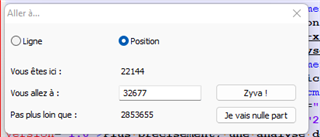
and validated the appropriate button, which led me to the middle of a comment:
The cursor was not easy to find, but I was able to find it in moving it with the keyboard arrows.
As you may see, the supposed-to-have-caused-the-error hexadecimal character is not there.
I just took that one entire comment content (that is ONLY the characters in black, between red brackets in the pic below) and removed it. I just sacrified one comment (actually not, since I saved it elsewhere).
I saved the file, closed it.
And… it opened normally in Studio! Halleluia!
I really thought I had lost days of work.
Anyway, I cannot understand how the content of a comment may have caused that issue.
Hope that helps.
Philippe Riondel, c. tr.
[Windows 11, Studio 2021 SR2]
Generated Image Alt-Text
[edited by: Trados AI at 3:03 PM (GMT 0) on 1 Mar 2024]