How to change XLIFF file type so it doesn't show CDATA tags in Editor

Former Member
Former Member

Dear Community,

In our company, we recently introduced WPML for website translation management. Unfortunately, we now have problems with the XLIFF file that we get for translation, specifically the CDATA tags that we see in the Editor:
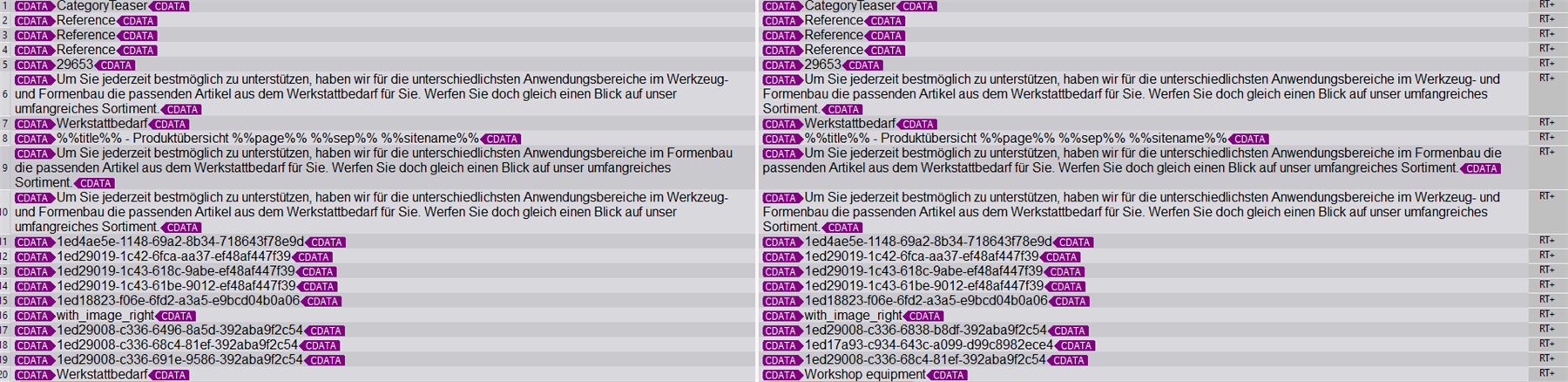
Screenshot of Trados Studio Editor showing multiple CDATA tags within the XLIFF file content, highlighting the issue described by the user.

For reasons that would take too long to explain here, we cannot use the XML file type or the Multilingual XML file type in Studio, it has to be the XLIFF file type. Is there any way to configure this file type so it doesn't show the CDATA tags in the Editor?

This is an example of a trans-unit element in the XLIFF file:

<trans-unit extradata="Titel" resname="title" restype="string" datatype="html" id="title"><source><![CDATA[Werkstattbedarf]]></source><target><![CDATA[Workshop equipment]]></target></trans-unit>

Attached, you'll find the same XLIFF file (I had to change the file ending from .xliff to .xml to be able to upload it here, but the file is the same).

And this is our Studio version: Trados Studio 2021 SR2 - 16.2.9.9198

Any help would be appreciated!

Thanks!

<?xml version="1.0" encoding="utf-8" standalone="no"?>
<xliff xmlns="urn:oasis:names:tc:xliff:document:1.2" version="1.2"><file original="3442-181e96ca26a48009e64281bf486d6bad" source-language="de" target-language="en" datatype="plaintext"><header><phase-group><phase phase-name="shortcodes" process-name="Shortcodes identification"><note>wp_caption,caption,gallery,playlist,audio,video,embed,acf,wpml_language_form_field,wpml_language_switcher,wpml_language_selector_widget,wpml_language_selector_footer,wpseo_breadcrumb,call_to_action,newsletter,tours_shortcode,cta_button,woocommerce_thankyou,woocommerce_shop,table,custom_profile,symple_heading,row,tagcloud,sform,nano,add_eventon_list,che,era,essa,nel,gli,per,come,anima,ella,quel,show_gd_mylist_btn,su_spoiler,email,vul,wpv-view,wpv-post-field,accordion_item,citation,foogallery,user-submitted-posts,chronologie,adresse,get_unit_label,get_reference_label,woocommerce_api_manager_lost_api_key,wp-knowledgebase,testimonials_slider,rpwe,posts,nowotworu,intima-media,dostarcza,standaryzowany,jako,czarny,ekstrakt,kwas,std,dwuwodzian,stm_icon_box,ess_grid,rev_slider,linkview,dropcap,permalinklist,testimonial_slider,woocommerce_software_lost_license,text-blocks,wp_sitemap_page,wcmp_vendor,vendor_registration,efsrow,efscolumn,efsbutton,md_rev_slider,md_live_text,md_imagebox_full,flagallery,pbr_quicklinksmenu,rev_slider_vc,opalhotel_reservation_form,pbr_title_heading,pbr_testimonials,embedyt,yith_wcwl_wishlist,wcm_content_restricted,feature_box,woocommerce_en_check,wc_box,wc_row,wc_column,wc_fullwidth,wc_center,wp_social_sharing,infoboxes,testimonials,woocommerce_social_media_share_buttons,wcv_vendor_dashboard,wcv_shop_settings,wcv_orders,inplayer,useyourdrive,wp_blog_designer,us_blog,tt_address,tt_dashboard,envira-gallery,hotspotitem,woocommerce_klarna_checkout,wpml_mailto,contact-field,ux_banner,advanced_iframe,siteorigin_widget,ec_store,simpay_payment_receipt,su-mensaje,borlabs_cookie,contact_info,stm_boats_video,packages_orderdata,yith_ywraq_request_quote,woocommerce_pay,button,supsystic-tables,clean-login,pdf-embedder,insertgenerator,youzer_register,wysija_form,customer-area,customer-area-dashboard,customer-area-private-files-home,customer-area-private-files,customer-account-home,customer-area-account,customer-area-logout,bookly-form,bookly-cancellation-confirmation,stm_classic_filter,popup_trigger,mainwp_archived_lists,wcv_vendorslist,dotpay_content,formularz,cyberactive_school_courses_selection_form,cyberactive_school_session_timeout,ditty_news_ticker,donationcampaign,das-list-events,event_embed,sectiontitle,learn_press_profile,ticket-submit,tickets,aanduiding,datum,thim-icon-box,ngg_images,wpdomainchecker,visualizer,mk_page_section,rssreviews,animate_this,simple-sitemap,gravityform,stm_tech_info,fep_submission_form,ucaddon_diagonal_event_box,wcv_feedback_form,newsletters_management,wcv_pro_dashboard,tm_pb_section,wwof_product_listing,res_map,jssupportticket,socialbar,socialbar_service,front-end-pm,stm_sidebar,give_receipt,donation_history,simpay_error,tm_pb_contact_field,jwp,woocommerce_checkout,mk_custom_list,sg_popup,icon,extra_wrap,frontier-post,invierno,appbox,highlight,ci_alert,vc_mad_products,dt_list,geoip-continent,geoip-country,geoip-region,geoip-city,geoip-postalcode,geoip-latitude,geoip-longitude,geoip-location,woocommerce_notices,post-timeline,private-message,ga_optout,manage_serial_key_usage,ut_header,site_name,bfname,order_id,menu-country,menu-prefer,accordion-item,mini-icon,gvlogic,stm_gmap,contact-form,iconbox,woocommerce_my_account,super_form,wpdm-all-packages,photoblocks,et_pb_map_pin,ginger_reset_cookie,su_divider,fbl_login_button,gmw_single_location,one_full,recent_products,custom_list,endif,jours,wpuf-login,lyte,product_table,wpuf-registration,wpuf_dashboard,amazon,member-pricing-table,rozinky,add_to_cart_url,srizonfbgallery,cl-itext,icon_counter,text_block,vtftable,header_static,bookingcalendar,flexslider,anova-geoip-meta,zp_vc_slideshow_element,zp_scrollto,my_calendar_upcoming,wpv-post-url,fusion_button,su_tab,freeconsultation_technical_forum_link,vc_images_carousel,otgs_logo_url,wpv-conditional,teaser,dt_fancy_image,fusion_tagline_box,contact_us_add,content_box,tagline_box,us_iconbox,fusion_tab,fisicamente,one_half_sidebar,action-btn,invicta_contacts,pricing_price,icon_link,slideshow,vcex_milestone,secondary-demo,vh_pricing_table,category_name,blogurl,q_team,tab_nav_item</note></phase><phase phase-name="post_type" process-name="Post type"><note>post_page</note></phase></phase-group><reference><external-file href="wp.meusburger-api-prod.aditsystems.dev/.../header><body><trans-unit extradata="field-main-0" resname="field-main-0-0" restype="string" datatype="html" id="field-main-0-0"><source><![CDATA[CategoryTeaser]]></source><target><![CDATA[CategoryTeaser]]></target></trans-unit><trans-unit extradata="field-main-0" resname="field-main-0-1" restype="string" datatype="html" id="field-main-0-1"><source><![CDATA[Reference]]></source><target><![CDATA[Reference]]></target></trans-unit><trans-unit extradata="field-main-0" resname="field-main-0-2" restype="string" datatype="html" id="field-main-0-2"><source><![CDATA[Reference]]></source><target><![CDATA[Reference]]></target></trans-unit><trans-unit extradata="field-main-0" resname="field-main-0-3" restype="string" datatype="html" id="field-main-0-3"><source><![CDATA[Reference]]></source><target><![CDATA[Reference]]></target></trans-unit><trans-unit extradata="field-image" resname="field-image-0" restype="string" datatype="html" id="field-image-0"><source><![CDATA[29653]]></source><target><![CDATA[29653]]></target></trans-unit><trans-unit extradata="field-content" resname="field-content-0" restype="string" datatype="html" id="field-content-0"><source><![CDATA[Um Sie jederzeit bestmöglich zu unterstützen, haben wir für die unterschiedlichsten Anwendungsbereiche im Werkzeug- und Formenbau die passenden Artikel aus dem Werkstattbedarf für Sie. Werfen Sie doch gleich einen Blick auf unser umfangreiches Sortiment.]]></source><target><![CDATA[Um Sie jederzeit bestmöglich zu unterstützen, haben wir für die unterschiedlichsten Anwendungsbereiche im Werkzeug- und Formenbau die passenden Artikel aus dem Werkstattbedarf für Sie. Werfen Sie doch gleich einen Blick auf unser umfangreiches Sortiment.]]></target></trans-unit><trans-unit extradata="field-headline" resname="field-headline-0" restype="string" datatype="html" id="field-headline-0"><source><![CDATA[Werkstattbedarf]]></source><target><![CDATA[Werkstattbedarf]]></target></trans-unit><trans-unit extradata="field-_yoast_wpseo_title" resname="field-_yoast_wpseo_title-0" restype="string" datatype="html" id="field-_yoast_wpseo_title-0"><source><![CDATA[%%title%% - Produktübersicht %%page%% %%sep%% %%sitename%%]]></source><target><![CDATA[%%title%% - Produktübersicht %%page%% %%sep%% %%sitename%%]]></target></trans-unit><trans-unit extradata="field-_yoast_wpseo_metadesc" resname="field-_yoast_wpseo_metadesc-0" restype="string" datatype="html" id="field-_yoast_wpseo_metadesc-0"><source><![CDATA[Um Sie jederzeit bestmöglich zu unterstützen, haben wir für die unterschiedlichsten Anwendungsbereiche im Formenbau die passenden Artikel aus dem Werkstattbedarf für Sie. Werfen Sie doch gleich einen Blick auf unser umfangreiches Sortiment.]]></source><target><![CDATA[Um Sie jederzeit bestmöglich zu unterstützen, haben wir für die unterschiedlichsten Anwendungsbereiche im Formenbau die passenden Artikel aus dem Werkstattbedarf für Sie. Werfen Sie doch gleich einen Blick auf unser umfangreiches Sortiment.]]></target></trans-unit><trans-unit extradata="field-hero_group_text" resname="field-hero_group_text-0" restype="string" datatype="html" id="field-hero_group_text-0"><source><![CDATA[Um Sie jederzeit bestmöglich zu unterstützen, haben wir für die unterschiedlichsten Anwendungsbereiche im Werkzeug- und Formenbau die passenden Artikel aus dem Werkstattbedarf für Sie. Werfen Sie doch gleich einen Blick auf unser umfangreiches Sortiment.]]></source><target><![CDATA[Um Sie jederzeit bestmöglich zu unterstützen, haben wir für die unterschiedlichsten Anwendungsbereiche im Werkzeug- und Formenbau die passenden Artikel aus dem Werkstattbedarf für Sie. Werfen Sie doch gleich einen Blick auf unser umfangreiches Sortiment.]]></target></trans-unit><trans-unit extradata="field-main_0_uuid" resname="field-main_0_uuid-0" restype="string" datatype="html" id="field-main_0_uuid-0"><source><![CDATA[xxxxxxxx-xxxx-xxxx-xxxx-xxxxxxxxxxxx]]></source><target><![CDATA[xxxxxxxx-xxxx-xxxx-xxxx-xxxxxxxxxxxx]]></target></trans-unit><trans-unit extradata="field-main_1_uuid" resname="field-main_1_uuid-0" restype="string" datatype="html" id="field-main_1_uuid-0"><source><![CDATA[xxxxxxxx-xxxx-xxxx-xxxx-xxxxxxxxxxxx]]></source><target><![CDATA[xxxxxxxx-xxxx-xxxx-xxxx-xxxxxxxxxxxx]]></target></trans-unit><trans-unit extradata="field-main_2_uuid" resname="field-main_2_uuid-0" restype="string" datatype="html" id="field-main_2_uuid-0"><source><![CDATA[xxxxxxxx-xxxx-xxxx-xxxx-xxxxxxxxxxxx]]></source><target><![CDATA[xxxxxxxx-xxxx-xxxx-xxxx-xxxxxxxxxxxx]]></target></trans-unit><trans-unit extradata="field-main_3_uuid" resname="field-main_3_uuid-0" restype="string" datatype="html" id="field-main_3_uuid-0"><source><![CDATA[xxxxxxxx-xxxx-xxxx-xxxx-xxxxxxxxxxxx]]></source><target><![CDATA[xxxxxxxx-xxxx-xxxx-xxxx-xxxxxxxxxxxx]]></target></trans-unit><trans-unit extradata="field-hero_group_uuid" resname="field-hero_group_uuid-0" restype="string" datatype="html" id="field-hero_group_uuid-0"><source><![CDATA[xxxxxxxx-xxxx-xxxx-xxxx-xxxxxxxxxxxx]]></source><target><![CDATA[xxxxxxxx-xxxx-xxxx-xxxx-xxxxxxxxxxxx]]></target></trans-unit><trans-unit extradata="field-hero_group_image_position" resname="field-hero_group_image_position-0" restype="string" datatype="html" id="field-hero_group_image_position-0"><source><![CDATA[with_image_right]]></source><target><![CDATA[with_image_right]]></target></trans-unit><trans-unit extradata="field-main_1_reference_wp" resname="field-main_1_reference_wp-0" restype="string" datatype="html" id="field-main_1_reference_wp-0"><source><![CDATA[xxxxxxxx-xxxx-xxxx-xxxx-xxxxxxxxxxxx]]></source><target><![CDATA[xxxxxxxx-xxxx-xxxx-xxxx-xxxxxxxxxxxx]]></target></trans-unit><trans-unit extradata="field-main_2_reference_wp" resname="field-main_2_reference_wp-0" restype="string" datatype="html" id="field-main_2_reference_wp-0"><source><![CDATA[xxxxxxxx-xxxx-xxxx-xxxx-xxxxxxxxxxxx]]></source><target><![CDATA[xxxxxxxx-xxxx-xxxx-xxxx-xxxxxxxxxxxx]]></target></trans-unit><trans-unit extradata="field-main_3_reference_wp" resname="field-main_3_reference_wp-0" restype="string" datatype="html" id="field-main_3_reference_wp-0"><source><![CDATA[xxxxxxxx-xxxx-xxxx-xxxx-xxxxxxxxxxxx]]></source><target><![CDATA[xxxxxxxx-xxxx-xxxx-xxxx-xxxxxxxxxxxx]]></target></trans-unit><trans-unit extradata="Titel" resname="title" restype="string" datatype="html" id="title"><source><![CDATA[Werkstattbedarf]]></source><target><![CDATA[Workshop equipment]]></target></trans-unit></body></file></xliff>


Generated Image Alt-Text
[edited by: Trados AI at 8:54 AM (GMT 0) on 29 Feb 2024]
  •  

    The easiest solution is to use the Multilingual XML filetype...

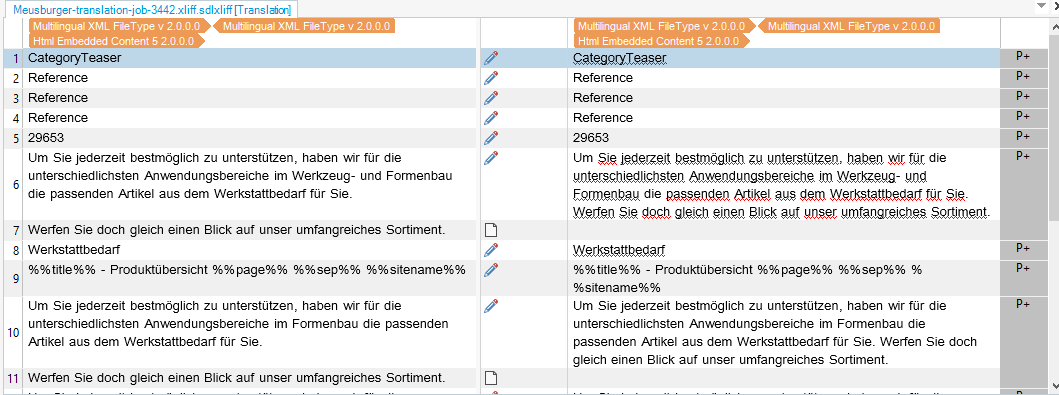
    Trados Studio screenshot showing Multilingual XML FileType settings with segments #6 and #7 highlighted, demonstrating better segmentation on the source.

    You'll also get better segmentation on the source this way (see segment #6 and #7 for example).

    Settings as follows:

    Trados Studio Project Settings window with Language Mapping for Multilingual XML showing German as source and English as target.

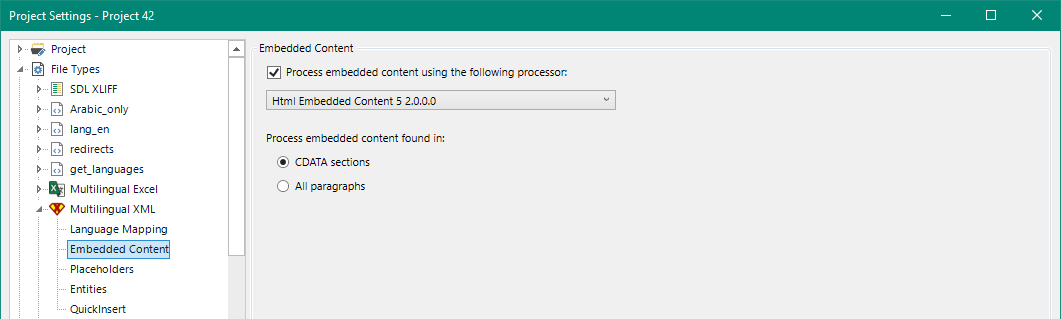
    Trados Studio Project Settings window for Multilingual XML with Embedded Content tab selected, showing Html Embedded Content processor.

    For more details follow this wiki:  Multilingual XML FileType 

    Paul Filkin | RWS

    Design your own training!
    You've done the courses and still need to go a little further, or still not clear? 
    Tell us what you need in our Community Solutions Hub

    emoji


    Generated Image Alt-Text
    [edited by: Trados AI at 8:54 AM (GMT 0) on 29 Feb 2024]
  • Former Member
    0 Former Member in reply to Paul Filkin

    Hello,  ,

    Thanks for your quick reply. Actually, I know about the Multilingual XML file type, have installed the necessary plugin and already done some tests with it. It works just fine, as you showed, but the problem is that we often have projects requiring us to translate the same XLIFF into multiple target languages. The way the XLIFF is built only allows me to map one target language (English in your example) to <target> and not multiple ones, which would mean that we'd have to create an entire project for each target language. I have not yet found a way to overcome this, otherwise I would have gladly used the Multilingual XML file type because it just offers so much more ...

    Do you perhaps have a solution for this?

    Best regards,

    Katharina

    emoji
  •  

    The way the XLIFF is built only allows me to map one target language (English in your example) to <target> and not multiple ones, which would mean that we'd have to create an entire project for each target language.

    If you are able to support multiple target languages in your XLIFF then the multilingual xml filetype would support this for you easily.  So if you had this structure for example:

    <?xml version="1.0" encoding="utf-8" standalone="no"?>
    <xliff xmlns="urn:oasis:names:tc:xliff:document:1.2" version="1.2">
      <file original="3442-181e96ca26a48009e64281bf486d6bad" source-language="de"
      target-language="en" datatype="plaintext">
        <body>
          <trans-unit extradata="field-main-0" resname="field-main-0-0"
          restype="string" datatype="html" id="field-main-0-0">
            <source>
              <![CDATA[Kategorien]]>
    	</source>
            <target>
              <![CDATA[Category]]>
    	</target>
    	<alt-trans>
    	  <target xml:lang='fr'><![CDATA[Catégories]]></target>
    	  <target xml:lang='it'><![CDATA[Categorie]]></target>
    	  <target xml:lang='es'><![CDATA[Categorías]]></target>
    	  <target xml:lang='zh'><![CDATA[類別]]></target>
    	</alt-trans>
          </trans-unit>
          <trans-unit extradata="field-main-0" resname="field-main-0-1"
          restype="string" datatype="html" id="field-main-0-1">
            <source>
              <![CDATA[Bezug]]>
    	</source>
            <target>
              <![CDATA[Reference]]>
    	</target>
    	<alt-trans>
    	  <target xml:lang='fr'><![CDATA[Référence]]></target>
    	  <target xml:lang='it'><![CDATA[Riferimento]]></target>
    	  <target xml:lang='es'><![CDATA[Referencia]]></target>
    	  <target xml:lang='zh'><![CDATA[參考]]></target>
    	</alt-trans>
          </trans-unit>
          <trans-unit extradata="field-content" resname="field-content-0"
          restype="string" datatype="html" id="field-content-0">
            <source>
              <![CDATA[Um Sie jederzeit bestmöglich zu unterstützen, haben wir für die unterschiedlichsten Anwendungsbereiche im Werkzeug]]>
    	</source>
            <target>
              <![CDATA[In order to provide you with the best possible support at all times, we have tools for the most diverse areas of application]]>
    	</target>
    	<alt-trans>
    	  <target xml:lang='fr'><![CDATA[Afin de vous fournir le meilleur support possible à tout moment, nous disposons d'outils pour les domaines d'application les plus divers]]></target>
    	  <target xml:lang='it'><![CDATA[Per fornirvi il miglior supporto possibile in ogni momento, disponiamo di strumenti per le più diverse aree di applicazione]]></target>
    	  <target xml:lang='es'><![CDATA[Para brindarle el mejor soporte posible en todo momento, contamos con herramientas para las más diversas áreas de aplicación]]></target>
    	  <target xml:lang='zh'><![CDATA[為了始終為您提供最好的支持,我們擁有適用於最多樣化應用領域的工具]]></target>
    	</alt-trans>
          </trans-unit>
        </body>
      </file>
    </xliff>

    Then in theory you could do it.  But to be honest , even though the specification for XLIFF seems to suggest this is ok, I have actually never seen an XLIFF using alt-trans for this and I'm only suggesting it because of the multilingual XML filetype that could handle this in a single project.  I think the other way would be to include separate <file>s for each language pair in a single XLIFF, but again maybe not the easiest way to work and I'm not sure how Studio would manage this.

    In practice the least problematic way to go when working with XLIFF is probably going to be multiple projects, so you have a project for each language pair.  If the CDATA was handled better the out of the box XLIFF filetype would be the best approach.  If you have XLIFF without any target language populated you could create multilingual projects for these files because Studio can rewrite the language attributes for each language pair and correctly manage the translations.  But Wordpress has never been very easy to manage as they don't exactly follow any sort of "best practice" for localisation!

    Paul Filkin | RWS

    Design your own training!
    You've done the courses and still need to go a little further, or still not clear? 
    Tell us what you need in our Community Solutions Hub

    emoji
  • Former Member
    0 Former Member in reply to Paul Filkin

    Unfortunately, what you suggested with alt-trans will not work because WPML generates a different ID for each translation job (i.e. each target language), so we'd first have to merge all those files into one, then translate, then split them again ... Separate <file>s in one XLIFF will also not work, for the same reason.

    What do you mean, if target language is not populated? Do you mean this attribute? Screenshot showing an XML attribute 'target-language' set to 'en' within Trados Studio software.

    If yes, multilingual projects with XLIFF will not work (I tried) because this attribute is always populated. And even though I could just delete the attribute value and then create a multilingual project with the XLIFF (that works fine), this would not work if for some languages there is more content already translated than for others ...

    Or did you mean the <target> element? It doesn't matter, though, because this element is also always populated, either with the source text (if there is no translation available yet) or with the target text (if there already is a translation in WMPL).

    So, the conclusion is that we either create one project for each target language (with the Multilingual XML file type, so we don't have all those CDATA tags) or that we can convince our software developer to test a Wordpress plugin that should, if I understand the description correctly, be able to export Multilingual XMLs.

    emoji


    Generated Image Alt-Text
    [edited by: Trados AI at 8:55 AM (GMT 0) on 29 Feb 2024]
  •  

    What do you mean, if target language is not populated? Do you mean this attribute? Screenshot showing an XML code snippet with a highlighted 'target-language="en"' attribute.

    Yes, I meant that.

    multilingual projects with XLIFF will not work (I tried) because this attribute is always populated.

    Correct, but it can be "overwritten" when you save the target.  So if you did create a multilingual project, for example:

    Project 45.zip

    Where I used this as the source:

    <?xml version="1.0" encoding="utf-8" standalone="no"?>
    <xliff xmlns="urn:oasis:names:tc:xliff:document:1.2" version="1.2">
      <file original="3442-181e96ca26a48009e64281bf486d6bad" source-language="de" datatype="plaintext">
        <body>
          <trans-unit extradata="field-main-0" resname="field-main-0-0"
          restype="string" datatype="html" id="field-main-0-0">
            <source>
              <![CDATA[Kategorien]]>
    	</source>
            <target>
              <![CDATA[Category]]>
    	</target>
          </trans-unit>
          <trans-unit extradata="field-main-0" resname="field-main-0-1"
          restype="string" datatype="html" id="field-main-0-1">
            <source>
              <![CDATA[Bezug]]>
    	</source>
            <target>
              <![CDATA[Reference]]>
    	</target>
          </trans-unit>
          <trans-unit extradata="field-content" resname="field-content-0"
          restype="string" datatype="html" id="field-content-0">
            <source>
              <![CDATA[Um Sie jederzeit bestmöglich zu unterstützen, haben wir für die unterschiedlichsten Anwendungsbereiche im Werkzeug]]>
    	</source>
            <target>
              <![CDATA[In order to provide you with the best possible support at all times, we have tools for the most diverse areas of application]]>
    	</target>
          </trans-unit>
        </body>
      </file>
    </xliff>

    You can see that the target language attributes in the target files were all created based on the target language in my project.

    I put "overwritten" in quotes because this only works if the target attribute is missing altogether as you can see from my example, but then the targets looks like this:

    <file original="3442-181e96ca26a48009e64281bf486d6bad" source-language="de" datatype="plaintext" target-language="en-US">

    <file original="3442-181e96ca26a48009e64281bf486d6bad" source-language="de" datatype="plaintext" target-language="fr-FR">

    <file original="3442-181e96ca26a48009e64281bf486d6bad" source-language="de" datatype="plaintext" target-language="it-CH">

    But the problem you'll encounter is when you have those large CDATA dumps that Wordpress likes to use... as you have no doubt seen already.

    Paul Filkin | RWS

    Design your own training!
    You've done the courses and still need to go a little further, or still not clear? 
    Tell us what you need in our Community Solutions Hub

    emoji


    Generated Image Alt-Text
    [edited by: Trados AI at 8:55 AM (GMT 0) on 29 Feb 2024]
  • Former Member
    0 Former Member in reply to Paul Filkin

    Okay, I already tried a similar strategy once, only I did not delete the whole target-language attribute in my source file, just its value (target-language=""). This worked quite well, too, and Studio inserted the target language codes in the right place.

    However, as you said, this unfortunately doesn't solve the problem with the CDATA dumps. Also, it would be impractical to use this strategy because we'd always have to detete the target-language attribute, and we couldn't use it anyway if for some languages we had different source files (e.g. because in these languages more content has already been translated earlier).

    I think I have to have another talk with our software developer about this plugin ...

    Thanks a lot anyway!

    emoji
  •  

    I think I have to have another talk with our software developer about this plugin ...

    Indeed... and also note we opensourced the code so as you have one perhaps your developer can make a change to the code to address the target language attributes, and even help to solve your requirement to create XLIFF target files, from a single XLIFF, in a single multilingual project.

    https://github.com/RWS/Sdl-Community/tree/master/Multilingual.XML.FileType

    Paul Filkin | RWS

    Design your own training!
    You've done the courses and still need to go a little further, or still not clear? 
    Tell us what you need in our Community Solutions Hub

    emoji
  • Former Member
    0 Former Member in reply to Paul Filkin

    Thank you! I will definitely look into this code, but I'm not sure if our developer will go to such lengths for this. Unfortunately, I can't write code myself ...

    It's not possible to create a customised multilingual XML file type just like you would do with normal XMLs via the "New..." button, is it?

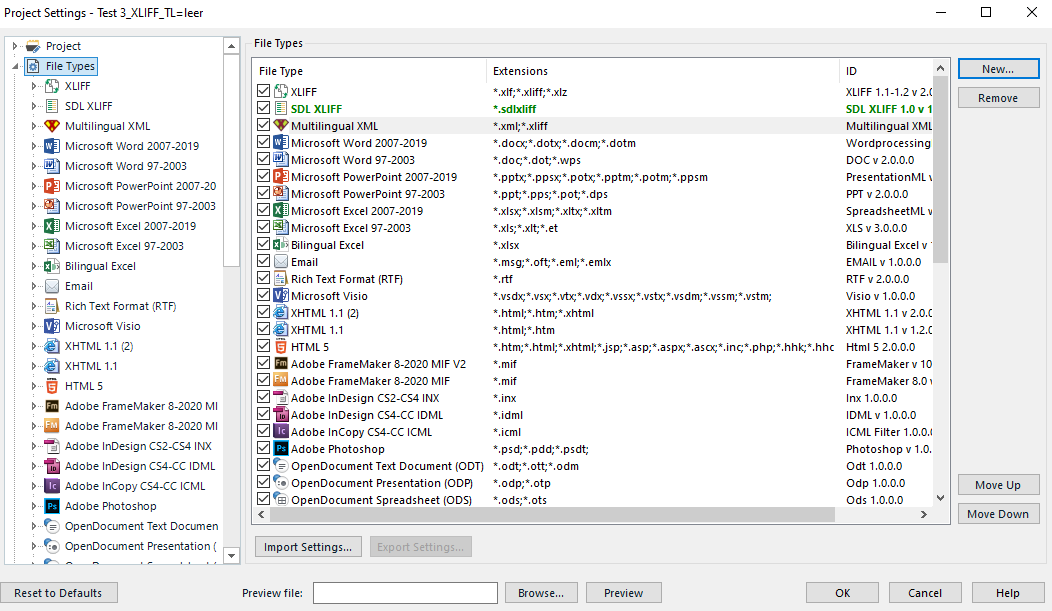
    Trados Studio Project Settings window showing a list of file types including XLIFF, SDL XLIFF, and Multilingual XML with no visible errors or warnings.

    emoji


    Generated Image Alt-Text
    [edited by: Trados AI at 8:55 AM (GMT 0) on 29 Feb 2024]
  •  

    It's not possible to create a customised multilingual XML file type just like you would do with normal XMLs via the "New..." button, is it?

    No, its not.  Why do you want to do this?

    You can export the settings and save different settings for different filetypes so it's easy to import them back in again when needed.  You can also work with project templates and have different templates for each customer or requirement you have.

    Paul Filkin | RWS

    Design your own training!
    You've done the courses and still need to go a little further, or still not clear? 
    Tell us what you need in our Community Solutions Hub

    emoji
  • Former Member
    0 Former Member in reply to Paul Filkin

    Mmh, I just thought that would be helpful, but you are right, of course, different templates would do the trick just as well. Thanks a lot for your help!

    emoji