 Translate



Hi guys, being relatively new to Trados, I struggle to italicise every occurrence of a word/expression in Trados. For example, how do I italicise each and every occurrence of "in vitro" in all target segments?
Many thanks in advance!
Christophe


Hi guys, being relatively new to Trados, I struggle to italicise every occurrence of a word/expression in Trados. For example, how do I italicise each and every occurrence of "in vitro" in all target segments?
Many thanks in advance!
Christophe
Is the source already italicised or are you introducing formatting that was in the source?
- relevant because if this is the case you would transfer the controlling tags across from the source
What is the original filetype you are translating?
- relevant because if you are introducing tags that were not there some filetypes may not support formatting at all
A screenshot would also have been helpful to give you a better reply.
Paul Filkin | RWS
Design your own training!
You've done the courses and still need to go a little further, or still not clear?
Tell us what you need in our Community Solutions Hub


Hi,
The source is not italicised, and the original file is a Word file.
I just would like to know how to do a global find/replace with formatting, here italicised. Please help.
Thanks,
Christophe


I just would like to know how to do a global find/replace with formatting, here italicised.
This is not possible in Studio. If you want to do this I suggest you do it in the target file when you're finished with the translation. It's easy with Microsoft Word.
Paul Filkin | RWS
Design your own training!
You've done the courses and still need to go a little further, or still not clear?
Tell us what you need in our Community Solutions Hub


If Paul’s suggestion is not enough and you still need to do it in Trados Studio, I’d filter by all the strings that need to be italicised. To do so, use the Display Advanced Filter:
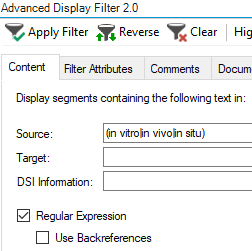
Just create a regex separating each instance you wish to italicise by a pipe symbol (|) and all the expression surrounded by brackets. In the example above: (in vitro|in vivo|in situ)
Tick the Regular Expression checkbox and click on Apply Filter. Then manually select the text in Target segment and press CTRL+I to apply italics.
This is the safest way and the recommended way if tehre are just a few instances to be italised.
If you know how to use the Toolkit plugin, you can apply this replace all procedure:
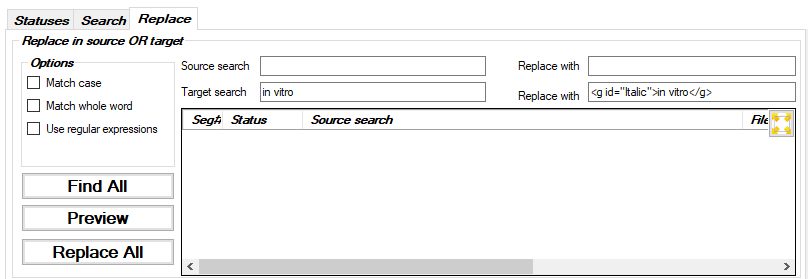
Target search:
in vitro
Replace with:
<g id="Italic">in vitro</g>
Disclaimer: I've tested that it works with a dummy document, but please test it yourself and always work with a backup SDXLIFF. A typo in the Replace with string and you may not be able to open that XLIFF file again in Trados Studio.

If Paul’s suggestion is not enough and you still need to do it in Trados Studio, I’d filter by all the strings that need to be italicised. To do so, use the Display Advanced Filter:
Just create a regex separating each instance you wish to italicise by a pipe symbol (|) and all the expression surrounded by brackets. In the example above: (in vitro|in vivo|in situ)
Tick the Regular Expression checkbox and click on Apply Filter. Then manually select the text in Target segment and press CTRL+I to apply italics.
This is the safest way and the recommended way if tehre are just a few instances to be italised.
If you know how to use the Toolkit plugin, you can apply this replace all procedure:
Target search:
in vitro
Replace with:
<g id="Italic">in vitro</g>
Disclaimer: I've tested that it works with a dummy document, but please test it yourself and always work with a backup SDXLIFF. A typo in the Replace with string and you may not be able to open that XLIFF file again in Trados Studio.
I've tested that it works with a dummy document, but please test it yourself and always work with a backup SDXLIFF. A typo in the Replace with string and you may not be able to open that XLIFF file again in Trados Studio.
I'm amazed that works, also slightly worried, and will definitely test this later. I don't understand how it can even work given we only work with text.
Paul Filkin | RWS
Design your own training!
You've done the courses and still need to go a little further, or still not clear?
Tell us what you need in our Community Solutions Hub
I'm amazed that works, also slightly worried
Me too, amazed and worried…
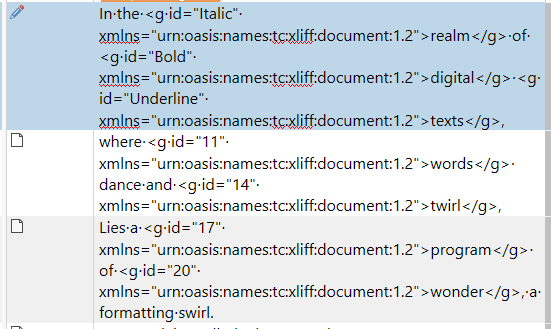
No... I can't make that work at all. First attempt corrupted the file and I'm sure the syntax was correct. Second attempt didn't corrupt the file but it did introduce all sorts of code into my file.
I would not recommend anyone try to use this, and I'll make sure the team look at this because the behaviour should be to simply replace it as text in the word file, not do this sort of thing!
Paul Filkin | RWS
Design your own training!
You've done the courses and still need to go a little further, or still not clear?
Tell us what you need in our Community Solutions Hub
If you mean did I test with an SDLXLIFF from a project created with a DOCX then yes. Although I wanted to look at other formatting so started with a few segments already formatted, then copied to target and removed all the tags. This action is most likely what caused my issue in the screenshot (aside from the bizarre behaviour of the Toolkit) since adding the formatting you used would be ok only for a DOCX and only when you introduce tags that were not present before since Studio doesn't really care what the formatting does... it's just a tag.
Here's my test file if you want to have a play?
Paul Filkin | RWS
Design your own training!
You've done the courses and still need to go a little further, or still not clear?
Tell us what you need in our Community Solutions Hub
Paul Same behaviour here. You are right: I had tested it with a DOCX with some italics already in Target (having italics tags in Source is not enough to avoid the error).
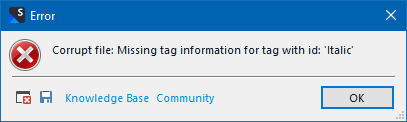
So my proposed procedure with Toolkit is definetely not good! Anyway, I don’t like unattended Replace All operations, there are always cases causing big unexpected issues, we’ve all seen them, and I’ve ben there too.
So my proposed procedure with Toolkit is definetely not good! Anyway, I don’t like unattended Replace All operations, there are always cases causing big unexpected issues, we’ve all seen them, and I’ve ben there too.
Yep... I can only echo that!
Paul Filkin | RWS
Design your own training!
You've done the courses and still need to go a little further, or still not clear?
Tell us what you need in our Community Solutions Hub