TradosStudio2022SR2_17.2.10.19084 Starter Edition (Performing verification)

Hello there,

I hope all are well.

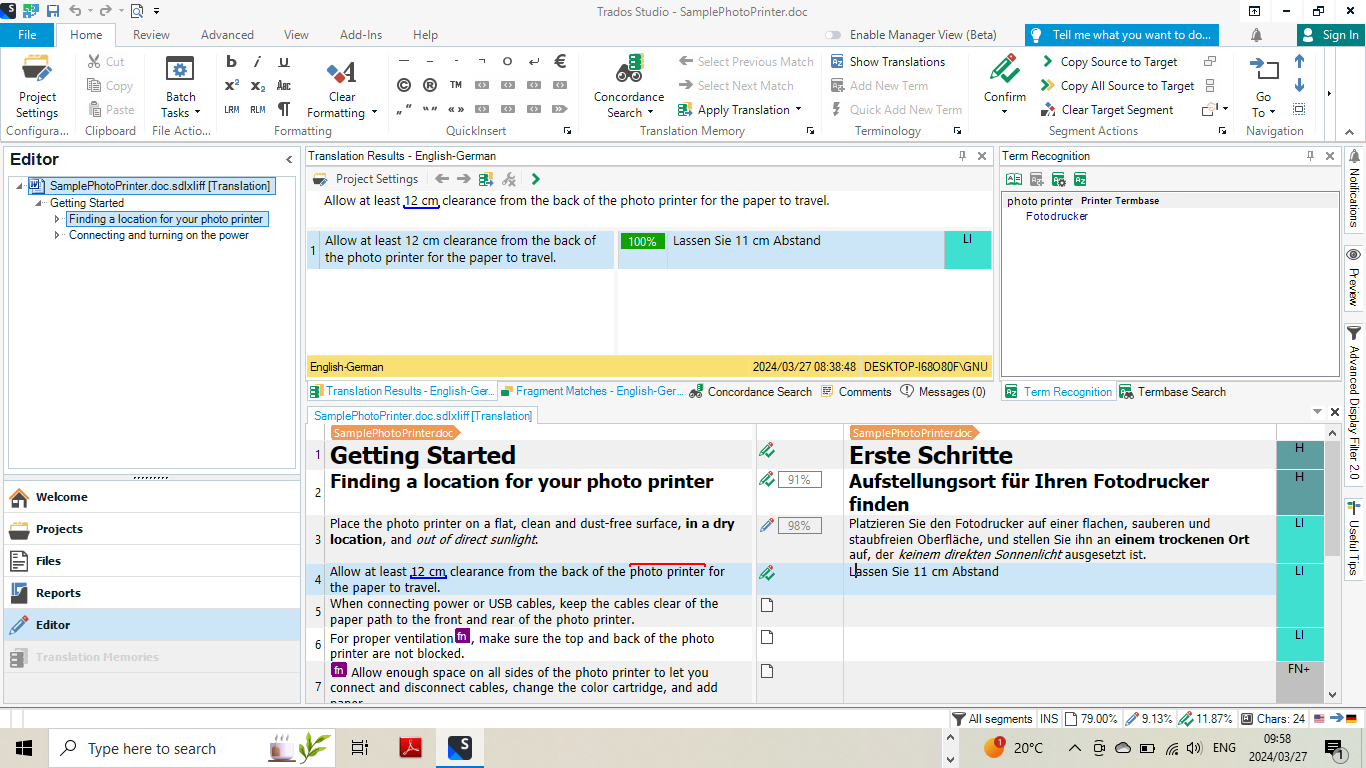
Please check the screenshot below.  I came across this problem first on segment 1 and then later on segment 4.

As you can see both segments 1 & 4 segments status don't reflect what the quick start guide tells we should expect. Such as on segment 1 the segment status should display a green block with CM (context match) 100%, and on segment 4 the error symbol X does not pop up.

Also the translation result window incorrectly shows as 100% correct. As we can see the performing verification is incorrect.

 I have been given 90 days free to practice and  as the clock is ticking I see myself running out of time. 

Please, your assistance is appreciated. 

What is it that I am missing here?

.Screenshot of Trados Studio interface showing segment 1 with a 100% match but no green CM block, and segment 4 with a 91% match but no error symbol.
Thank you in anticipation.

Warm regards

Gilberto


removed email.
[edited by: Paul at 10:04 PM (GMT 0) on 29 Mar 2024]

emoji
Parents
  • Hi Paul,
    Thank you so much for your quick response.
    First and foremost with regard to including my email address it was not very smart and I really appreciated you having it removed. It actually was a decision of desperation.
    As far as my queries and segment # 1, you are right. I forgot the fact that there was already a similar or equal phrase in the TM.
    On segment # 4 however I feel that I shall have given you more background to reason this query.
    • I am a newcomer to Trados. I am following the Quick Start Guide step by step using the sample project included with the Trados Studio 2022 Starter Edition 90 days free. I am told that some features such as RWS App stores and Cloud are limited or not available such as machine translation, as I already have checked it.
    • I agree that verification is only based on what I have in my source and target segments checked against the rules I have set up under Verification in my Project Settings.And as per my Project Settings under Verification the QA Checker (Punctuation, Numbers, Word list, Regular Expressions, QA Checker Profiles) are all set. So it seems.
    • I am including two screenshots below of the  Quick Start Guide steps that I am following and show that as per the Guide there is no match in the TM. And for the purpose of this example I entered an incorrected translation with a wrong number. pressed Ctrl + Enter to confirm the translation and perform verification. 
    Screenshot of Trados Studio showing QA Checker 3.0 and Terminology Verifier sections with an error in segment 4 indicating a missing match in the translation memory and an incorrect number entered in the translation.
    Screenshot of Trados Studio highlighting an error in the Segment Status Column where the number '11 cm' from the source segment is incorrectly translated instead of '12 cm', with the Messages Window open showing the error details.
    I hope I have not missed giving you any further relevant points for this query. However in proceeding further with the Quick Starter Guide I have been wondering whether this Quick Starter Guide I am following is compatible with the Trados software version TradosStdio2022SR2_17.2.10.19084 Starter Edition? The reason for saying that is that I have found more and more issues that don't correlate with the Quick Starter Guide expected results.
    Looking forward to hearing from you.
    Thank you
    Warm regards
    Gilberto

    --

    Gilberto Nunes
    emoji


    Generated Image Alt-Text
    [edited by: Trados AI at 6:28 AM (GMT 1) on 2 Apr 2024]
  •  

    Maybe this will help?

    Paul Filkin | RWS

    Design your own training!
    You've done the courses and still need to go a little further, or still not clear? 
    Tell us what you need in our Community Solutions Hub

    emoji
Reply
  •  

    Maybe this will help?

    Paul Filkin | RWS

    Design your own training!
    You've done the courses and still need to go a little further, or still not clear? 
    Tell us what you need in our Community Solutions Hub

    emoji
Children