Font mapping Simplified Chinese not working

Hi,

I am trying to map some fonts for Chinese in IDML file type, but I'm afraid it's not working as it's supposed to be. Or maybe I'm doing or understanding something wrong?

Here's what I do:

Project Settings > File Types > IDML > Font mapping
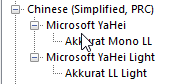
Font mapping settings in Trados Studio showing Akkurat Mono LL mapped to Microsoft YaHei and Akkurat LL Light mapped to Microsoft YaHei Light under Chinese (Simplified, PRC).

The way I understand it, this should map the Akkurat Mono LL of my source file to Microsoft YaHei in my target file. Idem with Akkurat LL Light and Microsoft YaHei Light.

However, when I open the generated Chinese IDML file in InDesign, it looks like this:
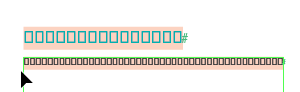
Generated Chinese IDML file in InDesign showing text replaced with square boxes, indicating font rendering issues.

What am I doing wrong?

Any help appreciated! :)

Kind regards,

Katharina

Trados Studio 2024 SR1 18.1.2.6370

InDesign: 20.5 x64


Generated Image Alt-Text
[edited by: RWS Community AI at 1:12 PM (GMT 1) on 20 Oct 2025]

emoji
  • Probability score: 0.7  

    Question improvement suggestion: Provide more details about the specific steps you took in the font mapping process and clarify if any error messages were encountered.  

    In the meantime, based on the information you have provided, here is a suggested answer to your question:  

    Hello Katharina,  

    Thank you for reaching out! It seems like you're experiencing issues with font mapping in your IDML file. Let's go through a few steps to troubleshoot this:  

    **Step 1:** Double-check your font mapping settings. Ensure that you have correctly mapped "Akkurat Mono LL" to "Microsoft YaHei" and "Akkurat LL Light" to "Microsoft YaHei Light" in the Project Settings under File Types > IDML > Font mapping.  

    **Step 2:** Verify that the fonts you are trying to map are installed on your system. If "Microsoft YaHei" is not installed, it won't be applied in the output file.  

    **Step 3:** Check the formatting tags in your source segments. In the Editor view, go to View > Options and ensure that "Toggle formatting tag display" and "Full Tag Text" are enabled. This will help ensure that all formatting tags are correctly placed during translation.  

    **Step 4:** After making these adjustments, try generating the target file again and open it in InDesign to see if the font mapping works as expected.  

    If the issue persists, please let me know if you encounter any error messages or if there are specific behaviors that differ from your expectations. This additional information will help in diagnosing the problem further.  

    I hope this answer addressed your question. If not, please reject the answer, add the question improvement suggestion information, and click the RWS Community AI checkbox on the right to try again.  

    RWS Community AI

    emoji
  • Sadly, no error messages. All necessary fonts are installed on my PC. Tags are placed correctly.

    emoji
  • Probability score: 0.8  

    Question improvement suggestion: Provide specific details about the font mapping settings you have configured and any additional steps you may have taken to troubleshoot the issue.  

    In the meantime, based on the information you have provided, here is a suggested answer to your question:  

    Hello Katharina,  

    Thank you for your follow-up! Since you mentioned that there are no error messages, all necessary fonts are installed, and the tags are placed correctly, let's explore a few additional steps to help resolve the font mapping issue in your IDML file:  

    **Step 1:** Ensure that the font mapping settings are correctly configured. Go to Project Settings > File Types > IDML > Font mapping and double-check that "Akkurat Mono LL" is mapped to "Microsoft YaHei" and "Akkurat LL Light" to "Microsoft YaHei Light."  

    **Step 2:** Since you mentioned that the tags are placed correctly, consider using the Quick Place feature during translation to ensure that all formatting tags are accurately inserted in the target segments. This can help maintain the correct font application.  

    **Step 3:** If the issue persists, try re-saving the IDML file in Adobe InDesign. Open the file, click on File > Save As, and save it with a different name. This can sometimes resolve underlying issues with the file itself.  

    **Step 4:** If you haven't already, enable the "Process unsupported file versions" option in the IDML filter settings. This can be found under File Types > Adobe In Design CS4-CC IDML > Common. This setting can help with compatibility issues.  

    **Step 5:** Lastly, consider updating Trados Studio to the latest version, as updates often include fixes for compatibility with various file formats, including IDML.  

    If you continue to experience issues, please provide any additional details about your font mapping settings or any other steps you've taken. This information will help in diagnosing the problem further.  

    I hope this answer addressed your question. If not, please reject the answer, add the question improvement suggestion information, and click the RWS Community AI checkbox on the right to try again.  

    RWS Community AI

    emoji
  • Unfortunately, this is also not the answer. The fonts are mapped correctly, as far as I can see, the tags are good, re-saving the file didn't work, unsupported file versions are enabled and we have the latest Studio version installed.

    emoji
  •  

    I can't be 100% on this but, I think this might be occurring because the font you mapped doesn’t actually support Chinese characters, or the mapping didn’t apply as expected.  Trados only swaps the font name in the IDML; it doesn’t ensure the new font has the right glyphs.  When InDesign opens it, you get boxes because it’s still referencing a Western font.

    This article might he helpful as I think this is more of an InDesign issue than a Trados one: https://community.adobe.com/t5/indesign-discussions/native-american-symbols-displaying-as-squares/m-p/12858168

    In short: check that Microsoft YaHei is installed, make sure the mapping matches exactly, and confirm the IDML actually uses that font when opened in a text editor.

    Paul Filkin | RWS Group

    ________________________
    Design your own training!

    You've done the courses and still need to go a little further, or still not clear? 
    Tell us what you need in our Community Solutions Hub

    emoji
  •  

    Thanks for your quick answer.

    Unfortunately, the graphics people in our company said the problem does seem to be Trados because the standard font mapping from all fonts to SimSun works fine. Only the custom mapping does not work. If they open the InDesign file, the boxes appear because the file is still in Akkurat font, which does not support Chinese characters.

    So ... any other ideas maybe?

    emoji
  •  

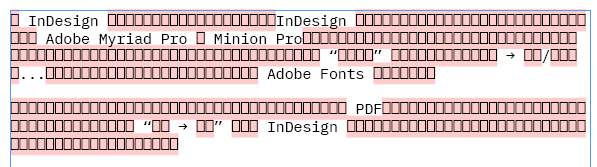
    ok -I had to mess around a little to figure this out.  I could reproduce your problem trying various scenraios, so I checked inside the Resources/Fonts.xml which you can find if you unzip the IDML and looked at the font name being used for the source.  What I found is that initially I used the name of the font as I saw it in my fonts. so I used this:

    IBMPlexMono-Regular

    That got me this:

    Screenshot showing text in a pink-highlighted box with references to InDesign, Adobe Myriad Pro, Minion Pro, and Adobe Fonts.

    When I looked in the Font.xml InDesign used it was this:

    IBM Plex Mono

    Like this:

    	<FontFamily Self="di140" Name="IBM Plex Mono">
    		<Font Self="di140FontnIBM Plex Mono Regular" FontFamily="IBM Plex Mono" Name="IBM Plex Mono Regular" PostScriptName="IBMPlexMono-Regular" Status="Installed" FontStyleName="Regular" FontType="TrueType" WritingScript="0" FullName="IBM Plex Mono Regular" FullNameNative="IBM Plex Mono Regular" FontStyleNameNative="Regular" PlatformName="$ID/" Version="Version 2.3" TypekitID="$ID/" />
    	</FontFamily>

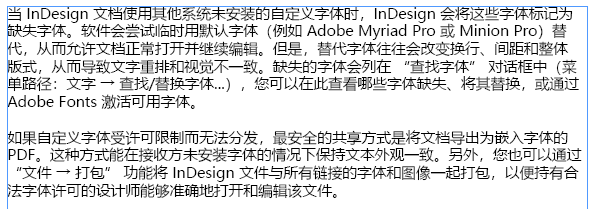
    So I removed the custom font settings and added them again with the correct name.  Then when I recreated my project and ran it through my TM the target file looked like this:

    Screenshot displaying text in Chinese discussing InDesign, missing fonts, Adobe Myriad Pro, Minion Pro, and font replacement options.

    So this seems to be all about using the correct name for the font exactly when you create the mapping.  Maybe you can check as I suggested before?

    Paul Filkin | RWS Group

    ________________________
    Design your own training!

    You've done the courses and still need to go a little further, or still not clear? 
    Tell us what you need in our Community Solutions Hub


    Generated Image Alt-Text
    [edited by: RWS Community AI at 8:36 AM (GMT 1) on 21 Oct 2025]
  •  

    Wow, thanks for all the research! I was so sure that this was the solution that I tested it right away ... sadly, with the same result. But I did use the font name and not the font family name. I'll try it again with the font family name.

    emoji
  •  

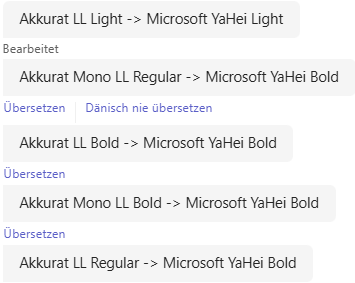
    Okay, it worked with the font families, but unfortunately I can't differentiate between bold and light when I use the font family names, and I would actually need this mapping:

    Screenshot showing font mapping: Akkurat LL Light mapped to Microsoft YaHei Light, Akkurat Mono LL Regular mapped to Microsoft YaHei Bold, and Akkurat LL Bold mapped to Microsoft YaHei Bold.

    Any ideas? That's the font resources file that I have from my IDML:

    <?xml version="1.0" encoding="UTF-8" standalone="yes"?>
    <idPkg:Fonts xmlns:idPkg="ns.adobe.com/.../packaging" DOMVersion="20.0">
    	<FontFamily Self="di3f" Name="Minion Pro">
    		<Font Self="di3fFontnMinion Pro Regular" FontFamily="Minion Pro" Name="Minion Pro Regular" PostScriptName="MinionPro-Regular" Status="Installed" FontStyleName="Regular" FontType="OpenTypeCFF" WritingScript="0" FullName="Minion Pro" FullNameNative="Minion Pro" FontStyleNameNative="Regular" PlatformName="$ID/" Version="Version 2.112;PS 2.000;hotconv 1.0.70;makeotf.lib2.5.5900" TypekitID="$ID/" />
    		<Font Self="di3fFontnMinion Pro Italic" FontFamily="Minion Pro" Name="Minion Pro Italic" PostScriptName="MinionPro-It" Status="Installed" FontStyleName="Italic" FontType="OpenTypeCFF" WritingScript="0" FullName="Minion Pro Italic" FullNameNative="Minion Pro Italic" FontStyleNameNative="Italic" PlatformName="$ID/" Version="Version 2.115;PS 2.000;hotconv 1.0.78;makeotf.lib2.5.61930" TypekitID="TkD-6814-7f26ce6a20a52873776fad57275c7d91f90d1c3e" />
    		<Font Self="di3fFontnMinion Pro Bold" FontFamily="Minion Pro" Name="Minion Pro Bold" PostScriptName="MinionPro-Bold" Status="Installed" FontStyleName="Bold" FontType="OpenTypeCFF" WritingScript="0" FullName="Minion Pro Bold" FullNameNative="Minion Pro Bold" FontStyleNameNative="Bold" PlatformName="$ID/" Version="Version 2.115;PS 2.000;hotconv 1.0.78;makeotf.lib2.5.61930" TypekitID="TkD-6812-51d7e68bccdf059a2b659984d148bdd44e00cbcb" />
    		<Font Self="di3fFontnMinion Pro Medium" FontFamily="Minion Pro" Name="Minion Pro Medium" PostScriptName="MinionPro-Medium" Status="Installed" FontStyleName="Medium" FontType="OpenTypeCFF" WritingScript="0" FullName="Minion Pro Medium" FullNameNative="Minion Pro Medium" FontStyleNameNative="Medium" PlatformName="$ID/" Version="Version 2.115;PS 2.000;hotconv 1.0.78;makeotf.lib2.5.61930" TypekitID="TkD-6815-9cbe48aa38360f52610e63bc7f1e15215c535d31" />
    	</FontFamily>
    	<FontFamily Self="di9d" Name="Myriad Pro">
    		<Font Self="di9dFontnMyriad Pro Regular" FontFamily="Myriad Pro" Name="Myriad Pro Regular" PostScriptName="MyriadPro-Regular" Status="Installed" FontStyleName="Regular" FontType="OpenTypeCFF" WritingScript="0" FullName="Myriad Pro" FullNameNative="Myriad Pro" FontStyleNameNative="Regular" PlatformName="$ID/" Version="Version 2.106;PS 2.000;hotconv 1.0.70;makeotf.lib2.5.58329" TypekitID="$ID/" />
    		<Font Self="di9dFontnMyriad Pro Italic" FontFamily="Myriad Pro" Name="Myriad Pro Italic" PostScriptName="MyriadPro-It" Status="Installed" FontStyleName="Italic" FontType="OpenTypeCFF" WritingScript="0" FullName="Myriad Pro Italic" FullNameNative="Myriad Pro Italic" FontStyleNameNative="Italic" PlatformName="$ID/" Version="Version 2.106;PS 2.000;hotconv 1.0.70;makeotf.lib2.5.58329" TypekitID="$ID/" />
    		<Font Self="di9dFontnMyriad Pro Bold" FontFamily="Myriad Pro" Name="Myriad Pro Bold" PostScriptName="MyriadPro-Bold" Status="Installed" FontStyleName="Bold" FontType="OpenTypeCFF" WritingScript="0" FullName="Myriad Pro Bold" FullNameNative="Myriad Pro Bold" FontStyleNameNative="Bold" PlatformName="$ID/" Version="Version 2.106;PS 2.000;hotconv 1.0.70;makeotf.lib2.5.58329" TypekitID="$ID/" />
    		<Font Self="di9dFontnMyriad Pro Bold Italic" FontFamily="Myriad Pro" Name="Myriad Pro Bold Italic" PostScriptName="MyriadPro-BoldIt" Status="Installed" FontStyleName="Bold Italic" FontType="OpenTypeCFF" WritingScript="0" FullName="Myriad Pro Bold Italic" FullNameNative="Myriad Pro Bold Italic" FontStyleNameNative="Bold Italic" PlatformName="$ID/" Version="Version 2.106;PS 2.000;hotconv 1.0.70;makeotf.lib2.5.58329" TypekitID="$ID/" />
    		<Font Self="di9dFontnMyriad Pro Condensed" FontFamily="Myriad Pro" Name="Myriad Pro Condensed" PostScriptName="MyriadPro-Cond" Status="Substituted" FontStyleName="Condensed" FontType="OpenTypeCFF" WritingScript="0" FullName="Myriad Pro Condensed" FullNameNative="Myriad Pro Condensed" FontStyleNameNative="Condensed" PlatformName="$ID/" Version="Version 2.115;PS 2.000;hotconv 1.0.81;makeotf.lib2.5.63406" TypekitID="TkD-6809-fa6b5a34ab3341c489ea88a559046c512e17755e" />
    		<Font Self="di9dFontnMyriad Pro Bold Condensed" FontFamily="Myriad Pro" Name="Myriad Pro Bold Condensed" PostScriptName="MyriadPro-BoldCond" Status="Substituted" FontStyleName="Bold Condensed" FontType="OpenTypeCFF" WritingScript="0" FullName="Myriad Pro Bold Condensed" FullNameNative="Myriad Pro Bold Condensed" FontStyleNameNative="Bold Condensed" PlatformName="$ID/" Version="Version 2.115;PS 2.000;hotconv 1.0.81;makeotf.lib2.5.63406" TypekitID="TkD-6808-aa5bb201225610d5d00d8b0c3e2a8ebd44543554" />
    		<Font Self="di9dFontnMyriad Pro Semibold" FontFamily="Myriad Pro" Name="Myriad Pro Semibold" PostScriptName="MyriadPro-Semibold" Status="Substituted" FontStyleName="Semibold" FontType="OpenTypeCFF" WritingScript="0" FullName="Myriad Pro Semibold" FullNameNative="Myriad Pro Semibold" FontStyleNameNative="Semibold" PlatformName="$ID/" Version="Version 2.115;PS 2.000;hotconv 1.0.81;makeotf.lib2.5.63406" TypekitID="TkD-6852-5334caf4d00a155a8cbd10fd1e6df58d7f3bb016" />
    	</FontFamily>
    	<FontFamily Self="diaa" Name="Kozuka Mincho Pr6N">
    		<Font Self="diaaFontnKozuka Mincho Pr6N R" FontFamily="Kozuka Mincho Pr6N" Name="Kozuka Mincho Pr6N R" PostScriptName="KozMinPr6N-Regular" Status="Installed" FontStyleName="R" FontType="OpenTypeCID" WritingScript="1" FullName="KozMinPr6N-Regular" FullNameNative="小塚明朝 Pr6N R" FontStyleNameNative="R" PlatformName="$ID/" Version="Version 7.001;hotconv 1.0.107;makeotfexe 2.5.65593" TypekitID="$ID/" />
    	</FontFamily>
    	<FontFamily Self="di19b" Name="Avenir Next W1G">
    		<Font Self="di19bFontnAvenir Next W1G Light" FontFamily="Avenir Next W1G" Name="Avenir Next W1G Light" PostScriptName="AvenirNextW1G-Light" Status="Installed" FontStyleName="Light" FontType="OpenTypeCFF" WritingScript="0" FullName="Avenir Next W1G Light" FullNameNative="Avenir Next W1G Light" FontStyleNameNative="Light" PlatformName="$ID/" Version="Version 1.00" TypekitID="$ID/" />
    		<Font Self="di19bFontnAvenir Next W1G Light Italic" FontFamily="Avenir Next W1G" Name="Avenir Next W1G Light Italic" PostScriptName="AvenirNextW1G-LightItalic" Status="Installed" FontStyleName="Light Italic" FontType="OpenTypeCFF" WritingScript="0" FullName="Avenir Next W1G Light Italic" FullNameNative="Avenir Next W1G Light Italic" FontStyleNameNative="Light Italic" PlatformName="$ID/" Version="Version 1.00" TypekitID="$ID/" />
    		<Font Self="di19bFontnAvenir Next W1G Regular" FontFamily="Avenir Next W1G" Name="Avenir Next W1G Regular" PostScriptName="AvenirNextW1G-Regular" Status="Installed" FontStyleName="Regular" FontType="OpenTypeCFF" WritingScript="0" FullName="Avenir Next W1G Regular" FullNameNative="Avenir Next W1G Regular" FontStyleNameNative="Regular" PlatformName="$ID/" Version="Version 1.00" TypekitID="$ID/" />
    		<Font Self="di19bFontnAvenir Next W1G Italic" FontFamily="Avenir Next W1G" Name="Avenir Next W1G Italic" PostScriptName="AvenirNextW1G-Italic" Status="Installed" FontStyleName="Italic" FontType="OpenTypeCFF" WritingScript="0" FullName="Avenir Next W1G Italic" FullNameNative="Avenir Next W1G Italic" FontStyleNameNative="Italic" PlatformName="$ID/" Version="Version 1.00" TypekitID="$ID/" />
    		<Font Self="di19bFontnAvenir Next W1G Demi" FontFamily="Avenir Next W1G" Name="Avenir Next W1G Demi" PostScriptName="AvenirNextW1G-Demi" Status="Installed" FontStyleName="Demi" FontType="OpenTypeCFF" WritingScript="0" FullName="Avenir Next W1G Demi" FullNameNative="Avenir Next W1G Demi" FontStyleNameNative="Demi" PlatformName="$ID/" Version="Version 1.00" TypekitID="$ID/" />
    		<Font Self="di19bFontnAvenir Next W1G Demi Italic" FontFamily="Avenir Next W1G" Name="Avenir Next W1G Demi Italic" PostScriptName="AvenirNextW1G-DemiItalic" Status="Installed" FontStyleName="Demi Italic" FontType="OpenTypeCFF" WritingScript="0" FullName="Avenir Next W1G Demi Italic" FullNameNative="Avenir Next W1G Demi Italic" FontStyleNameNative="Demi Italic" PlatformName="$ID/" Version="Version 1.00" TypekitID="$ID/" />
    		<Font Self="di19bFontnAvenir Next W1G Bold" FontFamily="Avenir Next W1G" Name="Avenir Next W1G Bold" PostScriptName="AvenirNextW1G-Bold" Status="Installed" FontStyleName="Bold" FontType="OpenTypeCFF" WritingScript="0" FullName="Avenir Next W1G Bold" FullNameNative="Avenir Next W1G Bold" FontStyleNameNative="Bold" PlatformName="$ID/" Version="Version 1.00" TypekitID="$ID/" />
    		<Font Self="di19bFontnAvenir Next W1G Medium" FontFamily="Avenir Next W1G" Name="Avenir Next W1G Medium" PostScriptName="AvenirNextW1G-Medium" Status="Substituted" FontStyleName="Medium" FontType="OpenTypeCFF" WritingScript="0" FullName="Avenir Next W1G Medium" FullNameNative="Avenir Next W1G Medium" FontStyleNameNative="Medium" PlatformName="$ID/" Version="Version 1.00" TypekitID="$ID/" />
    	</FontFamily>
    	<FontFamily Self="di1aa" Name="Font Awesome 6 Pro">
    		<Font Self="di1aaFontnFont Awesome 6 Pro Thin" FontFamily="Font Awesome 6 Pro" Name="Font Awesome 6 Pro Thin" PostScriptName="FontAwesome6Pro-Thin" Status="Installed" FontStyleName="Thin" FontType="OpenTypeCFF" WritingScript="0" FullName="Font Awesome 6 Pro Thin" FullNameNative="Font Awesome 6 Pro Thin" FontStyleNameNative="Thin" PlatformName="$ID/" Version="Version 772.00390625 (Font Awesome version: 6.4.0)" TypekitID="$ID/" />
    		<Font Self="di1aaFontnFont Awesome 6 Pro Light" FontFamily="Font Awesome 6 Pro" Name="Font Awesome 6 Pro Light" PostScriptName="FontAwesome6Pro-Light" Status="Installed" FontStyleName="Light" FontType="OpenTypeCFF" WritingScript="0" FullName="Font Awesome 6 Pro Light" FullNameNative="Font Awesome 6 Pro Light" FontStyleNameNative="Light" PlatformName="$ID/" Version="Version 772.00390625 (Font Awesome version: 6.4.0)" TypekitID="$ID/" />
    		<Font Self="di1aaFontnFont Awesome 6 Pro Regular" FontFamily="Font Awesome 6 Pro" Name="Font Awesome 6 Pro Regular" PostScriptName="FontAwesome6Pro-Regular" Status="Installed" FontStyleName="Regular" FontType="OpenTypeCFF" WritingScript="0" FullName="Font Awesome 6 Pro Regular" FullNameNative="Font Awesome 6 Pro Regular" FontStyleNameNative="Regular" PlatformName="$ID/" Version="Version 772.00390625 (Font Awesome version: 6.4.0)" TypekitID="$ID/" />
    		<Font Self="di1aaFontnFont Awesome 6 Pro Solid" FontFamily="Font Awesome 6 Pro" Name="Font Awesome 6 Pro Solid" PostScriptName="FontAwesome6Pro-Solid" Status="Installed" FontStyleName="Solid" FontType="OpenTypeCFF" WritingScript="0" FullName="Font Awesome 6 Pro Solid" FullNameNative="Font Awesome 6 Pro Solid" FontStyleNameNative="Solid" PlatformName="$ID/" Version="Version 772.00390625 (Font Awesome version: 6.4.0)" TypekitID="$ID/" />
    	</FontFamily>
    	<FontFamily Self="di31ca" Name="Akkurat LL">
    		<Font Self="di31caFontnAkkurat LL Thin" FontFamily="Akkurat LL" Name="Akkurat LL Thin" PostScriptName="AkkuratLL-Thin" Status="Installed" FontStyleName="Thin" FontType="OpenTypeCFF" WritingScript="0" FullName="Akkurat LL Thin" FullNameNative="Akkurat LL Thin" FontStyleNameNative="Thin" PlatformName="$ID/" Version="Version 5.000; build 0026" TypekitID="$ID/" />
    		<Font Self="di31caFontnAkkurat LL Thin Italic" FontFamily="Akkurat LL" Name="Akkurat LL Thin Italic" PostScriptName="AkkuratLL-ThinItalic" Status="Installed" FontStyleName="Thin Italic" FontType="OpenTypeCFF" WritingScript="0" FullName="Akkurat LL Thin Italic" FullNameNative="Akkurat LL Thin Italic" FontStyleNameNative="Thin Italic" PlatformName="$ID/" Version="Version 5.000; build 0025" TypekitID="$ID/" />
    		<Font Self="di31caFontnAkkurat LL Light" FontFamily="Akkurat LL" Name="Akkurat LL Light" PostScriptName="AkkuratLL-Light" Status="Installed" FontStyleName="Light" FontType="OpenTypeCFF" WritingScript="0" FullName="Akkurat LL Light" FullNameNative="Akkurat LL Light" FontStyleNameNative="Light" PlatformName="$ID/" Version="Version 5.000; build 0025" TypekitID="$ID/" />
    		<Font Self="di31caFontnAkkurat LL Light Italic" FontFamily="Akkurat LL" Name="Akkurat LL Light Italic" PostScriptName="AkkuratLL-LightItalic" Status="Installed" FontStyleName="Light Italic" FontType="OpenTypeCFF" WritingScript="0" FullName="Akkurat LL Light Italic" FullNameNative="Akkurat LL Light Italic" FontStyleNameNative="Light Italic" PlatformName="$ID/" Version="Version 5.000; build 0024" TypekitID="$ID/" />
    		<Font Self="di31caFontnAkkurat LL Regular" FontFamily="Akkurat LL" Name="Akkurat LL Regular" PostScriptName="AkkuratLL-Regular" Status="Installed" FontStyleName="Regular" FontType="OpenTypeCFF" WritingScript="0" FullName="Akkurat LL" FullNameNative="Akkurat LL" FontStyleNameNative="Regular" PlatformName="$ID/" Version="Version 5.000; build 0024" TypekitID="$ID/" />
    		<Font Self="di31caFontnAkkurat LL Italic" FontFamily="Akkurat LL" Name="Akkurat LL Italic" PostScriptName="AkkuratLL-Italic" Status="Installed" FontStyleName="Italic" FontType="OpenTypeCFF" WritingScript="0" FullName="Akkurat LL Italic" FullNameNative="Akkurat LL Italic" FontStyleNameNative="Italic" PlatformName="$ID/" Version="Version 5.000; build 0024" TypekitID="$ID/" />
    		<Font Self="di31caFontnAkkurat LL Bold" FontFamily="Akkurat LL" Name="Akkurat LL Bold" PostScriptName="AkkuratLL-Bold" Status="Installed" FontStyleName="Bold" FontType="OpenTypeCFF" WritingScript="0" FullName="Akkurat LL Bold" FullNameNative="Akkurat LL Bold" FontStyleNameNative="Bold" PlatformName="$ID/" Version="Version 5.000; build 0025" TypekitID="$ID/" />
    		<Font Self="di31caFontnAkkurat LL Bold Italic" FontFamily="Akkurat LL" Name="Akkurat LL Bold Italic" PostScriptName="AkkuratLL-BoldItalic" Status="Installed" FontStyleName="Bold Italic" FontType="OpenTypeCFF" WritingScript="0" FullName="Akkurat LL Bold Italic" FullNameNative="Akkurat LL Bold Italic" FontStyleNameNative="Bold Italic" PlatformName="$ID/" Version="Version 5.000; build 0024" TypekitID="$ID/" />
    		<Font Self="di31caFontnAkkurat LL Black" FontFamily="Akkurat LL" Name="Akkurat LL Black" PostScriptName="AkkuratLL-Black" Status="Installed" FontStyleName="Black" FontType="OpenTypeCFF" WritingScript="0" FullName="Akkurat LL Black" FullNameNative="Akkurat LL Black" FontStyleNameNative="Black" PlatformName="$ID/" Version="Version 5.000; build 0032" TypekitID="$ID/" />
    		<Font Self="di31caFontnAkkurat LL Black Italic" FontFamily="Akkurat LL" Name="Akkurat LL Black Italic" PostScriptName="AkkuratLL-BlackItalic" Status="Installed" FontStyleName="Black Italic" FontType="OpenTypeCFF" WritingScript="0" FullName="Akkurat LL Black Italic" FullNameNative="Akkurat LL Black Italic" FontStyleNameNative="Black Italic" PlatformName="$ID/" Version="Version 5.000; build 0024" TypekitID="$ID/" />
    	</FontFamily>
    	<FontFamily Self="di31cd" Name="Akkurat Mono LL">
    		<Font Self="di31cdFontnAkkurat Mono LL Regular" FontFamily="Akkurat Mono LL" Name="Akkurat Mono LL Regular" PostScriptName="AkkuratMonoLL-Regular" Status="Installed" FontStyleName="Regular" FontType="OpenTypeCFF" WritingScript="0" FullName="Akkurat Mono LL" FullNameNative="Akkurat Mono LL" FontStyleNameNative="Regular" PlatformName="$ID/" Version="Version 5.000; build 0013" TypekitID="$ID/" />
    		<Font Self="di31cdFontnAkkurat Mono LL Italic" FontFamily="Akkurat Mono LL" Name="Akkurat Mono LL Italic" PostScriptName="AkkuratMonoLL-Italic" Status="Installed" FontStyleName="Italic" FontType="OpenTypeCFF" WritingScript="0" FullName="Akkurat Mono LL Italic" FullNameNative="Akkurat Mono LL Italic" FontStyleNameNative="Italic" PlatformName="$ID/" Version="Version 5.000; build 0012" TypekitID="$ID/" />
    		<Font Self="di31cdFontnAkkurat Mono LL Bold" FontFamily="Akkurat Mono LL" Name="Akkurat Mono LL Bold" PostScriptName="AkkuratMonoLL-Bold" Status="Installed" FontStyleName="Bold" FontType="OpenTypeCFF" WritingScript="0" FullName="Akkurat Mono LL Bold" FullNameNative="Akkurat Mono LL Bold" FontStyleNameNative="Bold" PlatformName="$ID/" Version="Version 5.000; build 0012" TypekitID="$ID/" />
    		<Font Self="di31cdFontnAkkurat Mono LL Bold Italic" FontFamily="Akkurat Mono LL" Name="Akkurat Mono LL Bold Italic" PostScriptName="AkkuratMonoLL-BoldItalic" Status="Installed" FontStyleName="Bold Italic" FontType="OpenTypeCFF" WritingScript="0" FullName="Akkurat Mono LL Bold Italic" FullNameNative="Akkurat Mono LL Bold Italic" FontStyleNameNative="Bold Italic" PlatformName="$ID/" Version="Version 5.000; build 0012" TypekitID="$ID/" />
    	</FontFamily>
    	<FontFamily Self="di97e8" Name="Microsoft YaHei">
    		<Font Self="di97e8FontnMicrosoft YaHei Light" FontFamily="Microsoft YaHei" Name="Microsoft YaHei Light" PostScriptName="MicrosoftYaHeiLight" Status="Installed" FontStyleName="Light" FontType="TrueType" WritingScript="25" FullName="Microsoft YaHei Light" FullNameNative="微软雅黑 Light" FontStyleNameNative="Light" PlatformName="$ID/" Version="Version 6.25" TypekitID="$ID/" />
    		<Font Self="di97e8FontnMicrosoft YaHei Regular" FontFamily="Microsoft YaHei" Name="Microsoft YaHei Regular" PostScriptName="MicrosoftYaHei" Status="Installed" FontStyleName="Regular" FontType="TrueType" WritingScript="25" FullName="Microsoft YaHei" FullNameNative="微软雅黑" FontStyleNameNative="Regular" PlatformName="$ID/" Version="Version 6.31" TypekitID="$ID/" />
    		<Font Self="di97e8FontnMicrosoft YaHei Bold" FontFamily="Microsoft YaHei" Name="Microsoft YaHei Bold" PostScriptName="MicrosoftYaHei-Bold" Status="Installed" FontStyleName="Bold" FontType="TrueType" WritingScript="25" FullName="Microsoft YaHei Bold" FullNameNative="微软雅黑 Bold" FontStyleNameNative="Bold" PlatformName="$ID/" Version="Version 6.31" TypekitID="$ID/" />
    	</FontFamily>
    	<CompositeFont Self="CompositeFont/$ID/[No composite font]" Name="$ID/[No composite font]">
    		<CompositeFontEntry Self="ua9" Name="$ID/Kanji" FontStyle="$ID/R" RelativeSize="100" HorizontalScale="100" VerticalScale="100" Locked="true" ScaleOption="true" BaselineShift="0">
    			<Properties>
    				<AppliedFont type="string">Kozuka Mincho Pr6N</AppliedFont>
    			</Properties>
    		</CompositeFontEntry>
    		<CompositeFontEntry Self="uab" Name="$ID/Kana" FontStyle="$ID/R" RelativeSize="100" HorizontalScale="100" VerticalScale="100" CustomCharacters="ぁあぃいぅうぇえぉおかがきぎくぐけげこごさざしじすずせぜそぞただちぢっつづてでとどなにぬねのはばぱひびぴふぶぷへべぺほぼぽまみむめもゃやゅゆょよらりるれろゎわゐゑをんゔゕゖゝゞァアィイゥウェエォオカガキギクグケゲコゴサザシジスズセゼソゾタダチヂッツヅテデトドナニヌネノハバパヒビピフブプヘベペホボポマミムメモャヤュユョヨラリルレロヮワヰヱヲンヴヵヶヷヸヹヺーヽヾ" Locked="true" ScaleOption="true" BaselineShift="0">
    			<Properties>
    				<AppliedFont type="string">Kozuka Mincho Pr6N</AppliedFont>
    			</Properties>
    		</CompositeFontEntry>
    		<CompositeFontEntry Self="uac" Name="$ID/Punctuation" FontStyle="$ID/R" RelativeSize="100" HorizontalScale="100" VerticalScale="100" CustomCharacters="—―‖‘’“”‥…′″∥、。〈〉《》「」『』【】〔〕〜・!(),./:;?[]{}~" Locked="true" ScaleOption="true" BaselineShift="0">
    			<Properties>
    				<AppliedFont type="string">Kozuka Mincho Pr6N</AppliedFont>
    			</Properties>
    		</CompositeFontEntry>
    		<CompositeFontEntry Self="uad" Name="$ID/Symbols" FontStyle="$ID/R" RelativeSize="100" HorizontalScale="100" VerticalScale="100" CustomCharacters="¢£§¨¬°±´¶×÷ΑΒΓΔΕΖΗΘΙΚΛΜΝΞΟΠΡΣΤΥΦΧΨΩαβγδεζηθικλμνξοπρστυφχψωЁАБВГДЕЖЗИЙКЛМНОПРСТУФХЦЧШЩЪЫЬЭЮЯабвгдежзийклмнопрстуфхцчшщъыьэюяё‐†‡‰※℃Å←↑→↓⇒⇔∀∂∃∇∈∋−√∝∞∠∧∨∩∪∫∬∴∵∽≒≠≡≦≧≪≫⊂⊃⊆⊇⊥⌒■□▲△▼▽◆◇○◎●◯★☆♀♂♪♭♯〃〆〇〒〓゛゜#$%&*+-0123456789<=>@ABCDEFGHIJKLMNOPQRSTUVWXYZ\^_`abcdefghijklmnopqrstuvwxyz|¢£¬ ̄¥" Locked="true" ScaleOption="true" BaselineShift="0">
    			<Properties>
    				<AppliedFont type="string">Kozuka Mincho Pr6N</AppliedFont>
    			</Properties>
    		</CompositeFontEntry>
    		<CompositeFontEntry Self="uae" Name="$ID/Alphabetic" FontStyle="$ID/Regular" RelativeSize="100" HorizontalScale="100" VerticalScale="100" CustomCharacters=" !&quot;#$%&amp;&apos;()*+,-./:;&lt;=&gt;?@ABCDEFGHIJKLMNOPQRSTUVWXYZ[\]^_`abcdefghijklmnopqrstuvwxyz{|}~ ¡¤¥¦©ª«­®¯²³µ·¸¹º»¼½¾¿ÀÁÂÃÄÅÆÇÈÉÊËÌÍÎÏÐÑÒÓÔÕÖØÙÚÛÜÝÞßàáâãäåæçèéêëìíîïðñòóôõöøùúûüýþÿıŒœŠšŸŽžƒˆˇ˘˙˚˛˜˝–‚„•‹›⁄€Tm∆∏∑≈≤≥◊fffiflffifflſtst" Locked="true" ScaleOption="false" BaselineShift="0">
    			<Properties>
    				<AppliedFont type="string">Minion Pro</AppliedFont>
    			</Properties>
    		</CompositeFontEntry>
    		<CompositeFontEntry Self="uaf" Name="$ID/Numbers" FontStyle="$ID/Regular" RelativeSize="100" HorizontalScale="100" VerticalScale="100" CustomCharacters="0123456789" Locked="true" ScaleOption="false" BaselineShift="0">
    			<Properties>
    				<AppliedFont type="string">Minion Pro</AppliedFont>
    			</Properties>
    		</CompositeFontEntry>
    	</CompositeFont>
    </idPkg:Fonts>


    Generated Image Alt-Text
    [edited by: RWS Community AI at 9:40 AM (GMT 1) on 21 Oct 2025]
  •  

    I don't think you can do this without manually editing the font faces in the target IDML.  The reason, after looking a bit seems to be because of three layers of control:

    1. Windows: Groups faces by internal family. Single faces can only appear separately if the font’s internal family name is edited.

    2. InDesign / IDML: IDML references AppliedFont (family) and optional FontStyle. You can’t define new faces in IDML; it must point to installed fonts.

    3. Trados Studio: Font mapping runs on Save Target and is family-based, not style-aware.  So:
      1. Akkurat Mono LL -> Microsoft YaHei works;
      2. Akkurat Mono LL SemiBold -> Microsoft YaHei Bold does not unless that SemiBold is exposed as a distinct family.

    In short... Windows controls which fonts exist, IDML only references them, and Trados can only swap family names, not individual faces or weights unless they have been added as unique fonts (with distinct internal family names.)

    So you can see in the default source font lists that Studio picks up where there are variants you could map to and if you map to these they all work as you already know.

    It would require an enhancement request (ideas site is a good idea) to support this as you need... perhaps this will help by way of the example I tested with:

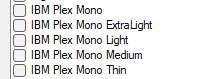
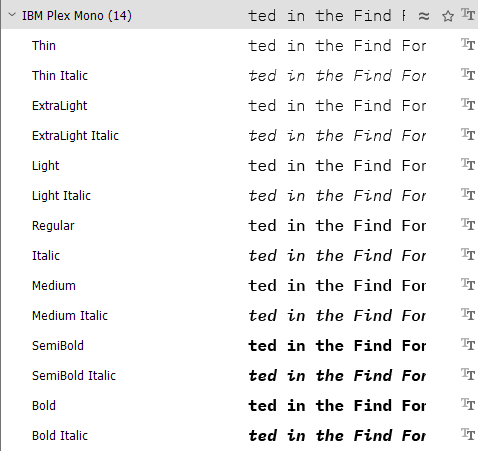
    • All 14 IBM Plex Mono that I imported files share the same internal family name (“IBM Plex Mono”), so Windows merges them into one family entry.

    • The Windows Fonts UI shows only the family and a few representative styles. It does not list every face even though all are installed.

    • Trados Studio’s font mapping is family-based, not face-aware.  So it would require an enhancement that could enumerate installed fonts via the full OpenType API instead of relying on Windows’ simplified family list that only displays this in Studio:
      A list of font styles under the IBM Plex Mono family, including ExtraLight, Light, Medium, and Thin.
    • InDesign, however, reads the full OpenType metadata directly (including usWeightClass and style records), so it correctly exposes all 14 faces such as Thin, Light, SemiBold, and their Italics.
      A detailed list of IBM Plex Mono font styles, showing 14 variations such as Thin, ExtraLight, Light, Regular, Medium, SemiBold, and Bold, with their italic counterparts.

    So in short... an enhancement would be needed for Studio to read full OpenType metadata and map family + style.

    Paul Filkin | RWS Group

    ________________________
    Design your own training!

    You've done the courses and still need to go a little further, or still not clear? 
    Tell us what you need in our Community Solutions Hub

    emoji


    Generated Image Alt-Text
    [edited by: RWS Community AI at 12:22 PM (GMT 1) on 21 Oct 2025]