"Update from bilingual review" not working (and driving me crazy)!

Hi guys,

OK, so this is driving me crazy. I am working on an app (https://supervertaler.com/ + https://github.com/michaelbeijer/Supervertaler) that imports bilingual files exported from various CAT tools, translates them, and export the bilingual file again so it can be re-imported into the person's CAT tool project.

CafeTran and memoQ bilingual files work flawlessly, but I am having serious trouble getting the Trados ones to be reimported back into my project (using: Update from bilingual review).

I know that these files are fragile, but is it still really this bad?

So far, there is no way I can get Supervertaler to generate a valid file that can be reimported. What's worse, even if I generate one of them, and then manually paste in the translations into the 4th column ("Target segment"), they still do not get reimported back into the project! A while ago, when I was struggling with the same problem, I remember a gotcha, but I can't seem to remember what it was.

A few questions:

  • Does track changes need to be switched on in these files? 
  • Do the tags need to be formatted exactly the same? My program does this.

 Anyway, any tips or suggestions would be most welcome!


Removed AI Suggestion
[edited by: Michael Beijer at 3:46 PM (GMT 0) on 4 Dec 2025]
emoji
Parents
  •   

    The main benefit of the Bilingual Word Review file was always that people who don't have a CAT tool and who are unable or unwilling to use one can still review the translation. If you are only using it for export/import, why not use the files that the very good app XLIFF Manager generates?

    emoji
  •       
    In my experience, this feature works very well and reliably.
    You don't need to make changes using Track Changes. Changes made without Track Changes are also imported. I haven't used this feature in a long time, but I checked it today (Trados Studio SR1 CU3) and can confirm that this is the case.

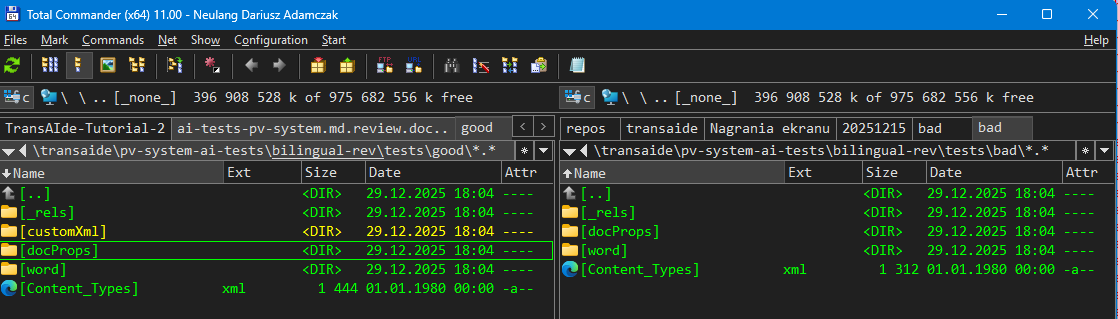
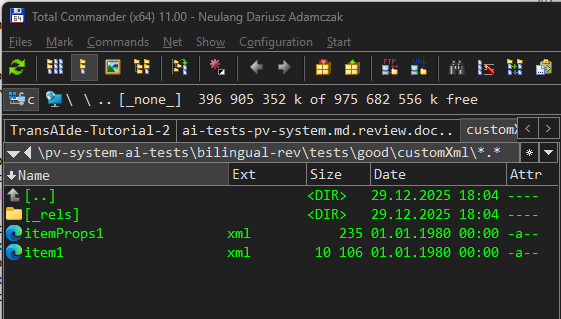
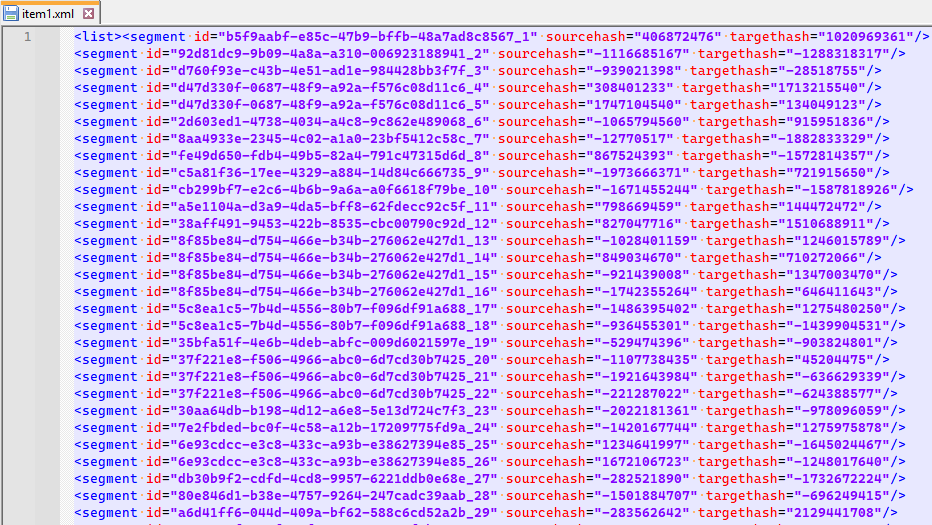
    Important: the file you use for the update must be the same file that was generated by Trados. Copying text/content from the original DOCX file to the new one does not work. This can be seen in the examples below. The original DOCX exported from Trados Studio has an additional CustomXml folder with an XML file that contains the identifiers and hashes of the source and target segments.

    And now everyone knows what problems can arise:
    - The SDLXLIFF file was changed in Trados Studio after the Bilingual Review file was generated (the hashes have changed, the update will fail)
    - The SDLXLIFF file has already been updated using the Bilingual Review file (the hashes have changed, the update can only be performed once)
    - etc.

    I have used Bilingual Update in a very unusual way many times. For example, I created the original bilingual review file in Trados, and then pasted the comparison of changes obtained from two different documents into the 4th column, and the function always worked. It is important to remember that:
    - You cannot make changes to the Trados Studio project in the meantime,
    - You must have the same DOCX file generated in Trados Studio with a list of segment IDs and hashes
    - The update can only be done once (because the hashes will change)

    Screenshot of Total Commander showing two panels comparing directories. The left panel displays a 'good' folder with subfolders '_rels', 'customXml', 'docProps', and 'word'.

    Screenshot of Total Commander showing the contents of the 'customXml' folder in the 'good' directory. It includes '_rels', 'itemProps1.xml', and 'item1.xml' files.

    Screenshot of an XML file named 'item1.xml' displaying a list of segments with attributes such as 'id', 'sourcehash', and 'targethash'.

    Dariusz Adamczak (Post-edit a CAT)

    emoji


    Generated Image Alt-Text
    [edited by: RWS Community AI at 5:42 PM (GMT 0) on 29 Dec 2025]
Reply
  •       
    In my experience, this feature works very well and reliably.
    You don't need to make changes using Track Changes. Changes made without Track Changes are also imported. I haven't used this feature in a long time, but I checked it today (Trados Studio SR1 CU3) and can confirm that this is the case.

    Important: the file you use for the update must be the same file that was generated by Trados. Copying text/content from the original DOCX file to the new one does not work. This can be seen in the examples below. The original DOCX exported from Trados Studio has an additional CustomXml folder with an XML file that contains the identifiers and hashes of the source and target segments.

    And now everyone knows what problems can arise:
    - The SDLXLIFF file was changed in Trados Studio after the Bilingual Review file was generated (the hashes have changed, the update will fail)
    - The SDLXLIFF file has already been updated using the Bilingual Review file (the hashes have changed, the update can only be performed once)
    - etc.

    I have used Bilingual Update in a very unusual way many times. For example, I created the original bilingual review file in Trados, and then pasted the comparison of changes obtained from two different documents into the 4th column, and the function always worked. It is important to remember that:
    - You cannot make changes to the Trados Studio project in the meantime,
    - You must have the same DOCX file generated in Trados Studio with a list of segment IDs and hashes
    - The update can only be done once (because the hashes will change)

    Screenshot of Total Commander showing two panels comparing directories. The left panel displays a 'good' folder with subfolders '_rels', 'customXml', 'docProps', and 'word'.

    Screenshot of Total Commander showing the contents of the 'customXml' folder in the 'good' directory. It includes '_rels', 'itemProps1.xml', and 'item1.xml' files.

    Screenshot of an XML file named 'item1.xml' displaying a list of segments with attributes such as 'id', 'sourcehash', and 'targethash'.

    Dariusz Adamczak (Post-edit a CAT)

    emoji


    Generated Image Alt-Text
    [edited by: RWS Community AI at 5:42 PM (GMT 0) on 29 Dec 2025]
Children
  • Thanks for all the info!

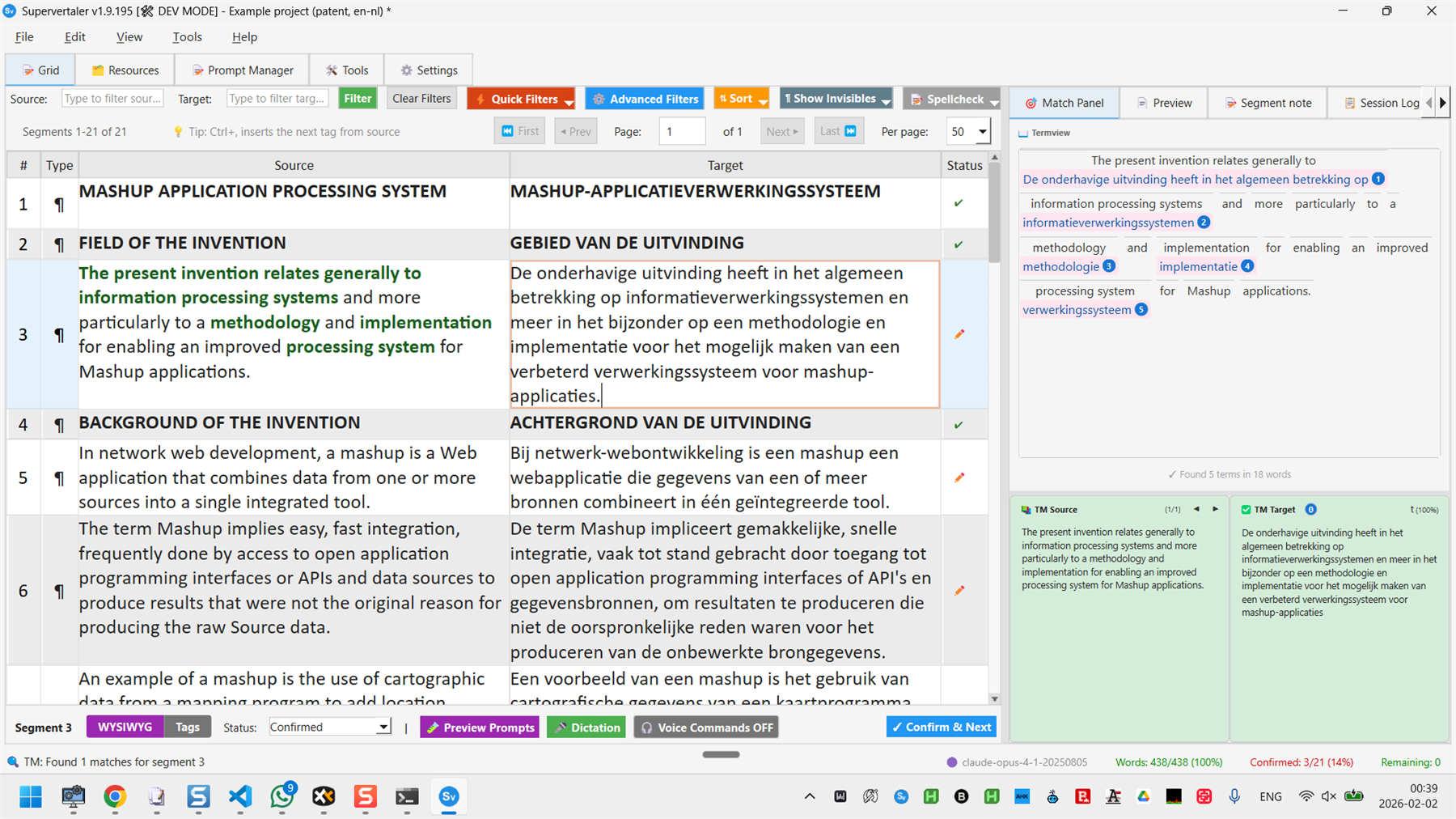
    By the way, Supervertaler can currently successfully import, translate, and export bilingual Trados review files! As long as the user follows a few rules, outlined in my screenshot above. It took a couple of iterations, but Claude Coe nailed it in the end.

    I have also nearly completed a functional Trados package import/exporter that exports Return Packages identical to those produced by Trados.

    See: https://supervertaler.com/changelog

    Screenshot of Supervertaler v1.9.195 interface showing a bilingual translation project. The source text discusses a methodology for processing systems, with corresponding target text in Dutch.

    PS: Supervertaler runs on Windows, macOS, and Linux and is completely free and open-source!

    emoji


    Generated Image Alt-Text
    [edited by: RWS Community AI at 4:16 PM (GMT 0) on 10 Feb 2026]
  •  

    I know these files may drive you crazy. So I have a method which works for me always, in case the import back is failing.

    My steps:

    • When the import of a bilingual review file fails, I store the revised file in a separate folder and keep it unchanged
    • Tracked changes do not really matter, if there are some in the revised file and you need to see them in Trados Studio, keep them. Otherwise you can also accept them in Word
    • Make sure there are no line breaks in the revised file. Should there be any, remove them
    • Delete the originally exported file for bilingual review
    • Export the sdlxliff file again
    • Open the newly exported file
    • Switch track changes off
    • Open the previously revised file
    • Switch track changes off
    • Remove the first row from the table there
    • Select the target column. The easiest way is to place the mouse cursor above the column. When it changes the shape clicking selects the whole column
    • Paste the copied content by clicking in the first text cell of the newly exported file in the target column
    • Save this file and try to import
    • This should work

    Otherwise TS might give you an error and point you to the row, where the error appears. Go to that column in the Word file and check, if there has been any tags. Most probably there were tags and the formatting of these tags has been applied to surrounding text or simply changed. If you, you need to recreate this cell using the revised content and the content from a newly exported file (you need to export it again for this).

    I know this is quite a big effort, but usually it works.

    The exported file may not be changed in formatting, especially you may not touch the first and second column. Only working in the target column is allowed.

    _________________________________________________________

    When asking for help here, please be as accurate as possible. Please always remember to give the exact version of product used and all possible error messages received. The better you describe your problem, the better help you will get.

    Want to learn more about Trados Studio? Visit the Community Hub. Have a good idea to make Trados Studio better? Publish it here.

    emoji