


Incomplete import into TM?

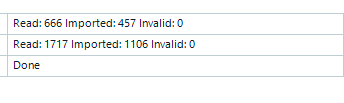
Screenshot showing Trados Studio import summary with 'Read: 666 Imported: 457 Invalid: 0' and 'Read: 1717 Imported: 1106 Invalid: 0' followed by 'Done'.

This screenshot was taken after I imported 2 sdlxliff files into an empty TM. How should this be interpreted? Why is the number of TUs imported not the same as the number of TUs read? If none are invalid, what happened to those that were read but not imported? How do I make all of the TUs go into the TM?

Many thanks in advance,

Charlotte


Removed AI Suggestion
[edited by: Charlotte Sjögren at 12:51 PM (GMT 0) on 9 Dec 2025]
emoji
  • Probability score: 0.8  

    Question improvement suggestion: Provide specific details about the version of Trados Studio you are using and any error messages encountered during the import process.  

    In the meantime, based on the information you have provided, here is a suggested answer to your question:  

    Hello Charlotte,  

    Thank you for your question regarding the import of SDLXLIFF files into your Translation Memory (TM). Here’s a step-by-step approach to help you understand the situation and resolve the issue:  

    **Step 1: Understand the Import Process**  

    When you import SDLXLIFF files into a TM, the number of Translation Units (TUs) read may differ from the number of TUs imported due to several factors, such as confirmation levels, invalid TUs, or existing TUs in the TM.  

    **Step 2: Check Confirmation Levels**  

    Ensure that the confirmation levels for the TUs you want to import are correctly set. If you have Draft TUs, make sure to select the appropriate confirmation level during the import process.  

    **Step 3: Review the Import Options**  

    During the import, check the options selected in the General Import Options window. If you have the option to "Export invalid translation units" selected, any TUs that do not meet the criteria will not be imported but saved to a TMX file.  

    **Step 4: Analyze the TMX File**  

    If you suspect that some TUs were not imported, you can open the TMX file in a text editor to check for any corrupt entries or missing target segments. Look for translation units that have source segments but no corresponding target segments, as these will be skipped during the import.  

    **Step 5: Clean Up the TMX File**  

    If you find any problematic entries, you can remove them from the TMX file. Make sure to delete entire translation units that are causing issues, and then save the file before attempting to import it again.  

    **Step 6: Re-import the TMX File**  

    After cleaning up the TMX file, try importing it again into your TM. Ensure that you select the correct TM and confirm that the language pairs match.  

    By following these steps, you should be able to identify why some TUs were not imported and ensure that all valid TUs are successfully added to your TM.  

    I hope this answer addressed your question. If not, please reject the answer, add the question improvement suggestion information, and click the RWS Community AI checkbox on the right to try again.  

    RWS Community AI

    emoji
  •  

    Did the AI answer your question?  It's set as the verified answer so just checking.

    It did mention this:

    When you import SDLXLIFF files into a TM, the number of Translation Units (TUs) read may differ from the number of TUs imported due to several factors, such as confirmation levels, invalid TUs, or existing TUs in the TM.  

    A more likely reason would be things like duplicate translation units, number only segments, segments that are the same apart from a variable that is in your settings etc.  An SDLTM doesn't retain every single TU that is imported unless they really are unique based on the way Trados works.  It shouldn't change the effectiveness as you'll still get everything translated.

    The downside of this approach is when you share a TMX based on a project with users working in other CAT tools that might need to have every TU.  They don't necessarily have the efficiency Trados Studio strives for built into their own tools so you might not get everything translated in their tools from the same TM.

    Paul Filkin | RWS Group

    ________________________
    Design your own training!

    You've done the courses and still need to go a little further, or still not clear? 
    Tell us what you need in our Community Solutions Hub

    emoji
  • Hi Paul,

    I didn't verify the AI answer so it must have done so itself:-) Sharing an xml with a colleague who's using a different tool was exactly what I was doing, and it seems he did not get my full translation from the import-export-import process. But as I understand your answer, this is simply a downside of using different tools, and there's no way around it?

    Kind regards,
    Charlotte

    emoji
  •  

    You could convert your sdlxliff files with this tool: https://appstore.rws.com/Plugin/113

    That doesn't use the APIs so you'll probably get a 1:2:1 conversion suitable for use in another tool.  Worth a try anyway.  I know 2024 isn't listed () but I doubt it makes any difference at all.  So download and install from the appstore as opposed to within the integrated appstore in Trados Studio (where you probably won't see it) and just give it a go.

    Paul Filkin | RWS Group

    ________________________
    Design your own training!

    You've done the courses and still need to go a little further, or still not clear? 
    Tell us what you need in our Community Solutions Hub

    emoji

