How to achieve document-level or project-level context for MT and AI

I am looking for a way to achieve at least document-level context for MT and AI. The current solution is to run an AI platform in parallel and copy/paste from Trados Studio to the AI platform. There, and agent is equipped with the entire document (and reference material, if there is). I then manually paste the response back into Studio. So far, so good, but this is painfully manual and very slow.

I'd like to be able to tell Studio's AI assistant:

“Include the preceding X segments (or paragraphs) in your request. With (or without) translation.”

“Include the succeeding X segments (or paragraphs) in your request. (With or without translation, for the sake of completion, although this will usually be without unless I am in the role of the reviewer.)

I created an idea for this, please support:  Context-awareness for AI Assistent 

For terminology, very, very important: Include such-and-such a field in your request. This is how I can tell AI not to use TB entries with the status “deprecated” or “superseded”. There is an idea for this already, please support:  OpenAI Provider for Trados Studio: option to include term information in system prompt 

A lot happened recently with the AI Assistant (user can modify the system prompt)! Thank you for that!


Removed AI Suggestion
[edited by: Daniel Hug at 10:17 AM (GMT 0) on 13 Dec 2025]

emoji
  • Hi Paul,

    Thanks for all the great information!

    As you might have guessed, Claude wrote most of the blurb for the new Okapi sidecar feature. Claude's first draft was even more enthusiastic, and I had to ask it to tone it down a bit. I think I will definitely need to temper its enthusiasm even more.

    In terms of how I use Supervertaler myself, unless the job involves a very simple Word docx, I almost always run the project through Trados or memoQ first, do the actual translation in Supervertaler (via SDXLIFF or memoQ bilingual docx), and then export back to Trados/memoQ to generate the final product.

    Ideally, I would love for Supervertaler to handle all kinds of complicated Word documents and other formats, but I know that probably won't happen. I don't have the knowledge, budget, or time to work with all the different file types that Trados and memoQ can handle.

    However, Supervertaler already offers things that Trados and MemoQ don't. One of these is to allow the AI to see the document as a whole, even images, and I find that if properly set up, I get a much better translation in Supervertaler than in Trados/memoQ.

    Another area where I vastly prefer Supervertaler is its terminology handling, which is as comfortable and powerful as CafeTran, or even memoQ, if memoQ weren't so damn slow these days.

    My love-hate relationship with Trados continues. Currently, one of my favourite setups is to do the actual translation in Supervertaler but start and end the project in Trados, mainly because the grid in Trados is so much faster than memoQ.

    Regarding my idea to launch an app on the RWS App Store, I have had several ideas.

    One of these is to make it easier for Trados users to quickly open their project in Supervertaler in order to translate it there and then send it back to Trados. Not that it's hard at the moment, since Supervertaler can open multiple SDXLIFF files in a single project and also handle Trados Studio packages.

    Another idea I had for an RWS app was to build something similar to the "RYSTUDIO Post-editing Package" (appstore.rws.com/.../135), which, in my view, is a vastly superior way to handle terminology in Trados or any CAT tool, for that matter. The interesting way it displays terms in the same format as the actual segment is so useful. This is why I built the same sort of thing in Supervertaler. Original versions of Supervertaler had a more memoq-based layout. However, even though I love using the "RYSTUDIO Post-editing Package" in Trados, I can hardly get it to work these days. It is always crashing, and I am always emailing its developer, who often takes weeks to respond, and even then I often can't get it to work properly.

    ---

    Anyway, thanks again for your detailed response! I will look at all the links you mentioned.

    I find myself in the rather odd position of having developed a fairly complicated CAT tool without any actual coding experience. Claude Code has allowed me to effectively manage a software development project, without actually understanding how the underlying code works. Also, since I am usually supposed to translate to make some actual money, I don't have much time to learn the nuts and bolts of programming.

    Michael

    emoji
  •   

    I find myself in the rather odd position of having developed a fairly complicated CAT tool without any actual coding experience. Claude Code has allowed me to effectively manage a software development project, without actually understanding how the underlying code works.

    You're surely not the only one!  I find I can build an application, or a Python or Powershell script, to solve a problem faster than I could set up a spreadsheet!  Once you can understand the basics of Visual Studio, Visual Studio Code, or even Android Studio (I built two apps to do things my wife wanted on her Pixel phone), using AI as just another tool to solve a problem is almost childs play.  One of our developers used to say to me that coding is like lego for adults... today it really is!

    Doing this for your own purposes is fantastic and fun.  But it's not quite the same for production tools sold to thousands of people that deliver massive amounts of capabilities, all built by teams of developers working together.  Worth remembering that, and especially remember that these teams did all this before they had AI in the first place!  Every day I marvel at how clever they must be!!

    Paul Filkin | RWS

    Design your own training!
    You've done the courses and still need to go a little further, or still not clear? 
    Tell us what you need in our Community Solutions Hub

    emoji
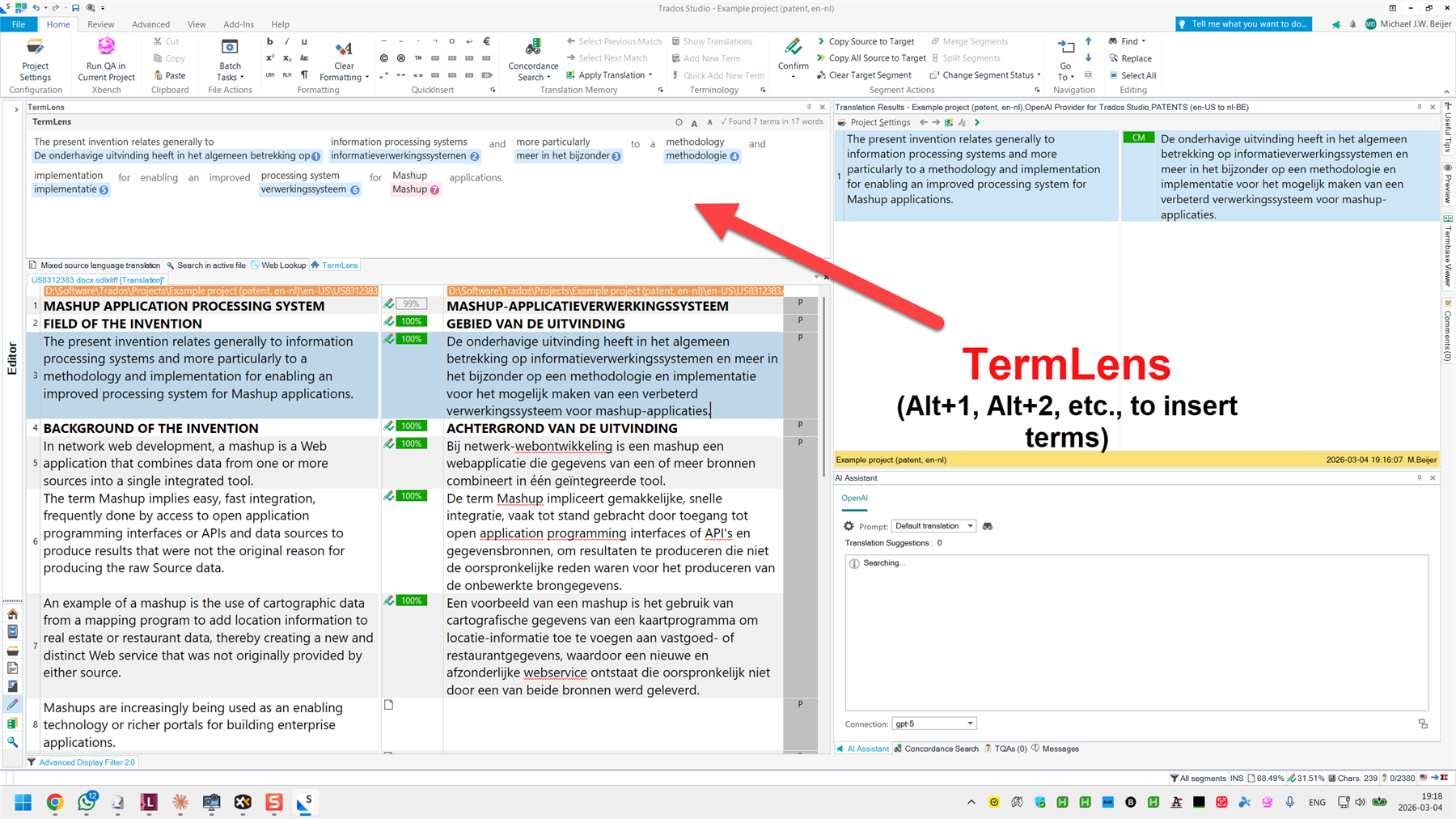
  • OK, this is pretty crazy. The basics are done, and work!

    See: https://github.com/michaelbeijer/TermLens

    Trados Studio interface showing TermLens with a red arrow pointing to the term insertion feature and text explaining Alt+1, Alt+2, etc., to insert terms.

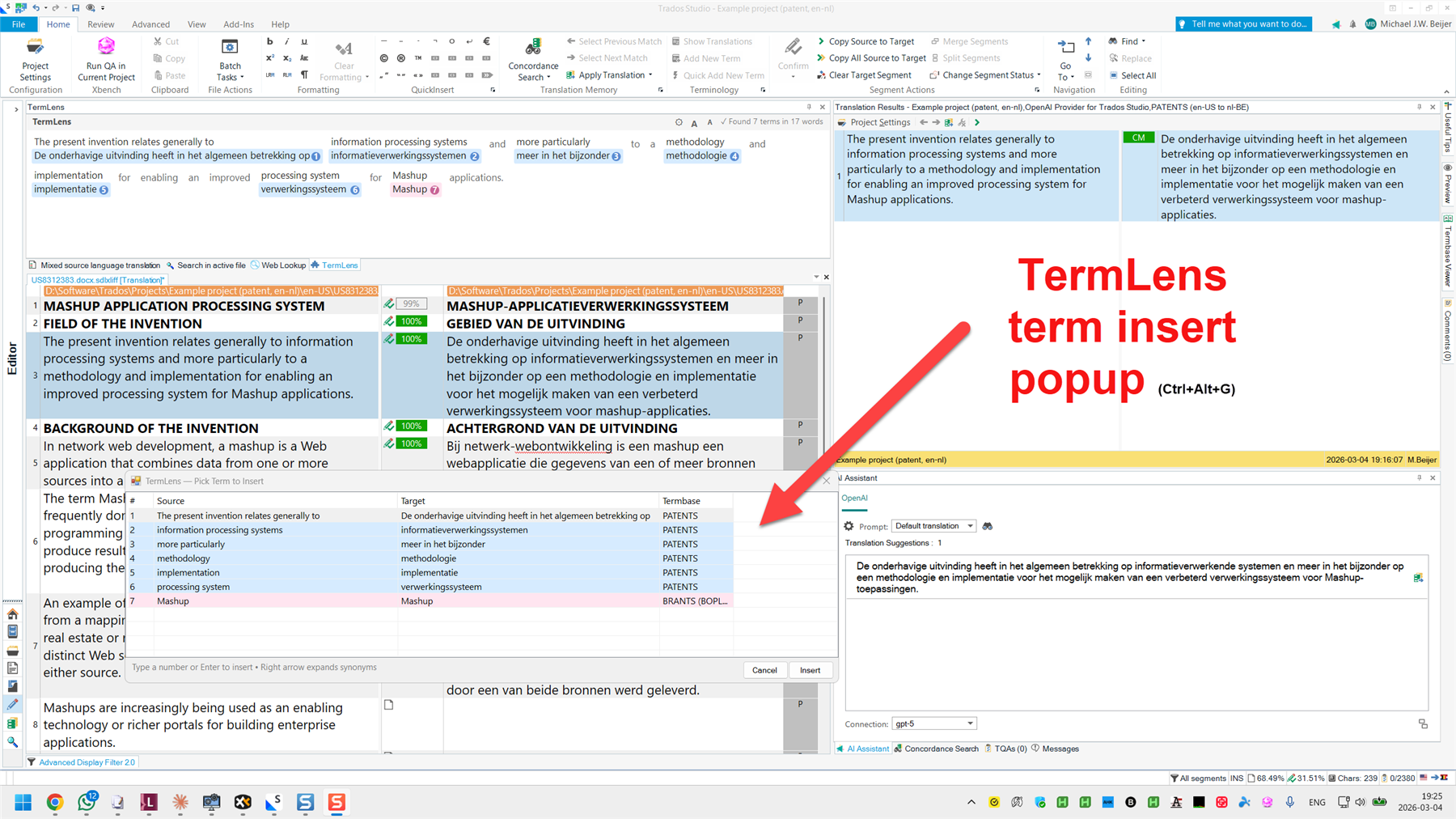
    Trados Studio interface with TermLens term insert popup highlighted by a red arrow, showing source and target terms with Ctrl+Alt+G shortcut for term insertion.

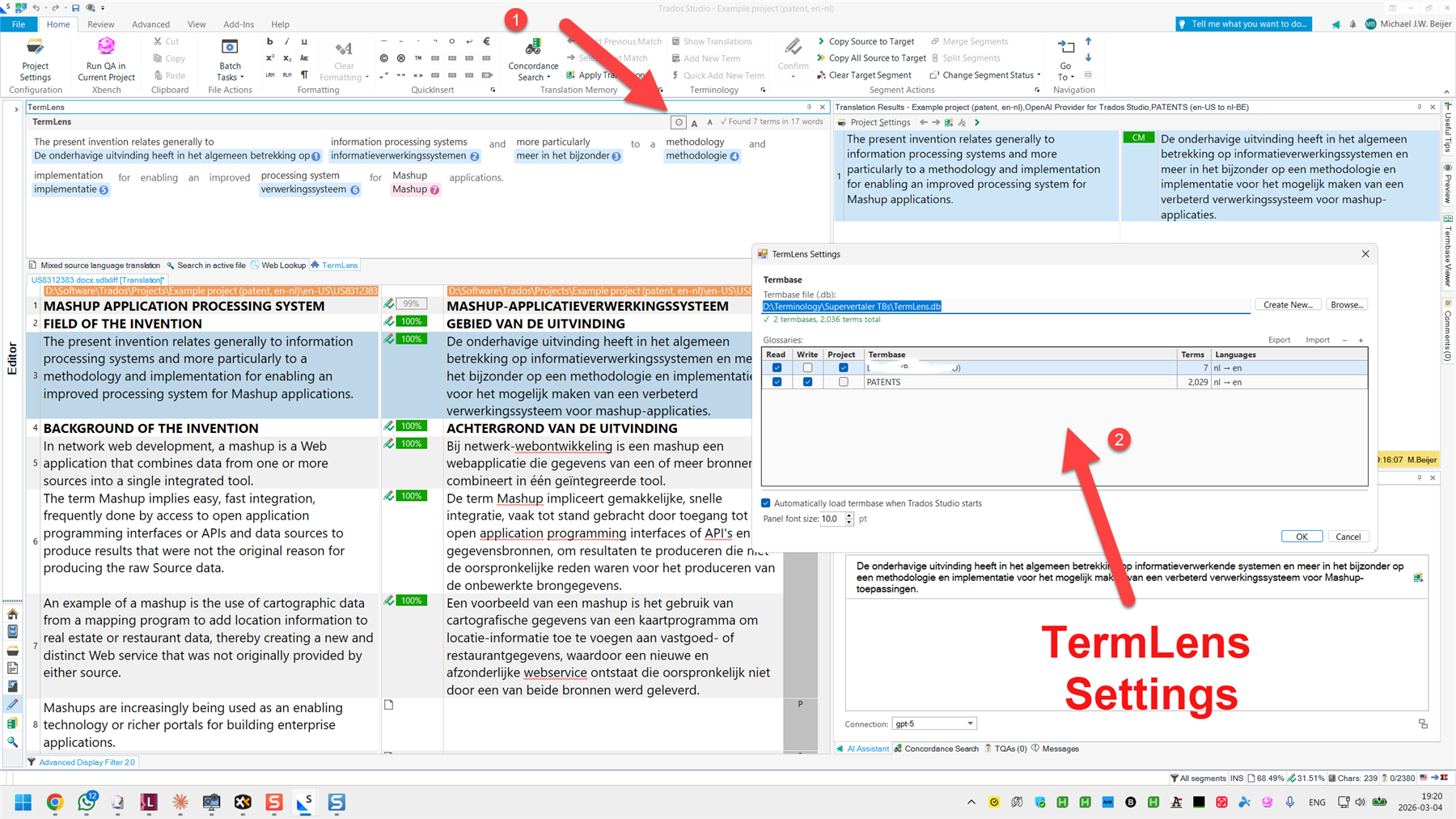
    Trados Studio interface with TermLens settings window highlighted by a red arrow, showing termbase details and language pairs.

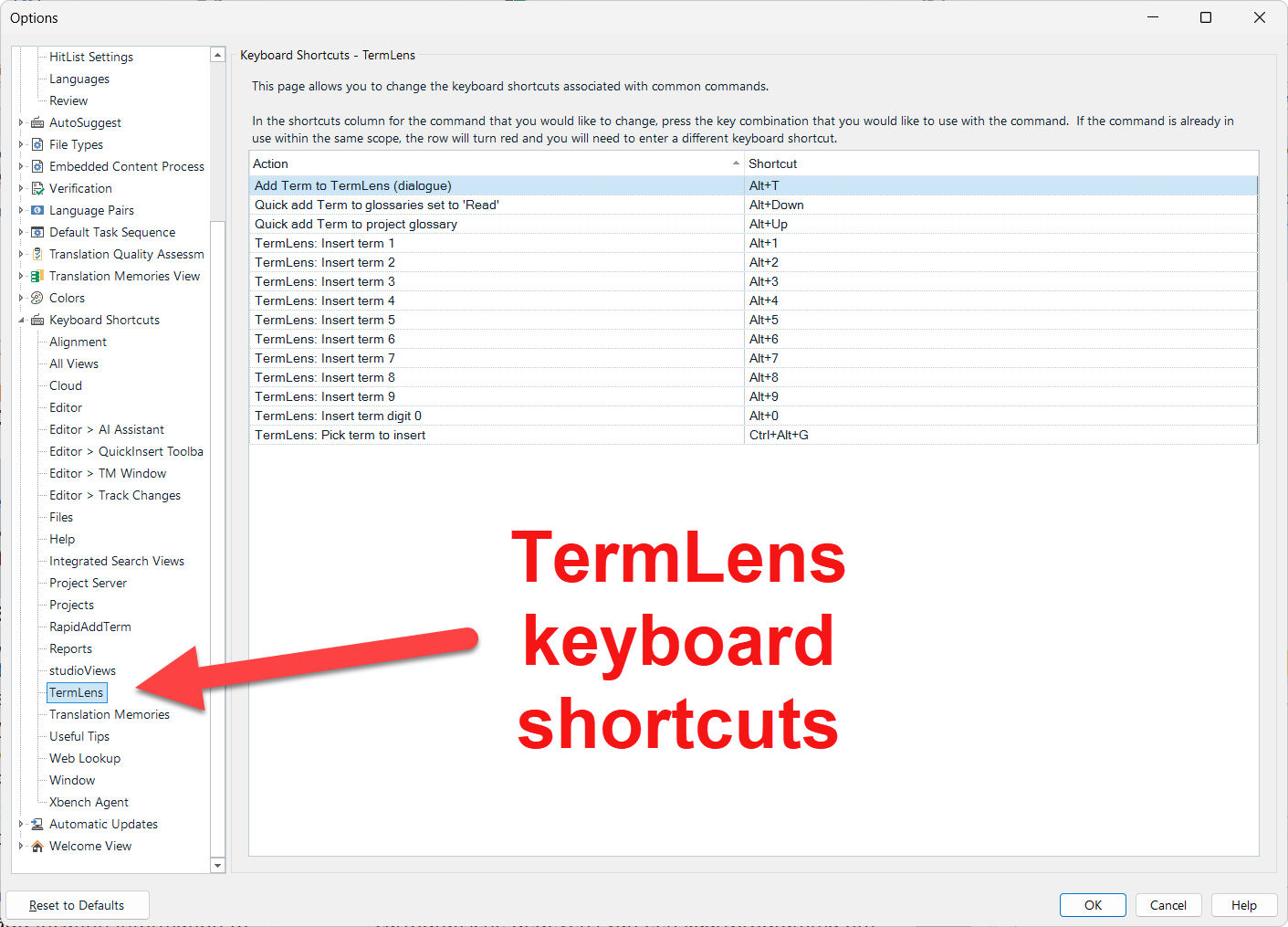
    Trados Studio options window showing TermLens keyboard shortcuts, with a red arrow pointing to the TermLens section and shortcut keys for term insertion.

    emoji


    Generated Image Alt-Text
    [edited by: RWS Community AI at 7:37 PM (GMT 0) on 4 Mar 2026]
  •  

    Impressive progress! If you want to publish it on the appstore drop an email to app-signing@rws.com and the team there can help you with that. It's free.

    Paul Filkin | RWS

    Design your own training!
    You've done the courses and still need to go a little further, or still not clear? 
    Tell us what you need in our Community Solutions Hub

    emoji
  • Thanks, Paul, I will definitely be sticking it on the RWS Appstore when it's ready! 

    I know I like to complain about Trados, but having an app store like this really is cool. 

    emoji
  •  

    I know I like to complain about Trados, but having an app store like this really is cool. 

    Indeed it is... and you're only scratching the surface of the iceberg!

    Paul Filkin | RWS

    Design your own training!
    You've done the courses and still need to go a little further, or still not clear? 
    Tell us what you need in our Community Solutions Hub

    emoji