Is it possible to create a project template after the fact (i.e.) from a project settings?

Hi everybody,

Studio allows to create a project template at the last step of the project wizard:
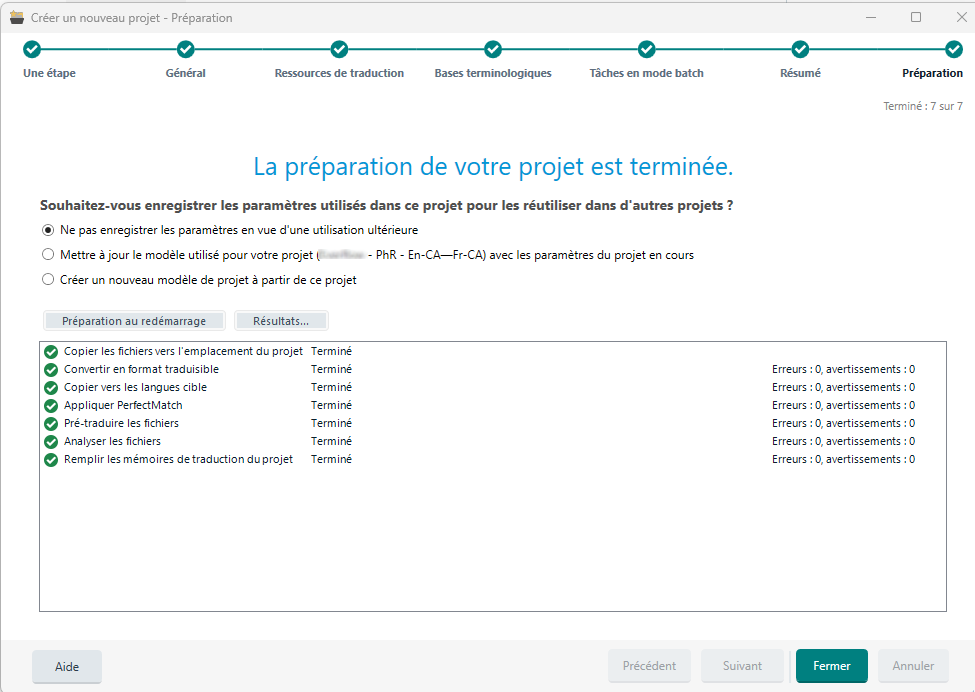
Trados Studio project wizard showing the final step with options to save project settings for reuse, a progress summary, and no errors or warnings displayed.

But it can happen we need to change some project settings (e.g., some verifier settings) in the course of a translation.

Is it then possible to create a template or update the existing template from the project settings after the fact, to keep the changes for future projects?

Thanks in advance


Removed AI Suggestion
[edited by: Philippe Riondel at 5:11 PM (GMT 0) on 20 Jan 2026]

emoji
Parents
  • Probability score: 0.8  

    Question improvement suggestion: Provide specific details about the project settings you wish to change and clarify if you want to create a new template or update an existing one.  

    In the meantime, based on the information you have provided, here is a suggested answer to your question:  

    Hello!  

    Yes, it is indeed possible to create a project template from an existing project in Trados Studio after the fact. Here’s how you can do it step-by-step:

    **Step 1:** Open the project for which you want to create or update a template.

    **Step 2:** Once you have made the necessary changes to the project settings (like verifier settings), go to the Projects view.

    **Step 3:** Right-click on the project you want to base the template on.

    **Step 4:** Select "Create Project Template" from the context menu. This will allow you to save the current settings as a new template.

    **Step 5:** If you want to update an existing template instead, you can do this by selecting the project and then choosing the option to update the template during the project creation process. You will have the opportunity to select the template you want to update with the new settings.

    **Step 6:** Follow the prompts to save the template with a specific name or overwrite the existing one.

    By following these steps, you can ensure that your updated settings are saved for future projects, making your workflow more efficient.  

    I hope this answer addressed your question. If not, please reject the answer, add the question improvement suggestion information, and click the RWS Community AI checkbox on the right to try again.  

    RWS Community AI

    emoji
  • Thank you, I've got my answer:

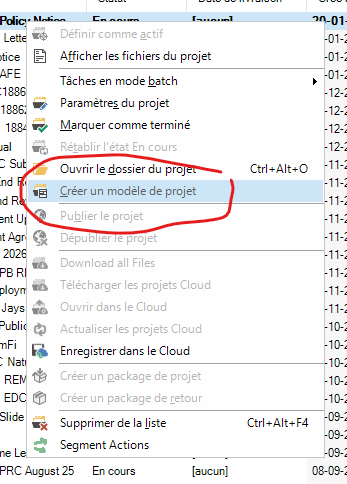
    Screenshot of a dropdown menu in Trados Studio with the 'Publier le projet' option circled in red.

    emoji


    Generated Image Alt-Text
    [edited by: RWS Community AI at 5:13 PM (GMT 0) on 20 Jan 2026]
  • Bonsoir  ,

    Vous n'avez pas besoin d'une liste énorme de templates, par ex. un template par client régulier, car au tout début du processus de création d''un nouveau projet, on vous propose de créer celui-ci sur la base d'un template enregistré... ou sur le modèle d'un projet antérieur. Vous pouvez donc créer le projet n+1 pour le client X sur le modèle du projet n dudit client X, ou sur le modèle du projet p d'un client Y proposant des traductions similaires, par exemple dans le même domaine. Et si, pendant l'exécution du projet n+1, vous décidez de changer quelque paramètre, quand vous recevrez la demande de traduction n+2 du Client X, vous créerez ce nouveau projet sur le  modèle du projet n+1.

    Si je n'ai pas été clair, n'hésitez pas à me recontacter par ce canal.

    Cordialement.

    Gérard

    emoji
  • Bonjour et merci Gérard,

    Je maîtrise bien les processus habituels de création des templates lorsque je crée un projet (ça ne demande pas d'avoir fait Polytechnique), y compris en partant d'un template existant. Je ne réinvente pas la roue à chaque fois, et je pars souvent du template existant pour un client pour en créer un nouveau pour un autre client.

    Mais cela oblige parfois à penser à ses paramètres au moment de la création, alors que l'on n'est pas entré dans le projet. Ce que je voulais, c'était pouvoir créer un nouveau template ou modifier le template en cours dans le cas où je modifie des paramètres en cours de traduction. :-)

    J'ai effectivement en principe un template par client, voire plusieurs pour des clients qui me confient des mandats de natures différentes (ce qui peut nécessiter, entre autres, des mémoires différentes).

    Cordialement

    emoji
Reply
  • Bonjour et merci Gérard,

    Je maîtrise bien les processus habituels de création des templates lorsque je crée un projet (ça ne demande pas d'avoir fait Polytechnique), y compris en partant d'un template existant. Je ne réinvente pas la roue à chaque fois, et je pars souvent du template existant pour un client pour en créer un nouveau pour un autre client.

    Mais cela oblige parfois à penser à ses paramètres au moment de la création, alors que l'on n'est pas entré dans le projet. Ce que je voulais, c'était pouvoir créer un nouveau template ou modifier le template en cours dans le cas où je modifie des paramètres en cours de traduction. :-)

    J'ai effectivement en principe un template par client, voire plusieurs pour des clients qui me confient des mandats de natures différentes (ce qui peut nécessiter, entre autres, des mémoires différentes).

    Cordialement

    emoji
Children
No Data