


SDL XLIFF validation error during the Finalize process

Hi Team, 

I am a Trados Studio 2022 user for KR > EN translation. 

I am experiencing failure during the file export process with SDL XLIFF validation error as shown below. 
It looks like it has a structural issue and I tried to figure out the problematic segments in the Edit window without any success. 

Please let me know what I have to do to fix this issue. FYI, I tried it on Trados Studio 2024 creating a new project with the same TM, but it still happens.

I can send you the report if necessary. 
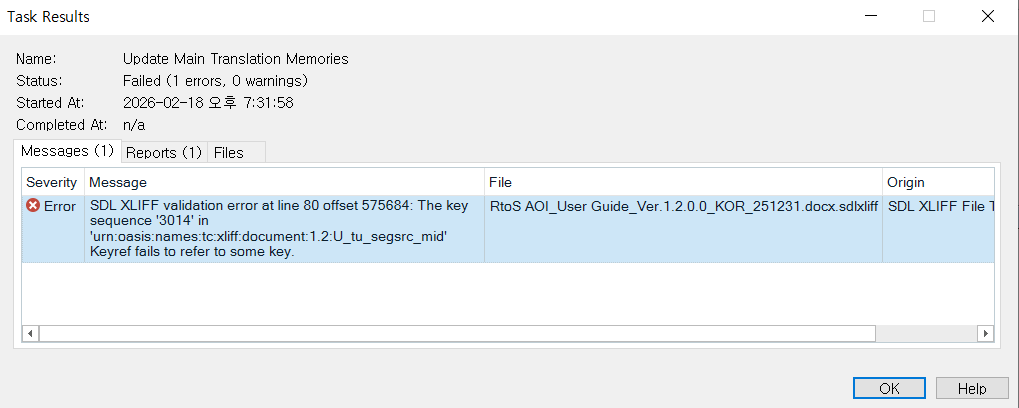
Task Results window showing an error for SDL XLIFF validation at line 80, offset 575684. The error message indicates a key sequence '3014' fails to refer to some key in the file.

Thank you for your help. 


Removed AI Suggestion
[edited by: Daewon Shin at 10:42 AM (GMT 0) on 18 Feb 2026]
emoji
Parents
  • Hi 

    The error message "SDL XLIFF validation error at line 80" in Trados Studio typically indicates a problem with the SDLXLIFF file. This error can arise from various reasons, including:


    Merging segments: If segments are merged across paragraph breaks, it can lead to validation errors. This is a common cause of the error message.

    File corruption: The error may also occur if the SDLXLIFF file is corrupted, possibly due to improper saving or closing of the file.

    File format issues: If the file is not in the correct format or has inconsistencies, it can cause validation errors.

    To resolve this error, you can try the following steps:


    1. Check for merging segments: Ensure that segments are not merged across paragraph breaks.

    2. Repair the file: Use the Repair File function in Microsoft Word or another compatible application to fix any potential issues with the file or follow these steps Trados Studio - How to troubleshoot problematic files

    3. Validate the file: Open the file in its native application and check for any inconsistencies or error messages.


    If the error persists, consider recreating the file or project to ensure that the translation memory is updated correctly.

    Hope this helps.

    Kind regards,

    Ana Sabo | RWS Group

    ___________________
    Design your own training!

    You've done the courses and still need to go a little further, or still not clear? 
    Tell us what you need in our Community Solutions Hub

    emoji
Reply
  • Hi 

    The error message "SDL XLIFF validation error at line 80" in Trados Studio typically indicates a problem with the SDLXLIFF file. This error can arise from various reasons, including:


    Merging segments: If segments are merged across paragraph breaks, it can lead to validation errors. This is a common cause of the error message.

    File corruption: The error may also occur if the SDLXLIFF file is corrupted, possibly due to improper saving or closing of the file.

    File format issues: If the file is not in the correct format or has inconsistencies, it can cause validation errors.

    To resolve this error, you can try the following steps:


    1. Check for merging segments: Ensure that segments are not merged across paragraph breaks.

    2. Repair the file: Use the Repair File function in Microsoft Word or another compatible application to fix any potential issues with the file or follow these steps Trados Studio - How to troubleshoot problematic files

    3. Validate the file: Open the file in its native application and check for any inconsistencies or error messages.


    If the error persists, consider recreating the file or project to ensure that the translation memory is updated correctly.

    Hope this helps.

    Kind regards,

    Ana Sabo | RWS Group

    ___________________
    Design your own training!

    You've done the courses and still need to go a little further, or still not clear? 
    Tell us what you need in our Community Solutions Hub

    emoji
Children
No Data
