How to detect inconsistency in segment end-space between source and target using QA?

The client wants to preserve end-space of the segment (after a text or after any punctuation, or tag) in the target if it is present in the source or remove it if it is not present in the source.

I can't find QA option that would notify about end-spacing inconsistencies between source and target. How do I set it up?


Removed AI Suggestion
[edited by: Vilius Butiskis at 5:51 AM (GMT 0) on 19 Mar 2026]

emoji
Parents
  •  

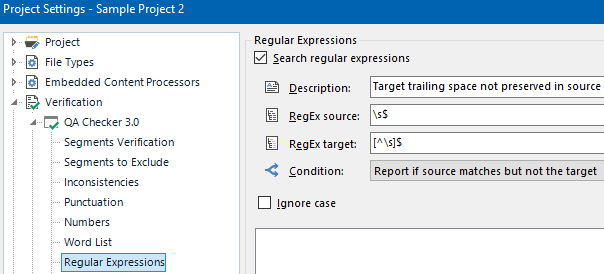
    Go to your Project Settings > Verification > QA Checker 3.0 > Regular Expressions, ensure that Search regular expressions is checked and add the following rule:

    • Description: Target trailing space not preserved in source (for example)
    • RegEx source:\s$
    • RegEx target:[^\s]$
    • Condition: Report if source matches but not the target

    Regex rule: Target trailing space not preserved in source

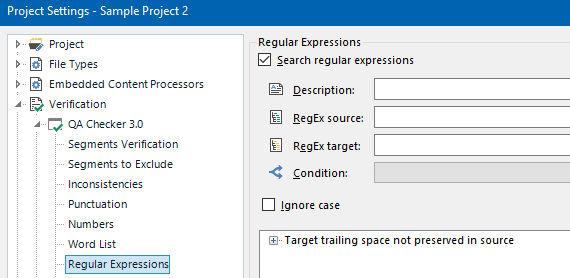
    Add it with the Action button on the right and save it with the OK button below.

    Regex rule added

    Now every time you confirm a segment, Trados Studio will verify that the segment complies with that regex rule. Or you can press the F8 shorcut to verify all the segments opened in Editor. You can add as many rules as you wish.

    One caveat though: I believe that trailing spaces are not saved to the TM, so you may get matches from the TM without the trailing space.

    emoji
Reply
  •  

    Go to your Project Settings > Verification > QA Checker 3.0 > Regular Expressions, ensure that Search regular expressions is checked and add the following rule:

    • Description: Target trailing space not preserved in source (for example)
    • RegEx source:\s$
    • RegEx target:[^\s]$
    • Condition: Report if source matches but not the target

    Regex rule: Target trailing space not preserved in source

    Add it with the Action button on the right and save it with the OK button below.

    Regex rule added

    Now every time you confirm a segment, Trados Studio will verify that the segment complies with that regex rule. Or you can press the F8 shorcut to verify all the segments opened in Editor. You can add as many rules as you wish.

    One caveat though: I believe that trailing spaces are not saved to the TM, so you may get matches from the TM without the trailing space.

    emoji
Children