 Translate



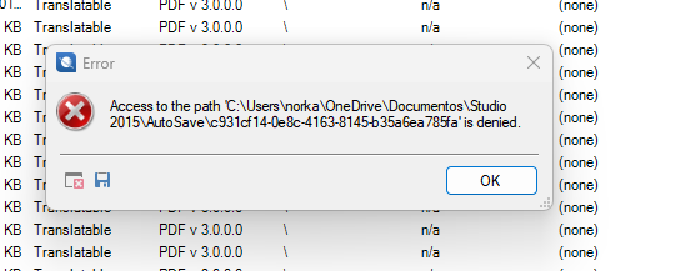
Everytime I try to save the work I receive this error, can you help me?
Thanks,
Norka F.
Removed AI Suggestion
[edited by: Norka Ferreira at 8:29 PM (GMT 1) on 29 Apr 2026]


Everytime I try to save the work I receive this error, can you help me?
Thanks,
Norka F.
Hi Norka Ferreira,
Use of the synchronization with OneDrive or Google drive may cause issues with Trados.
We advise that synchronization with OneDrive to be paused while Trados Studio is in use, or all Studio-related information should be saved in a location not synchronized with OneDrive. Or OneDrive can be disabled altogether. For further information, please see: Turn off, disable, or uninstall OneDrive.
And here is an article about the error:
You are using a very old version of Trados, but if you follow the path indicated in the article, you can find the path for your edition of Trados.
As for activating Trados 2015, I have already emailed you from the chat about what to do, but I will write here as well.
If your computer has Windows 11, keep in mind please that Trados 2015 was not tested on it and we cannot guarantee it will work properly on it, Trados 2015 is no longer supported technically and by engineering since February 2019 so no tests were done for it after that date.
However, if you have Windows 11 try the following steps, this is a workaround for older versions of Trados which helps with using them on Win11:
In Windows search bar type "Device Manager" and open it and then go to: Network Adapters - Action - Add Legacy Hardware - Install the hardware that I manually select from a list - Network adapters - Choose a network adapter (Microsoft > Microsoft KM -Test).
Then try offline activation, you can see in this video how to do that: https://www.youtube.com/watch?v=xVQZyX3tbsg&list=PLeCTib6EEYZHfZBaRI2ZsRm3r8bKGq-Qz&index=4
Best regards,
Anca
Anca Stoian | RWS Group

Hi Norka Ferreira,
Use of the synchronization with OneDrive or Google drive may cause issues with Trados.
We advise that synchronization with OneDrive to be paused while Trados Studio is in use, or all Studio-related information should be saved in a location not synchronized with OneDrive. Or OneDrive can be disabled altogether. For further information, please see: Turn off, disable, or uninstall OneDrive.
And here is an article about the error:
You are using a very old version of Trados, but if you follow the path indicated in the article, you can find the path for your edition of Trados.
As for activating Trados 2015, I have already emailed you from the chat about what to do, but I will write here as well.
If your computer has Windows 11, keep in mind please that Trados 2015 was not tested on it and we cannot guarantee it will work properly on it, Trados 2015 is no longer supported technically and by engineering since February 2019 so no tests were done for it after that date.
However, if you have Windows 11 try the following steps, this is a workaround for older versions of Trados which helps with using them on Win11:
In Windows search bar type "Device Manager" and open it and then go to: Network Adapters - Action - Add Legacy Hardware - Install the hardware that I manually select from a list - Network adapters - Choose a network adapter (Microsoft > Microsoft KM -Test).
Then try offline activation, you can see in this video how to do that: https://www.youtube.com/watch?v=xVQZyX3tbsg&list=PLeCTib6EEYZHfZBaRI2ZsRm3r8bKGq-Qz&index=4
Best regards,
Anca
Anca Stoian | RWS Group
