 Translate



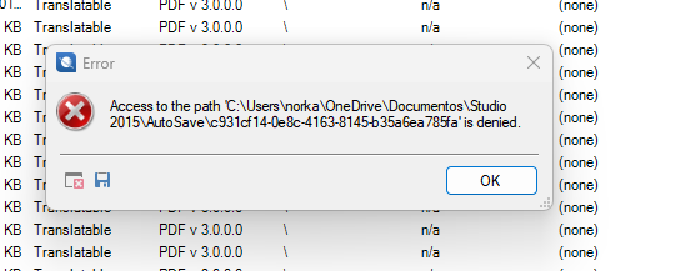
Everytime I try to save the work I receive this error, can you help me?
Thanks,
Norka F.
Removed AI Suggestion
[edited by: Norka Ferreira at 8:29 PM (GMT 1) on 29 Apr 2026]


Everytime I try to save the work I receive this error, can you help me?
Thanks,
Norka F.
Can you guys help me whit this. I lost all my document because of it. And nobody in trados is willing to help me. I stopped the sync with one drive, but it didn't work.

Hi Luz Doynel-Thompson ,
Please be more specific and provide more details about your issue.
I have already offered above what to do when one runs into an error because of OneDrive synchronization. I'll post again, in case you missed this information:
Use of the synchronization with OneDrive or Google drive may cause issues with Trados.
We advise that synchronization with OneDrive to be paused while Trados Studio is in use, or all Studio-related information should be saved in a location not synchronized with OneDrive. Or OneDrive can be disabled altogether. For further information, please see: Turn off, disable, or uninstall OneDrive.
And here is an article about the error:
The documents (files, projects, TMs) are not saved in Trados, Trados does not save any document in the software. The documents are saved where you selected them to be saved.
Normally Trados saves them locally, as default path, on Drive C in Windows, in Documents.
But, as mentioned above, OneDrive can cause issues while using Trados because OneDrive needs to connect to the internet constantly to update the files. Trados also has its own AutoUpdate and these two may not always be in synch. Therefore, it is advisable to either pause OneDrive when working in Trados or to move the files in a local folder that is not backed on OneDrive.
Best regards,
Anca
Anca Stoian | RWS Group

Hi Luz Doynel-Thompson ,
Please be more specific and provide more details about your issue.
I have already offered above what to do when one runs into an error because of OneDrive synchronization. I'll post again, in case you missed this information:
Use of the synchronization with OneDrive or Google drive may cause issues with Trados.
We advise that synchronization with OneDrive to be paused while Trados Studio is in use, or all Studio-related information should be saved in a location not synchronized with OneDrive. Or OneDrive can be disabled altogether. For further information, please see: Turn off, disable, or uninstall OneDrive.
And here is an article about the error:
The documents (files, projects, TMs) are not saved in Trados, Trados does not save any document in the software. The documents are saved where you selected them to be saved.
Normally Trados saves them locally, as default path, on Drive C in Windows, in Documents.
But, as mentioned above, OneDrive can cause issues while using Trados because OneDrive needs to connect to the internet constantly to update the files. Trados also has its own AutoUpdate and these two may not always be in synch. Therefore, it is advisable to either pause OneDrive when working in Trados or to move the files in a local folder that is not backed on OneDrive.
Best regards,
Anca
Anca Stoian | RWS Group
