Is it possible to choose another location of the "Studio 2015" folder than in the "Documents" folder?

I am about to install Studio 2015, and I am wondering if it is possible to choose another location of the "Studio 2015" folder than in the "Documents" folder?

More specifically, I might want to put it in my Dropbox folder for the purpose of automatic backup. I am also considering putting it on a different drive on my computer in order to be able to access it from outside of Windows (since I run Windows in a VirtualBox environment on a Linux computer).

Can this be done - perhaps during installation and setup? And if so, how?

Can it also be done later on?

Thanks in advance for any help!

Marie

Parents
  • Unknown said:
    I am about to install Studio 2015, and I am wondering if it is possible to choose another location of the "Studio 2015" folder than in the "Documents" folder?

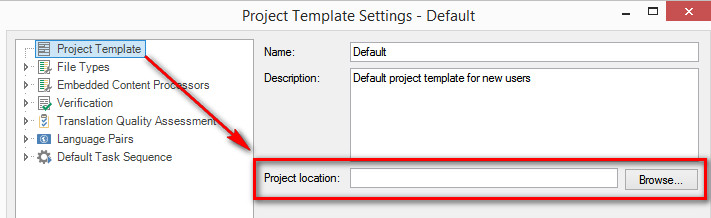
    Quite simply, yes you can.  Don't get into moving your documents folder... actually I don't think you suggested this in the first place.  Just decide where you want your folders to be and start using that location.  You can even set the preferred location in your project templates:

    You can do this at anytime.

    Regards

    Paul

    Paul Filkin | RWS

    Design your own training!
    You've done the courses and still need to go a little further, or still not clear? 
    Tell us what you need in our Community Solutions Hub

  • So the "Studio 2015" folder (with the "Projects" subfolder) is not created automatically when Studio is first installed? Because I am not only talking about putting the actual project files somewhere else. I want everything related to Studio (except for program files) moved out of the Documents folder if possible. Jerzy said that a few files must stay there. But you disagree?

    What is the problem with moving my Documents folder?
  • This folder is created with the first start of Studio...
    Please do yourself a favor and try to move a project and test it with Studio 2011. In that respect the behavior of both S2011 and S2015 is exactly the same.

    Re moving Documents folder: if you follow the instructions given in the article, the Documents folder will still be seen as system folder. More explanation is here www.windowscentral.com/how-manage-file-storage-windows-10

    _________________________________________________________

    When asking for help here, please be as accurate as possible. Please always remember to give the exact version of product used and all possible error messages received. The better you describe your problem, the better help you will get.

    Want to learn more about Trados Studio? Visit the Community Hub. Have a good idea to make Trados Studio better? Publish it here.

  • Unknown said:
    Jerzy said that a few files must stay there. But you disagree?

    I don't disagree.  This folder will be created and will always be there:

    c:\Users\[USERNAME]\Documents\Studio 2015\Projects\

    But this doesn't mean you have to put your projects in there if you don't want to.  I'd recommend you do because Studio works better when you let it do what it wants to, but using a different location or even multiple locations for your projects is not too hard to manage in Studio 2015.

    The projects.xml file will however always be in the Studio default folder here:

    c:\Users\[USERNAME]\Documents\Studio 2015\Projects\

    That's what Jerzy means.

    Unknown said:
    What is the problem with moving my Documents folder?

    No problem if you like to make work for yourself for no particularly good reason!  See the link from Jerzy.

    Paul

    Paul Filkin | RWS

    Design your own training!
    You've done the courses and still need to go a little further, or still not clear? 
    Tell us what you need in our Community Solutions Hub

  • Dear Jerzy, thank you, I will certainly do some experimenting in Studio 2011 first. It is great to know that I can expect the same behaviour from Studio 2015.
  • No problem if you like to make work for yourself for no particularly good reason!

    A very good reason - space on HDD. My main drive is a small SSD with 256 GB, where the whole OS and programs including the hidden restore partition are stored. So getting rid of Documents and Pictures from there and putting them to D (which is 2 TB) is really a good reason.

    _________________________________________________________

    When asking for help here, please be as accurate as possible. Please always remember to give the exact version of product used and all possible error messages received. The better you describe your problem, the better help you will get.

    Want to learn more about Trados Studio? Visit the Community Hub. Have a good idea to make Trados Studio better? Publish it here.

  • Dear Paul, thanks again. I think I understand your point now.

    It may seem like I have no particularly good reason for wanting to move the Documents folder, but I think I do, and I think this would in fact be the right solution for me. It will mean a little extra work here and now, but later on, this set-up will be very convenient for me.

    My reason for wanting to locate all my projects on a different drive is the fact that I run Studio on a virtual Windows machine inside a Linux machine, and it would be practical to be able to access all files - especially the final target files - without having to start Windows every time. Therefore, I want my project files in a shared folder that I can access both from both "machines". Such a shared folder can be created in Linux and would appear to Windows simply as a new drive. I already have many such shared folders, so the new "drive" would appear as drive M.

    So why do I want to move the entire Documents folder there, then, and not just my projects? You have mentioned the reason yourself: It would allow Studio to do what it wants to do and put everything in the Studio default folder. I would be fiddling as little as possible with the default file and folder structure by simply moving everything in one go.

    The only other change I will probably also make is creating per client sub-folders in the "Project" folder and placing my project folders there:
    M:\Documents\Studio 2015\Projects\Client1\Project1
    M:\Documents\Studio 2015\Projects\Client1\Project2
    M:\Documents\Studio 2015\Projects\Client2\Project1
    etc.

    Does it make sense now?
Reply
  • Dear Paul, thanks again. I think I understand your point now.

    It may seem like I have no particularly good reason for wanting to move the Documents folder, but I think I do, and I think this would in fact be the right solution for me. It will mean a little extra work here and now, but later on, this set-up will be very convenient for me.

    My reason for wanting to locate all my projects on a different drive is the fact that I run Studio on a virtual Windows machine inside a Linux machine, and it would be practical to be able to access all files - especially the final target files - without having to start Windows every time. Therefore, I want my project files in a shared folder that I can access both from both "machines". Such a shared folder can be created in Linux and would appear to Windows simply as a new drive. I already have many such shared folders, so the new "drive" would appear as drive M.

    So why do I want to move the entire Documents folder there, then, and not just my projects? You have mentioned the reason yourself: It would allow Studio to do what it wants to do and put everything in the Studio default folder. I would be fiddling as little as possible with the default file and folder structure by simply moving everything in one go.

    The only other change I will probably also make is creating per client sub-folders in the "Project" folder and placing my project folders there:
    M:\Documents\Studio 2015\Projects\Client1\Project1
    M:\Documents\Studio 2015\Projects\Client1\Project2
    M:\Documents\Studio 2015\Projects\Client2\Project1
    etc.

    Does it make sense now?
Children
No Data