


The Trados cloud platform will be undergoing maintenance on Saturday, 9th May 2026 between 05:00 to 17:00 UTC. During this time, you will not be able to log in to the Trados platform.

When in review mode, why is auto-propagation of status for unaltered accepted segments not active?

Former Member
Former Member

Today I got a set of 4 files, identical for about 90 %, for review. The LSP wanted me to use track changes.

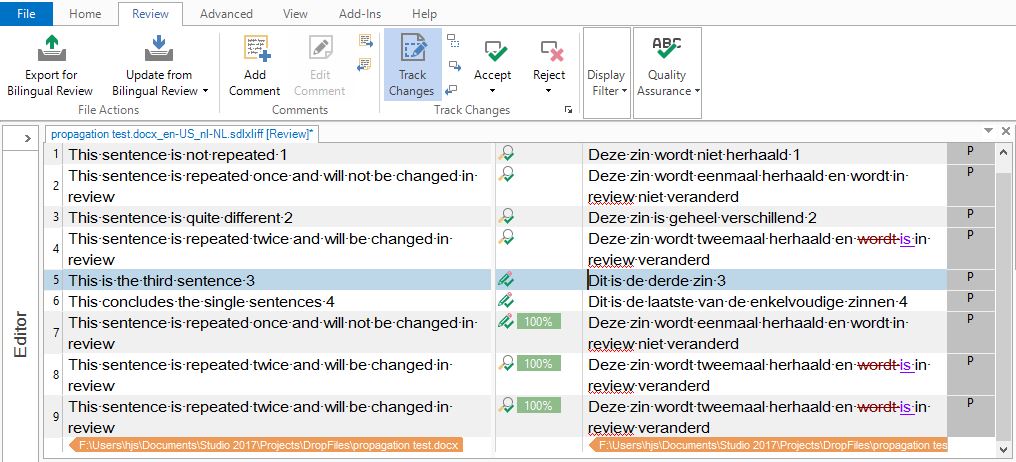
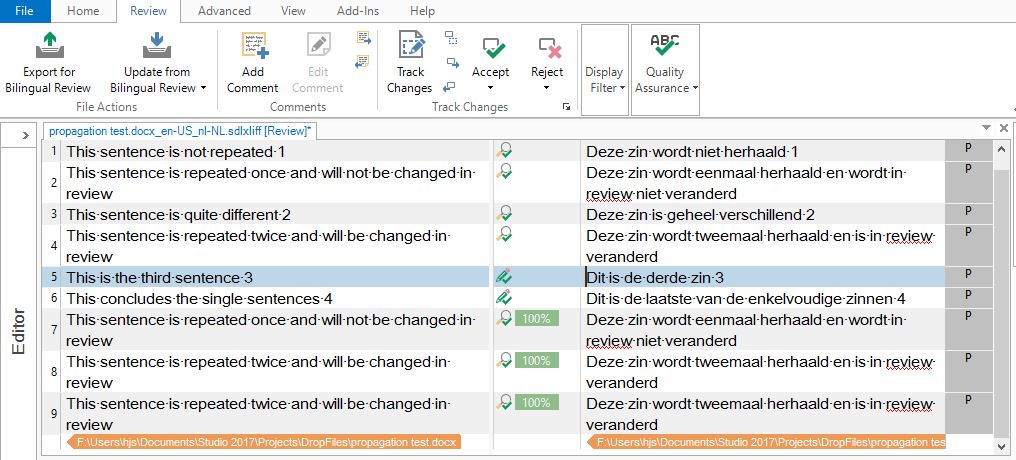
The problem is, when reviewing the file, and confirming most segments to Translation approved, that status is not propagated to all identical segments further on. Only segments that need a change and are then automatically approved by hitting Ctrl-Enter, have their status (together with the change) propagated.

So I end up with having to re-read and re-approve all unaltered repeated segments - quite a loss of productivity!

Strange enough, when Track changes is switched off (not the default for review) the behaviour is what I would expect - status change for unaltered segments IS propagated

Is there anything in my way of working or in the options settings that could change this behaviour?
Parents Reply
  • Former Member
    0 Former Member in reply to Nora Díaz
    Hi Nora,
    thanks for your suggestion. I am afraid however that the proposed procedure is quite error prone: too easy to forget switching on Track changes before an edit is made, and impossible(?) to find out later what changes have not been tracked. Moreover, it adds possibly quite some extra keystrokes/mouse movements and clicks and requires constant awareness of the tracking status of the tool while the attention should be on the translated text, not on the tool. The tool should be there to help the translator to do its job, not the other way around...
Children