


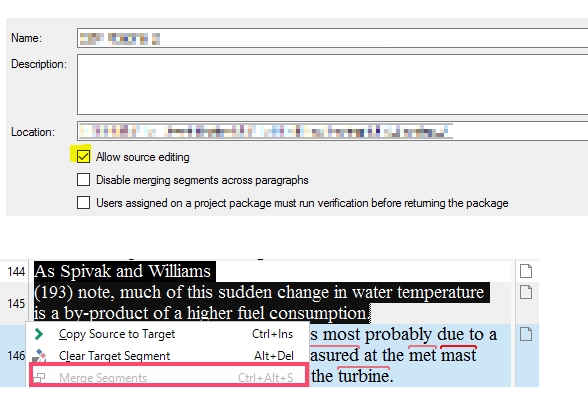
"Merge Segments" function does not work in my Studio 2017. It's always greyed-out

Former Member
Former Member

No matter what I'd do, I don't get "Merge Segments" to work. In the picture below, you can see I already check and uncheck all boxes as recommended in order for this feature to work. However, it DOES NOT work. What am I missing? Needless to say, I have created and recreated projects with this feature to no avail. Any advice? Thanks.
 

Parents Reply
  • Ali,

    Really appreciate the time you spent on this. The shortcut which appears is Ctrl+Alt+S, it is in the Keyboard shortcut, and I just verified that pressing these 3 keys together works to merge the segments.

    But what is maddening is that this feature appears to act randomly or at least it needs to be triggered a few times. I experimented several times with the same file (every time on a fresh copy) and Ctrl+Alt+S was greyed out, but after I went through the procedure (Allow Source edting etc.) a couple times, it worked. Also, it doesn't look you need to select the two consecutive segments, it's enough to select only the first of the two segments to merge. But not always.

    Overall, not a consistently reliable feature. You shouldn't need to spend a couple minutes with several tries to merge two segments.

    Thanks again for your insights

    Roberto
Children