Files order under a project

Hello,
Usually this is not a problem, but sometimes, when I add a file under a project, the files order just becomes alphabetical, whereas I want the files to be ranked by the date I added them under the project. I have tried by "Sort by", but there is no way I can sort by date... just other options like "due date", etc., but this is not helpful as I never add any due date to my projects.
How can I "reset" this? This used to be good, I must have clicked on a wrong button. I tried "reset window layout", but this doesn't change anything as this is used for something else I think.
As some of my projects include more than 100 files, it's making it difficult for me to find my files easily.
Thanks!

Parents Reply
  • Well, I believe you are just confusing us by confusing terminology...
    I believe that where you are saying "new files I added", it actually does NOT mean "files within a project", but rather "single document translation projects"... and that we are talking about list of projects, not about list of files... Am I correct?!

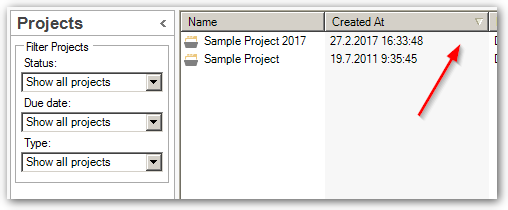
    If I am correct, then all you need to do is sort your list of projects by "Created At" and that's it - your new "files" will then be sorted as you want again...

    As Paul mentioned, files within a project were NEVER sorted by date they were added to project. So if you believe they were, it was just a pure coincidence - perhaps they were named in a way that they were always listed at the end of the - by default alphabetically ordered - list.

Children
No Data