Translate



①1つ目のファイルのときは下記の画面の中央部に「翻訳メモリと自動翻訳」が出て問題無かったです。翻訳作業が順調に目下進んでいます。
②2つ目のファイルの場合、下記画面(「翻訳メモリと自動翻訳」無し)が出ます:
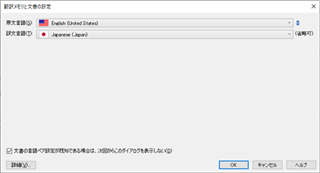
どうすればよろしいですか。また上記画面で「OK」をクリックしても何ら反応しません。
Generated Image Alt-Text
[edited by: Trados AI at 7:13 PM (GMT 0) on 28 Feb 2024]


①1つ目のファイルのときは下記の画面の中央部に「翻訳メモリと自動翻訳」が出て問題無かったです。翻訳作業が順調に目下進んでいます。
②2つ目のファイルの場合、下記画面(「翻訳メモリと自動翻訳」無し)が出ます:
どうすればよろしいですか。また上記画面で「OK」をクリックしても何ら反応しません。
土屋様
お世話になっています。
下記をインストールしましたが状況変わらずです。
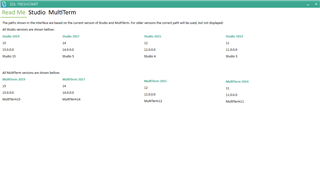
他に要因は無いでしょうか。
以上よろしくお願いします。
矢居

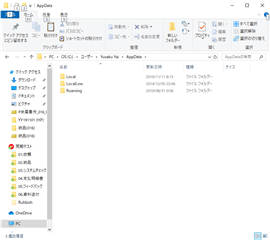
1.AppDataにて「14.0.0.0.old」に前回変更できました。「Remove Folders」とは『名前を変更したフォルダ(例えば先ほどの「14.0.0.0.old」を削除します。)』を意味しますか。いずれにせよ、本日段階では、上記画面です。つまり、AppDataには、フォルダ「Local」「LocalLow」「Roaming」しか存在しません。
2.「修理」は実施したつもりでいます。

1.AppDataにて「14.0.0.0.old」に前回変更できました。「Remove Folders」とは『名前を変更したフォルダ(例えば先ほどの「14.0.0.0.old」を削除します。)』を意味しますか。いずれにせよ、本日段階では、上記画面です。つまり、AppDataには、フォルダ「Local」「LocalLow」「Roaming」しか存在しません。
2.「修理」は実施したつもりでいます。
YY様
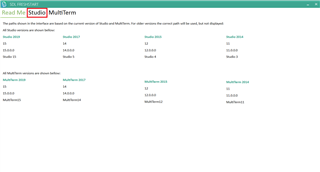
Freshstartインストール後、下記の操作を実行してください。
1. お使いのTrados Studio のバージョンを選択します(伺えておりませんが、おそらく2017かと存じます)。
2. [Select all]より、すべての項目にチェックを入れます。
3. [Remove folders]をクリックします。
4. [Repair Studio]をクリックします。
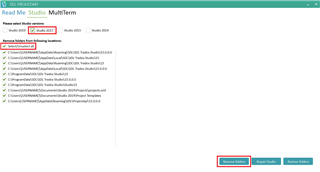
こちらで問題が解消いたしますかお試しください。
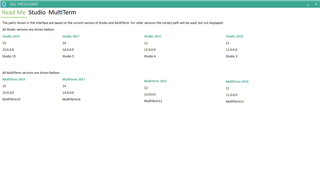
なお、手動でフォルダをリネームする場合、参照するパスに関しては下記のブログをお読みください。
SDL Trados Studio / MultiTerm Desktopのリセット
www.sdltrados.com/.../resetting_trados.html

土屋様
1.2017です。
2.アイコン「SDL Freshstart」をクリックしても上記画面が出るだけです。次に進めません。
3.[Select all]はどこにあるのですか。
矢居


Tsuchida様
「3. [Remove folders]をクリックします。」「4. [Repair Studio]をクリックします。」によって本問題は解決しました。
しかしながら:
1.これまでのデータが全て消去されました。これは望んでいたことではありません。とは言え、重要データは無かったのでとりあえず困りません。しかしながら、本問題の解決の作業中に、「データが全て消去」ではなく「データのバックアップ」はできないのですか。
2.上記「本問題は解決しました」は、一つ目の試しファイルのみです。2つ目のファイルにて試すと非表示問題が再発しました。
3.本メールでの質問も相当大変です。遠隔支援サービスはあったでしょうか。条件をご教示ください。
YY様
お試しいただきありがとうございます。
上記のリセット操作によって、ユーザーデータは影響を受けません。「データがすべて消去された」とは、「プロジェクト一覧」が空欄になったことを言われていますでしょうか。プロジェクトデータは作成いただいたフォルダに存在しているはずですので、ファイルエクスプローラよりご確認ください。
[プロジェクトを開く]より、プロジェクトを再度開くことができます。
2番目のファイルでも問題が発生したことから、デフォルトテンプレートが破損した可能性も考えられます。下記のフォルダのDefault.sdltplをDefault_old.sdltplとリネームし、Trados Studioを再起動の上、再度ご確認ください。
C:\Users\[USER NAME]\Documents\Studio 2017\Project Templates
まことにおそれいりますが、リモートアクセスによる支援は有償サポートサービスのメニューとなります。詳細に関しましては下記ページをご案内いたします。
https://www.sdltrados.com/jp/support/premium-support.html
内容をご検討いただければと存じます。どうぞよろしくお願いいたします。
別の質問です。
私の英語名がネットで検索できます。上記やり取りが公開されたら困ります。
1.公開されないようにしてもらえますか。
2.公開が不可避ならば名前を変更したいです。手順をご教示ください。
「SDL Trados Studio 2019 Freelance - リリース特別価格(3か月):61米ドル/43ポンド/50ユーロ/72カナダドル/7,000円」は2017にも当てはまる条件ですか。
まことにおそれいりますが、こちらは技術的な質問についてのフォーラムとなっておりますため、販売価格に関するお問い合わせは以下の販売窓口までお願いいたします。
tel: 03-5773-1471
email: sales-jp@sdl.com
ご理解のほどよろしくお願いいたします。