This discussion has been locked.
You can no longer post new replies to this discussion. If you have a question you can start a new discussion

Find / Replace not working - blank and unreachable window.

Hello.

When I click on Replace a blank window appears in the background instead of the Find/Replace window. It is unreachable. This issue was happenning on and off, but now the Find/Replace window is never accessible. 

I have reinstalled SDL Trados Studio and my version is 2019 SR2 - 15.2.0.1041 which I believe is up to date.

Please help.


[locked by: Steven Whale at 10:32 AM (GMT 0) on 13 Jan 2020]
Parents
  • Hello  ,

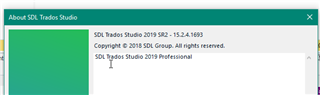
    The latest version of Studio is .1693, so you should have notifications to update (in the notifications' pane).

    About SDL Trados Studio dialog box showing version number 2019 - 15.2.4.1693 with no visible errors.

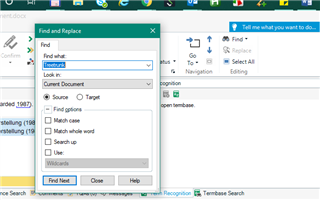
    If you are not seeing the Search and Replace...(I couldn't see this to start of with, as it was opening on another screen)

    Trados Studio Find and Replace window overlaid on Microsoft Word's Find feature, with no search term entered and no errors visible.

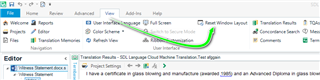
    Please try Reset Windows layout

    Trados Studio interface highlighting the 'Reset Window Layout' option in the View tab with no errors or warnings displayed.

    Oana Nagy | QA Engineer | RWS Group

    emoji


    Generated Image Alt-Text
    [edited by: Trados AI at 7:45 PM (GMT 0) on 28 Feb 2024]
  • Hi Steven,

    I am using Studio 2019 and I am having a similar problem to Alonso, which started after I had installed the most recent update.

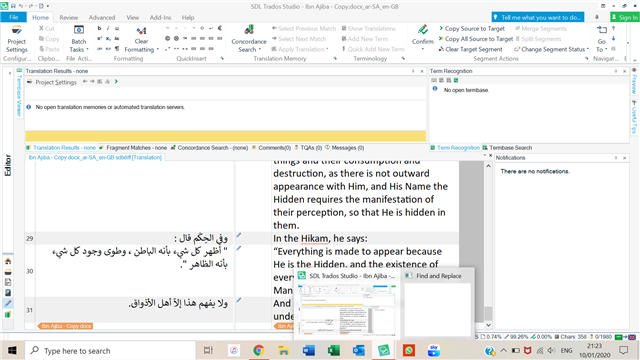
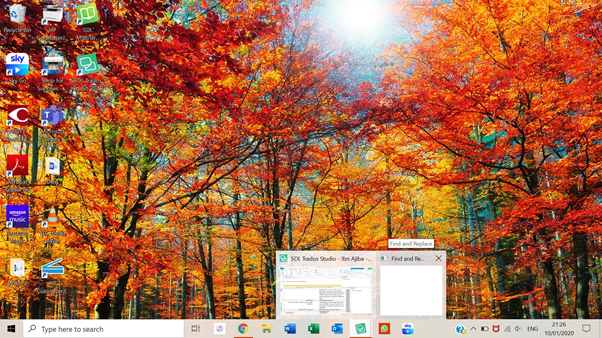
    I was using a second monitor with my laptop screen and had disconnected the external monitor at one point. Now, when I try to use Find and Replace, no window actually pops up; it is shown as a blank window in the taskbar, and when I hover the mouse over the blank window, it just brings up the desktop (images below). 

    Trados Studio application open with a project loaded, showing Arabic text in the translation grid. The Find and Replace window is not visible on the screen.  Desktop background with autumn trees, showing a blank Find and Replace window thumbnail in the taskbar without any visible content.

    I have tried:

    * Disconnecting and reconnecting the external display: the F&R window doesn't appear on the external display either, so I can't drag it across as Alonso was able to do.

    * Uninstalling and reinstalling Studio: I had installed update 15.2.5.2145 on the day that this problem started. Today I tried repairing Studio via the Control Panel, and I have also tried reinstalling it and the latest update. No change.

    Any suggestions?

    Kind regards,

    Rachel

    emoji


    Generated Image Alt-Text
    [edited by: Trados AI at 7:45 PM (GMT 0) on 28 Feb 2024]
Reply
  • Hi Steven,

    I am using Studio 2019 and I am having a similar problem to Alonso, which started after I had installed the most recent update.

    I was using a second monitor with my laptop screen and had disconnected the external monitor at one point. Now, when I try to use Find and Replace, no window actually pops up; it is shown as a blank window in the taskbar, and when I hover the mouse over the blank window, it just brings up the desktop (images below). 

    Trados Studio application open with a project loaded, showing Arabic text in the translation grid. The Find and Replace window is not visible on the screen.  Desktop background with autumn trees, showing a blank Find and Replace window thumbnail in the taskbar without any visible content.

    I have tried:

    * Disconnecting and reconnecting the external display: the F&R window doesn't appear on the external display either, so I can't drag it across as Alonso was able to do.

    * Uninstalling and reinstalling Studio: I had installed update 15.2.5.2145 on the day that this problem started. Today I tried repairing Studio via the Control Panel, and I have also tried reinstalling it and the latest update. No change.

    Any suggestions?

    Kind regards,

    Rachel

    emoji


    Generated Image Alt-Text
    [edited by: Trados AI at 7:45 PM (GMT 0) on 28 Feb 2024]
Children
No Data