cannot start my first translation, click on OK does not work

Hello, I've just purchased SDL Trados 2019. I am trying to translate my first document but I can't.

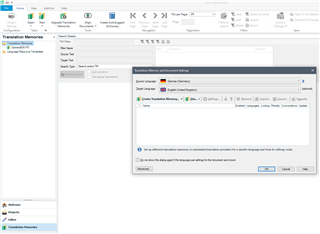
I open the software, I click File then Translate a single document, I choose a docx file, I choose the target language (French) and then when I click OK nothing happens (see attached file) and there is no error message or warning. If I click on Cancel I exit this window but my docx file is not opened, of course. Why the OK button does not work?Screenshot of SDL Trados Studio 2019 showing the 'Translate Single Document' dialog box with a selected DOCX file and target language set to French. The OK button is visible but not functioning.DOCX Thanks


Generated Image Alt-Text
[edited by: Trados AI at 9:21 PM (GMT 0) on 28 Feb 2024]
emoji
Parents
  • Hello @PascalGoux ,

    Thanks for the screenshot- these are always really useful.

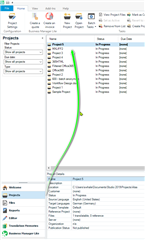
    The image is showing you are in the translation memories view- you need to click on Projects- then select the project you wish to open

    Screenshot of Trados Studio showing the Translation Memories view with an arrow pointing towards the Projects tab indicating where to click to select a project and open it in EDITOR mode.

    This will then open in EDITOR mode and you can begin translating.

    If you haven't already done so you can add the TM via the project settings.

    You might find this tutorial useful.

    https://www.youtube.com/watch?v=-QxkyjtP5zM

    Oana Nagy | QA Engineer | RWS Group

    emoji


    Generated Image Alt-Text
    [edited by: Trados AI at 9:22 PM (GMT 0) on 28 Feb 2024]
  • Hi , hi ,

    It is possible to translate a single file from any View, via File > Translate single document. The dialog opens successfully while the Translate single document Wizard opens, you then select the individual file and this is how it should then look:

    Trados Studio screenshot showing the Translate Single Document dialog with Translation Memory and Automated Translation providers listed.

    As you see, my screenshot contains a TM dialog window but Pascal's doesn't. Could this mean it has frozen before completing the content of the dialog...

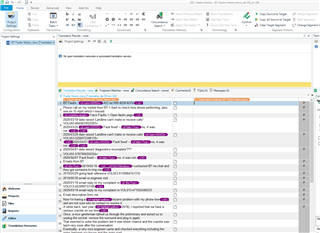
    Here, after I clicked OK, despite the TM View being active, the next action Studio performs is to successfully create an sdlxliff of the file and open it directly in the Editor mode:

    Trados Studio screenshot of the Editor mode with an open sdlxliff file displaying source and target segments for translation.

    However, it certainly might be a good way around Studio failing to open a single file to try setting up a project and opening that instead. Unless there's a problem with the file itself.

    If it's Studio at fault, a Windows Repair of Studio might be the answer?

    Windows Repair of Studio

    All the best,

    Ali

    emoji


    Generated Image Alt-Text
    [edited by: Trados AI at 9:22 PM (GMT 0) on 28 Feb 2024]
  • Thanks Steven and Ali,

    If I first click on Projects and try to open my single file to translate, I encounter the same problem.

    As Ali noticed, in my case, the Translate single document Wizard does NOT include the part with the TM.

    I have chosen my file to be translated BEFORE the Translate single document Wizard is displayed.

    I just went through the Repair option for Studio and this did not solve my problem.

    When I wrote that this was my first test of the software, it is not completely exact. Yesterday I briefly ‘played’ with the software, I created a project, managed to include a file and managed to start translating that Word file. But today I still can’t start the translation of a single document. Your further help will be appreciated.

Reply
  • Thanks Steven and Ali,

    If I first click on Projects and try to open my single file to translate, I encounter the same problem.

    As Ali noticed, in my case, the Translate single document Wizard does NOT include the part with the TM.

    I have chosen my file to be translated BEFORE the Translate single document Wizard is displayed.

    I just went through the Repair option for Studio and this did not solve my problem.

    When I wrote that this was my first test of the software, it is not completely exact. Yesterday I briefly ‘played’ with the software, I created a project, managed to include a file and managed to start translating that Word file. But today I still can’t start the translation of a single document. Your further help will be appreciated.

Children