No space inside Brakets or punctuation marks...

Guys, sorry for this ... I know this is a really MINOR thing BUT ...

Is it possible to set Studio so that it does NOT put a white space between punctuation marks, brakets&Co?

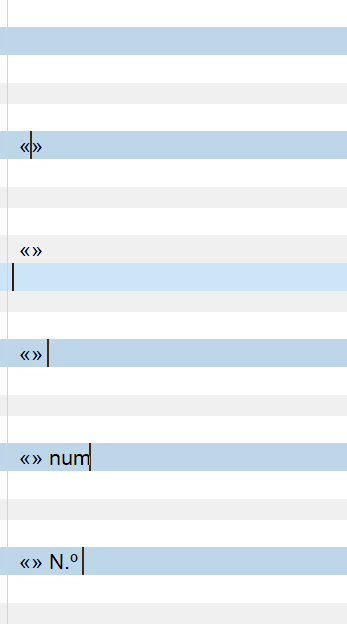
I do not know in english, but in Italian is it wrong to write " word " ... it should be "word". So «this one is correct» and «_this one is not_».

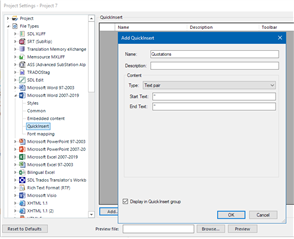
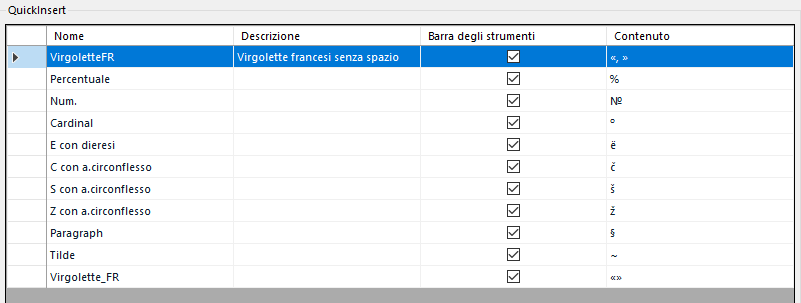
I use Quick insert quite a lot but every time I have to remove internal spaces
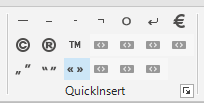
Screenshot of Trados Studio's QuickInsert feature showing various punctuation marks and symbols including quotation marks and brackets.

Text in Trados Studio showing Italian sentence with incorrect spacing around guillemets, 'La   pratica  non conferma'.

Can we set this somewhere in Studio and fix this little thing?


Many thanks.
Pietro


Generated Image Alt-Text
[edited by: Trados AI at 9:10 PM (GMT 0) on 28 Feb 2024]

emoji
Parents Reply
  • Hi Pietro, 

    Regarding the filetype, have you updated your Studio to the latest CU? Go to Help - Check for Updates.

    I agree with Paul: creating QuickInserts for what you have shown in your list might not be a good investment of your time, as they are bound to each filetype and you can easily get those characters in other ways.  If you love customizations (as do I), then my suggestion would be to use AutoHotkey instead for this specific need. An AutoHotkey script will work across all filetypes and is easy to grow and customize.

    For example, you could type the letters qt (or any letter combination of your choosing) and have the quotation pair be inserted and move the cursor inside the quotation mark pair, or type the letters num and have that be changed to N.º.

    Trados Studio screenshot showing the 'Help - Check for Updates' menu option highlighted.

    I'm attaching a script with these two hotstrings to get you started, along with instructions on how to use it.Autohotkey script.zip

    emoji


    Generated Image Alt-Text
    [edited by: Trados AI at 9:10 PM (GMT 0) on 28 Feb 2024]
Children
No Data