I can't install SDL Trados Studio 2017 Freelance Plus again

Hello,

I have removed Trados Studio from my computer without deactivating a licence.
Now I can't install it again. I get the following error message: "Setup did not complete. The error is: Setup has detected a higher version of this product already installed. If you still wish to install this version, you must remove the other version first.".
There is no other version on my computer...

Can you help me, please?

Parents Reply

  • I don't have File Explorer on my computer (Windows 8).

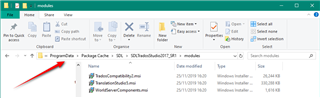
    I have followed the instructions below but my computer still don't see the folder path.

    Windows 8 / 7 / Vista

    1. Open the Control Panel:
      • Windows 7 / Vista: Click on the START button (this is the small round button with the Windows flag in the lower left corner) and click on Control Panel .
      • Windows 8: Hold the Windows Key and press the [X] key, then select Control Panel.
    2. Open Folder Options:
      • Type Folder Options in the Search Control Panel text box and click the Folder Options icon that appears.
    3. Activate the View tab.
    4. Then:
      • To show hidden folders, select the radio button Show hidden files and folders in the Hidden files and folders section.
      • To show all file name extensions, remove the check mark from the check box Hide extensions for known file types.
      • To show protected operation system files, remove the check mark from the check box Hide protected operating system files.
    5. Press the Apply button and then the OK button and close all dialogs.
Children