I can't install SDL Trados Studio 2017 Freelance Plus again

Hello,

I have removed Trados Studio from my computer without deactivating a licence.
Now I can't install it again. I get the following error message: "Setup did not complete. The error is: Setup has detected a higher version of this product already installed. If you still wish to install this version, you must remove the other version first.".
There is no other version on my computer...

Can you help me, please?

Parents Reply
  • All windows computers have "File Explorer"... perhaps the name is confusing you.  Try pressing the Windows key and the letter E at the same time.  This will open it for you.

    To see the folder path, once you are in "File Explorer" enable this:

    Screenshot of File Explorer with the 'View' tab active and an arrow pointing to the 'File name extensions' and 'Hidden items' checkboxes, both are checked.

    Now you should be able to navigate to and see the files in question.  One thing though, as the KB article is old.  The path is this:

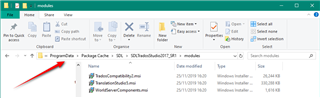
    C:\ProgramData\Package Cache\SDL\SDLTradosStudio2017_SR1\modules

    Looks like this in File Explorer:

    Screenshot of File Explorer showing the folder path 'C:ProgramDataPackage CacheSDLSDLTradosStudio2017_SR1modules' with files listed below.

    Let me know if this still doesn't help you?

    Paul Filkin | RWS Group

    ________________________
    Design your own training!

    You've done the courses and still need to go a little further, or still not clear? 
    Tell us what you need in our Community Solutions Hub

    emoji


    Generated Image Alt-Text
    [edited by: Trados AI at 12:09 AM (GMT 0) on 29 Feb 2024]
Children