 Translate



hi,
when I insert subscripted number to use it later for a footnote, I can't retain the original target font. it continues to write in small letters! I need help plz

hi,
when I insert subscripted number to use it later for a footnote, I can't retain the original target font. it continues to write in small letters! I need help plz
I think that if you press the keyboard combination Ctrl+Shift+H that this will display the hidden tags that are controlling the subscript. You'll probably see something like this:

If you don't display the tags you see this:

Once you can see these controls you can move them, like this for eaxmple:

I also recommend you learn how to handle tags:
https://multifarious.filkin.com/2012/09/10/working_with_tags/
Paul Filkin | RWS
Design your own training!
You've done the courses and still need to go a little further, or still not clear?
Tell us what you need in our Community Solutions Hub


Incidentally your other post was picked up by the automated spam filter... not sure why... but I deleted it because it was a duplicate of this one.
Paul Filkin | RWS
Design your own training!
You've done the courses and still need to go a little further, or still not clear?
Tell us what you need in our Community Solutions Hub

Brother Paul
There is no tags in the source or the target. I inserted superscripted number like these used for footenotes. Unfortunately Ctrl+Sgift+H did not work.
now I have another problem. target segment displays tags symboles i can't get rid of !
You really need to share some screenshots because we can only guess what you mean like this and it's not helpful. You can copy paste a screenshot into your reply.
Paul Filkin | RWS
Design your own training!
You've done the courses and still need to go a little further, or still not clear?
Tell us what you need in our Community Solutions Hub
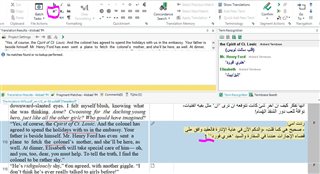
as you can see the tags are gone because I closed the program without saving. Still the cursor is small and continues to write superscripted font.
Thank you brother

I don't think you are showing the tags.
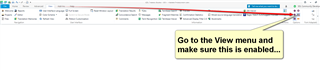
There is no trick to this... if you have subscript text then you must have tags in there controlling it. So you need to display them to see what you're doing.
You could also try pressing Ctrl. (Control dot) after the last subscript letter as this keyboard control might also help you stop using that control.
If you read the article I referred to you then you would learn how to do this.
Paul Filkin | RWS
Design your own training!
You've done the courses and still need to go a little further, or still not clear?
Tell us what you need in our Community Solutions Hub
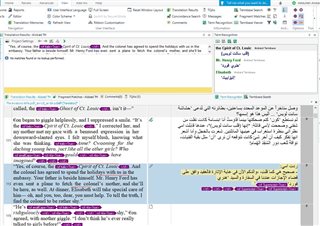
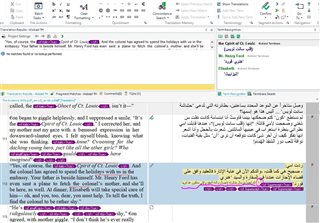
Dear brother Paul
The article is not useful because it is tackling tags that already existed in the source text which is not the case in my problem. As you can see there are no tags in the segment number (113) where lies the problem, except the phrase: 'Cpirit of Ct. Lousis' which is not my problem. My problem is that I inserted a superscripted number that is not found in the source text and I just want to continue writing in the original font, not in the small superscripted font. You will see that In the second picture where the circled number is the one I need it to be superscripted, but as you can see in the underlined writing that follows keeps using a superscripted font which i need it to retain the original big font.
I hope I made myself clear and I am very sorry sir for troubling you.
I hope I made myself clear and I am very sorry sir for troubling you.
Well... you're slowly getting there!
The article actually explains the problems for you if you are reading it carefully. It doesn't matter where the tags are, source or target.
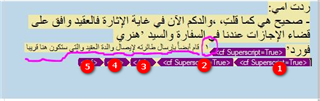
Do this:
1. delete tag
2. delete tag
3. delete tag
4. delete tag
5. move this one to wherever the subscript should stop
It's quite clear now that you are showing tags that you are typing inside the tag pair that controls the subscript. It will never change unless you type outside of the tag pair.
Another way to do this is delete all the tags and then just select the text that should be subscript and click the subscript icon in the ribbon.
Paul Filkin | RWS
Design your own training!
You've done the courses and still need to go a little further, or still not clear?
Tell us what you need in our Community Solutions Hub

I hope I made myself clear and I am very sorry sir for troubling you.
Well... you're slowly getting there!
The article actually explains the problems for you if you are reading it carefully. It doesn't matter where the tags are, source or target.
Do this:
1. delete tag
2. delete tag
3. delete tag
4. delete tag
5. move this one to wherever the subscript should stop
It's quite clear now that you are showing tags that you are typing inside the tag pair that controls the subscript. It will never change unless you type outside of the tag pair.
Another way to do this is delete all the tags and then just select the text that should be subscript and click the subscript icon in the ribbon.
Paul Filkin | RWS
Design your own training!
You've done the courses and still need to go a little further, or still not clear?
Tell us what you need in our Community Solutions Hub