The Trados cloud platform will be undergoing maintenance on Saturday, 9th May 2026 between 05:00 to 17:00 UTC. During this time, you will not be able to log in to the Trados platform.

Update

Good evening,

I have just updated to Trados Studio 2021, i have also updated multiterm. but How do I get back the glossaires and documents i had in the previous version.

I had glossaries, and I also had aligned 2 documents.

Updating shoudl not mean that you lose everything you had before right? There must be aa way to get it back, because in the end it's the same user, the only thing that changes is the license number.

Parents Reply
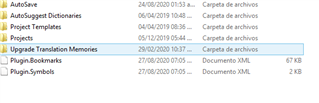
  • I went to c:\Users\[USERNAME]\Documents\Studio 2019\ but i dont find what you are mentioning.

    This is the only thing i find:

    Screenshot of Trados Studio 2019 file directory showing folders such as AutoSave, AutoSuggest Dictionaries, Project Templates, Projects, and Upgrade Translation Memories, along with XML documents for Plugin.Bookmarks and Plugin.Symbols.

    If I click inside i dont see what im looking for. Adn when you say this 

    you'll have to think about where you saved them with the old version.

    I did not save them anywhere that i know because i thougt i ust had to add the terms and TRADOS would keep it forever, it never occured to me that with an update i would have to pass my information myself. I had no idea i had to do that, why dont people tell you that before?

    Anyway all i see is what is above. If you can help me more, thanks.

    emoji


    Generated Image Alt-Text
    [edited by: Trados AI at 10:30 PM (GMT 0) on 28 Feb 2024]
Children