Base 64 error

Hello, I have a problem with Trados 2021 and I really need help. Trados support didn't help at all and told me to post this here.

A message with a Base 64 error is showing and nothing that I do makes it go away. I changed the name of the project, deleted ans installed trados and the message is still there:
"The entry is not a valid Base 64 character string, as it contains a non-base 64 character, more than two padding characters, or an illegal character between padding characters." 

PLEASE help

  • Hello, please email us to info@babeldgt.com and we will be glad to help, if you can send us a screen capture it will help a lot.

    Thanks!

  • Hello 

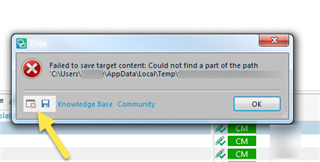
    Could you please give us a bit more details about the issue? Please save the error by clicking on the disc icon and, then saving to your desktop and including this in communications with SDL.

    These 'error stacks' helps us locate the issues and provide solutions much quicker generally.

    Error message in Trados Studio stating 'Failed to save target content: Could not find a part of the path C:UsersAppDataLocalTemp'.

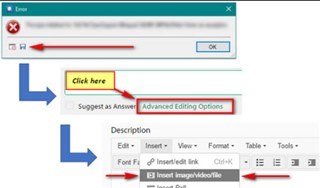
    You can also post the full 'error stack':

    Screenshot showing an error dialog box with options to click 'OK', and arrows pointing to 'Click here' and 'Advanced Editing Options' in a forum post editor.

    What kind of file is it, is it a package?

    Oana Nagy | QA Engineer | RWS Group

    emoji


    Generated Image Alt-Text
    [edited by: Trados AI at 2:00 AM (GMT 0) on 29 Feb 2024]
  • <?xml version="1.0"?>

    -<SDLErrorDetails time="06/04/2021 12:30:33">

    <ErrorMessage>A entrada não é uma cadeia de caracteres de Base 64 válida, pois contém um caractere que não é de base 64, mais de dois caracteres de preenchimento ou um caractere ilegal entre os caracteres de preenchimento. </ErrorMessage>


    -<Exception>

    <Type>System.FormatException, mscorlib, Version=4.0.0.0, Culture=neutral, PublicKeyToken=b77a5c561934e089</Type>

    <HelpLink/>

    <Source>mscorlib</Source>

    <HResult>-2146233033</HResult>


    -<StackTrace>

    -<![CDATA[ em System.Convert.FromBase64_Decode(Char startInputPtr, Int32 inputLength, Byte startDestPtr, Int32 destLength)
    em System.Convert.FromBase64CharPtr(Char* inputPtr, Int32 inputLength)
    em System.Convert.FromBase64String(String s)
    em Sdl.Core.Cryptography.SymmetricCryptographer.Decrypt(String encryptedText)
    em Sdl.TranslationStudio.LanguageCloud.Subscription.Encrypter.Decrypt(String encryptedText)
    em Sdl.TranslationStudio.LanguageCloud.Subscription.EncryptedSubscriptionDataFileRepository.ReadContent()
    em Sdl.TranslationStudio.LanguageCloud.Subscription.SubscriptionLicense.LoadSubscriptionFromLocalStore()
    em Sdl.TranslationStudio.Common.Licencing.LicensingService.ShouldShowLicenseManager()
    em Sdl.TranslationStudio.Common.Licencing.LicensingService.StartupLicenseCheck()
    em Sdl.Desktop.Platform.Implementation.Studio.Run(ISplashScreen splashScreen, IEventAggregator eventAggregator)
    em Sdl.TranslationStudio.Application.Launcher.RunApplication()]]>
    </StackTrace>

    </Exception>


    -<Environment>

    <ProductName>SDL Trados Studio</ProductName>

    <ProductVersion>Studio16</ProductVersion>

    <EntryAssemblyFileVersion>16.1.4.4184</EntryAssemblyFileVersion>

    <OperatingSystem>Microsoft Windows 10 Home Single Language</OperatingSystem>

    <ServicePack>NULL</ServicePack>

    <OperatingSystemLanguage>1046</OperatingSystemLanguage>

    <CodePage>1252</CodePage>

    <LoggedOnUser>DESKTOP-7I7RGS9\loren</LoggedOnUser>

    <DotNetFrameWork>4.0.30319.42000</DotNetFrameWork>

    <ComputerName>DESKTOP-7I7RGS9</ComputerName>

    <ConnectedToNetwork>True</ConnectedToNetwork>

    <PhysicalMemory>4057488 MB</PhysicalMemory>

    </Environment>

    </SDLErrorDetails>

  • <?xml version="1.0"?>

    -<SDLErrorDetails time="06/04/2021 12:30:33">

    <ErrorMessage>A entrada não é uma cadeia de caracteres de Base 64 válida, pois contém um caractere que não é de base 64, mais de dois caracteres de preenchimento ou um caractere ilegal entre os caracteres de preenchimento. </ErrorMessage>


    -<Exception>

    <Type>System.FormatException, mscorlib, Version=4.0.0.0, Culture=neutral, PublicKeyToken=b77a5c561934e089</Type>

    <HelpLink/>

    <Source>mscorlib</Source>

    <HResult>-2146233033</HResult>


    -<StackTrace>

    -<![CDATA[ em System.Convert.FromBase64_Decode(Char startInputPtr, Int32 inputLength, Byte startDestPtr, Int32 destLength)
    em System.Convert.FromBase64CharPtr(Char* inputPtr, Int32 inputLength)
    em System.Convert.FromBase64String(String s)
    em Sdl.Core.Cryptography.SymmetricCryptographer.Decrypt(String encryptedText)
    em Sdl.TranslationStudio.LanguageCloud.Subscription.Encrypter.Decrypt(String encryptedText)
    em Sdl.TranslationStudio.LanguageCloud.Subscription.EncryptedSubscriptionDataFileRepository.ReadContent()
    em Sdl.TranslationStudio.LanguageCloud.Subscription.SubscriptionLicense.LoadSubscriptionFromLocalStore()
    em Sdl.TranslationStudio.Common.Licencing.LicensingService.ShouldShowLicenseManager()
    em Sdl.TranslationStudio.Common.Licencing.LicensingService.StartupLicenseCheck()
    em Sdl.Desktop.Platform.Implementation.Studio.Run(ISplashScreen splashScreen, IEventAggregator eventAggregator)
    em Sdl.TranslationStudio.Application.Launcher.RunApplication()]]>
    </StackTrace>

    </Exception>


    -<Environment>

    <ProductName>SDL Trados Studio</ProductName>

    <ProductVersion>Studio16</ProductVersion>

    <EntryAssemblyFileVersion>16.1.4.4184</EntryAssemblyFileVersion>

    <OperatingSystem>Microsoft Windows 10 Home Single Language</OperatingSystem>

    <ServicePack>NULL</ServicePack>

    <OperatingSystemLanguage>1046</OperatingSystemLanguage>

    <CodePage>1252</CodePage>

    <LoggedOnUser>DESKTOP-7I7RGS9\loren</LoggedOnUser>

    <DotNetFrameWork>4.0.30319.42000</DotNetFrameWork>

    <ComputerName>DESKTOP-7I7RGS9</ComputerName>

    <ConnectedToNetwork>True</ConnectedToNetwork>

    <PhysicalMemory>4057488 MB</PhysicalMemory>

    </Environment>

    </SDLErrorDetails>

  • <?xml version="1.0"?>

    -<SDLErrorDetails time="08/04/2021 18:28:10">

    <ErrorMessage>A entrada não é uma cadeia de caracteres de Base 64 válida, pois contém um caractere que não é de base 64, mais de dois caracteres de preenchimento ou um caractere ilegal entre os caracteres de preenchimento. </ErrorMessage>


    -<Exception>

    <Type>System.FormatException, mscorlib, Version=4.0.0.0, Culture=neutral, PublicKeyToken=b77a5c561934e089</Type>

    <HelpLink/>

    <Source>mscorlib</Source>

    <HResult>-2146233033</HResult>


    -<StackTrace>

    -<![CDATA[ em System.Convert.FromBase64_Decode(Char* startInputPtr, Int32 inputLength, Byte* startDestPtr, Int32 destLength)
    em System.Convert.FromBase64CharPtr(Char* inputPtr, Int32 inputLength)
    em System.Convert.FromBase64String(String s)
    em Sdl.Core.Cryptography.SymmetricCryptographer.Decrypt(String encryptedText)
    em Sdl.TranslationStudio.LanguageCloud.Subscription.Encrypter.Decrypt(String encryptedText)
    em Sdl.TranslationStudio.LanguageCloud.Subscription.EncryptedSubscriptionDataFileRepository.ReadContent()
    em Sdl.TranslationStudio.LanguageCloud.Subscription.SubscriptionLicense.LoadSubscriptionFromLocalStore()
    em Sdl.TranslationStudio.Common.Licencing.LicensingService.ShouldShowLicenseManager()
    em Sdl.TranslationStudio.Common.Licencing.LicensingService.StartupLicenseCheck()
    em Sdl.Desktop.Platform.Implementation.Studio.Run(ISplashScreen splashScreen, IEventAggregator eventAggregator)
    em Sdl.TranslationStudio.Application.Launcher.RunApplication()]]>
    </StackTrace>

    </Exception>


    -<Environment>

    <ProductName>SDL Trados Studio</ProductName>

    <ProductVersion>Studio16</ProductVersion>

    <EntryAssemblyFileVersion>16.1.4.4184</EntryAssemblyFileVersion>

    <OperatingSystem>Microsoft Windows 10 Home Single Language</OperatingSystem>

    <ServicePack>NULL</ServicePack>

    <OperatingSystemLanguage>1046</OperatingSystemLanguage>

    <CodePage>1252</CodePage>

    <LoggedOnUser>DESKTOP-7I7RGS9\loren</LoggedOnUser>

    <DotNetFrameWork>4.0.30319.42000</DotNetFrameWork>

    <ComputerName>DESKTOP-7I7RGS9</ComputerName>

    <ConnectedToNetwork>True</ConnectedToNetwork>

    <PhysicalMemory>4057488 MB</PhysicalMemory>

    </Environment>

    </SDLErrorDetails>

  • Support Case Id : 00593793. Support case has been logged for your assistance. Please check your SDL Community email address for updates.

    Oana Nagy | QA Engineer | RWS Group