Outdated details carrying over when setting up a new project for an old customer using the customer's saved project template

Dear All,

I have noticed that when setting up a new project for an old customer using the customer's saved project template, some outdated information gets carried over, for example:

1.
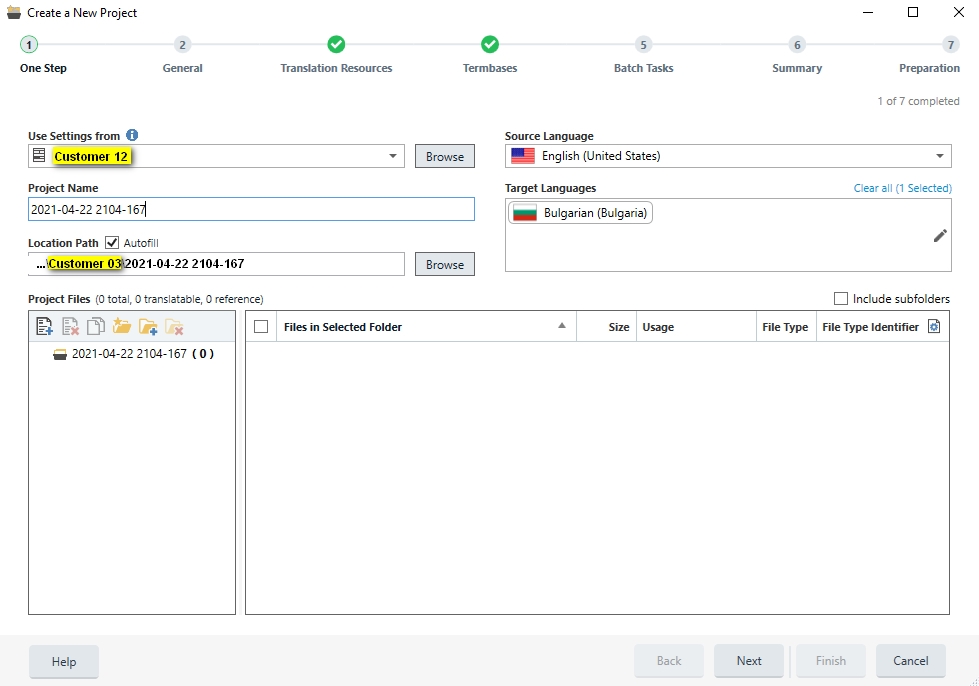
Trados Studio 'Create a New Project' window showing 'Use Settings from' dropdown with 'Customer 12' selected, and autofill location path from a different customer's project.

...What happens here is that Studio offers as a Location Path, the location path from a recent project fo a another customer. It would make sense to save the default location path for each customer in their corresponding project template and autofill it for new projects when using the same template. It would save us time.

2.
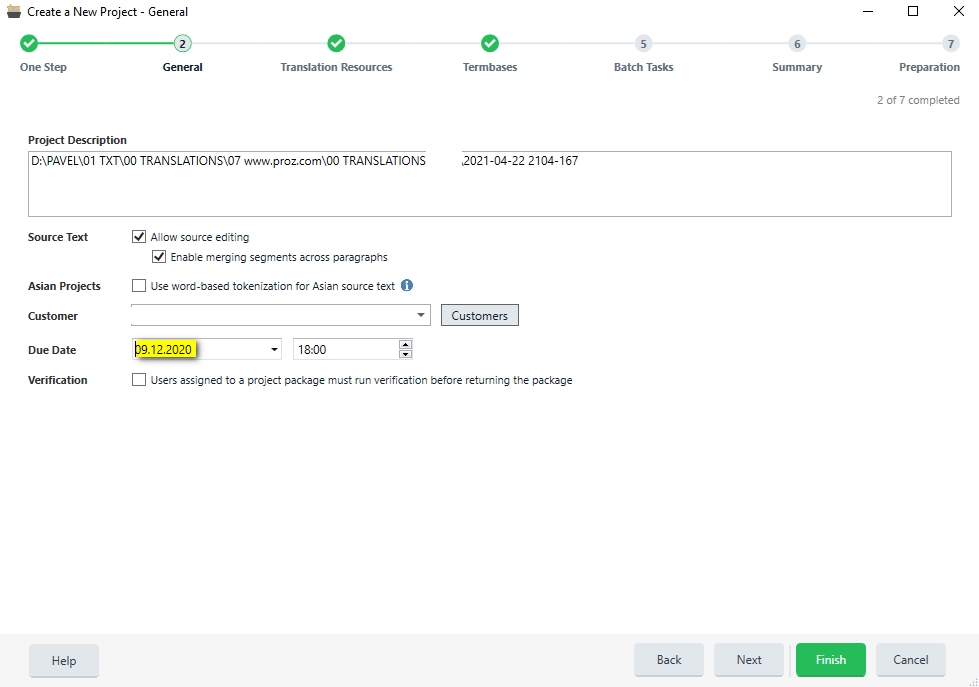
Trados Studio 'Create a New Project - General' tab displaying project description path and an outdated due date of '19.12.2020' that needs manual updating.

...And here is a piece of old information that was automatically saved by Studio in the customer project template and is then autofilled for each new project: the original project's due date. This forces me to manually skip forward many months (in some cases up to a full year or more) to finally arrive at the correct date. Would it be possible for Studio not to save the original due date and istead autocomplete today's date as the new due date? That would save us time.

Best regards,

Pavel


Generated Image Alt-Text
[edited by: Trados AI at 2:25 AM (GMT 0) on 29 Feb 2024]

emoji
Parents
  • Hi ,

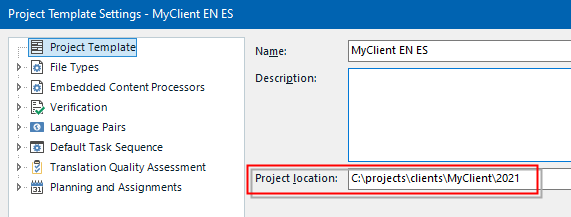
    Regarding the path, you can edit the project template in File > Setup > Project Templates. Then open the template you wish, and edit the Location field. Everytime you select that project template, the path will change accordingly. Your templates might look something like this:

    Trados Studio Project Template Settings window showing 'MyClient EN ES' template with editable 'Project location' field set to 'C:projectsclientsMyClient2021'.

    Of course, you can edit the location to suit your needs for every template.

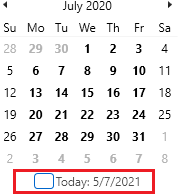
    Regarding your due date issue, I don’t know where the date is coming from, but you can click on the button Today to save time:

    Calendar pop-up window with 'Today' button highlighted, showing the date 572021.

    emoji


    Generated Image Alt-Text
    [edited by: Trados AI at 2:25 AM (GMT 0) on 29 Feb 2024]
  • Thank you for your answer.

    1. My question regarding the path was why the path for each client is not automatically retained in the location field based on the information for the first project when the project template for said client was being created? Why would Studio offer as the Location Path, the location path from a recent project for a another customer? It makes no sense. I understand that the Project Templates can be manually edited but why should this step be considered preferable to Studio simply automatically retaining the location field based on the information for the first project when the project template for said client was created? Even if slight corrections are needed afterwards, it will still be better than offering the path for a completely different client.

    2. Regarding the date: your solution makes sense, thank you!

    Best regards,

    Pavel

Reply
  • Thank you for your answer.

    1. My question regarding the path was why the path for each client is not automatically retained in the location field based on the information for the first project when the project template for said client was being created? Why would Studio offer as the Location Path, the location path from a recent project for a another customer? It makes no sense. I understand that the Project Templates can be manually edited but why should this step be considered preferable to Studio simply automatically retaining the location field based on the information for the first project when the project template for said client was created? Even if slight corrections are needed afterwards, it will still be better than offering the path for a completely different client.

    2. Regarding the date: your solution makes sense, thank you!

    Best regards,

    Pavel

Children