Txlf file does not convert to Translatable format

Until now, I have been working with the Txlf file in Trados Studio 2021. But suddenly, a certain Txlf file does not convert to Translatable format. Please tell me how to solve it. For reference, there is no problem with other Txlf files.

Parents
  • Hello ,

    Do you get any error messages at all? Is the file set as a reference in the project?

    Are you able to open the particular file as a single file translation? (Translate as a single document)

    As you said there is only an issue with one particular file (and all others work fine), this would suggest there is a problem with that particular file.

    Perhaps its worth speaking to your client and requesting a new file?


    Oana Nagy | Developer Experience | QA Engineer | RWS Group

  • Hello Steven,

    Thanks for the reply.
    However, when I try to translate it into a single document, the following error message pops up: 'Object reference not set to an instance of an object.'
    And I had the same problem with another Txlf file not long ago. Although it is intermittent, the problem recurs over and over, which is quite annoying.

  • Hello ,

    As this is an intermittent issue, please share the full error stack- as this may indicate what is perhaps causing the problems

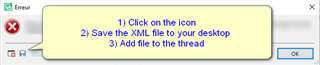
    Error message popup in Trados Studio with instructions: 1) Click on the icon, 2) Save the XML file to your desktop, 3) Add file to the thread.


    Oana Nagy | Developer Experience | QA Engineer | RWS Group

    emoji


    Generated Image Alt-Text
    [edited by: Trados AI at 2:58 AM (GMT 0) on 29 Feb 2024]
  • <SDLErrorDetails time="2021-06-17 오후 5:43:55">
      <ErrorMessage>개체 참조가 개체의 인스턴스로 설정되지 않았습니다.</ErrorMessage>
      <Exception>
        <Type>System.NullReferenceException, mscorlib, Version=4.0.0.0, Culture=neutral, PublicKeyToken=b77a5c561934e089</Type>
        <HelpLink />
        <Source>Sdl.FileTypeSupport.Filters.Xliff</Source>
        <HResult>-2147467261</HResult>
        <StackTrace><![CDATA[   위치: Sdl.FileTypeSupport.Filters.Xliff.Common.SubParagraphUnitKeyGenerator.BuildTagMatching()
       위치: Sdl.FileTypeSupport.Filters.Xliff.Infrastructure.Consumers.Parser.SubFlowPositionRecorder.Consume(XmlNodeParsed message)
       위치: lambda_method(Closure , IMessage )
       위치: Sdl.FileTypeSupport.Filters.Xliff.Infrastructure.InMemoryBus.Publish(IMessage message)
       위치: Sdl.FileTypeSupport.Filters.Xliff.Extractor.ParserImpl.Publish(XmlNodeParsed message)
       위치: Sdl.FileTypeSupport.Filters.Xliff.Infrastructure.XmlParser.Parse(XmlTextReader reader)
       위치: Sdl.FileTypeSupport.Filters.Xliff.Extractor.ParserImpl.Parse(String xliffPath)
       위치: Sdl.FileTypeSupport.Filters.Xliff.Parser.ParseNext()
       위치: Sdl.FileTypeSupport.Framework.Integration.FileExtractor.ParseNext()
       위치: Sdl.FileTypeSupport.Framework.Integration.MultiFileConverter.ParseNext()
       위치: Sdl.FileTypeSupport.Framework.Integration.MultiFileConverter.Parse()
       위치: Sdl.TranslationStudio.Editor.TranslationEditor.TranslatableDocument.Load(IJobExecutionContext context)
       위치: Sdl.Desktop.Platform.Services.JobRequest.Execute(IJobExecutionContext context)
       위치: Sdl.Desktop.Platform.Implementation.Services.Job.<_worker_DoWork>b__47_0()
       위치: Sdl.Desktop.Logger.Log.Resources(Object message, Action action)
       위치: Sdl.Desktop.Platform.Implementation.Services.Job._worker_DoWork(Object sender, DoWorkEventArgs e)
       위치: System.ComponentModel.BackgroundWorker.OnDoWork(DoWorkEventArgs e)
       위치: System.ComponentModel.BackgroundWorker.WorkerThreadStart(Object argument)]]></StackTrace>
      </Exception>
      <Environment>
        <ProductName>SDL Trados Studio</ProductName>
        <ProductVersion>Studio16</ProductVersion>
        <EntryAssemblyFileVersion>16.1.6.4276</EntryAssemblyFileVersion>
        <OperatingSystem>Microsoft Windows 10 Home</OperatingSystem>
        <ServicePack>NULL</ServicePack>
        <OperatingSystemLanguage>1042</OperatingSystemLanguage>
        <CodePage>949</CodePage>
        <LoggedOnUser>DESKTOP-TPSPFMF\leepr</LoggedOnUser>
        <DotNetFrameWork>4.0.30319.42000</DotNetFrameWork>
        <ComputerName>DESKTOP-TPSPFMF</ComputerName>
        <ConnectedToNetwork>True</ConnectedToNetwork>
        <PhysicalMemory>16684260 MB</PhysicalMemory>
      </Environment>
    </SDLErrorDetails>

    "개체 참조가 개체의 인스턴스로 설정되지 않았습니다" = "Object reference not set to an instance of an object"

    Is this okay?

  • Hello ,

    Thank you.

    Have you checked the file itself to make sure it's well-formed and doesn't contain any illegal characters?

    Perhaps you can share the file with us, so we can take a look? swhaleATsdl.com


    Oana Nagy | Developer Experience | QA Engineer | RWS Group

  • There is no problem with the file. 

    I want to too, but I don't think I can share the file because of the NDA.

  • If you edit the txlf so there is only one segment in there, and you anonymise the characters (they don't have to mean anything!), can you still reproduce the problem?  If you can then surely you can share that file?

    Paul Filkin | RWS Group

    ________________________
    Design your own training!

    You've done the courses and still need to go a little further, or still not clear? 
    Tell us what you need in our Community Solutions Hub

Reply Children