


RWS Community
RWS Community
  • Site

Trados Go

Trados Studio

Trados Ignite

Trados Team

Trados Accelerate

Trados Enterprise

Trados GroupShare

Passolo

MultiTerm

RWS AppStore

Connectors

Beta Groups

Managed Translation

MultiTrans

TMS

Trados Enterprise

WorldServer

Language Weaver

Language Weaver Edge

Language Weaver Connectors

Language Weaver in Trados Studio


Content Champions

Tridion Docs

Tridion Sites

Contenta

LiveContent

XPP

Trados Cloud

Trados Studio Ideas

Trados GroupShare Ideas

Trados Team Terminology Ideas

MultiTerm Ideas

Passolo Ideas

RWS Appstore Ideas

Tridion Docs Ideas

Tridion Sites Ideas

Language Weaver Ideas

Language Weaver Edge Ideas

Managed Translation - Enterprise Ideas

TMS Ideas

WorldServer Ideas

Trados Enterprise Ideas

XPP Ideas

GroupShare Developers

Language Cloud Developers

MultiTerm Developers

Passolo Developers

Trados Studio Developers

Managed Translation Developers

TMS Developers

WorldServer Developers

Tridion Docs Developers

XPP Developers

Language Combinations by Language Services

RWS Training & Certification

Style Guides

Content Management Partners

LDE Korean Vendor Support

RWS Campus

Trados Approved Trainers

Nordic Tridion Docs User Group

Recognition & Reward System

RWS Community Platform Related Questions

Community Solutions Hub (Trados)

About RWS

Events

RWS Services: Train AI & others

RWS Training & Certification

To RWS Support

  • Search
  • Translate

    Detecting language please wait for.......


    Powered by
  • User
  • Site
  • Search
  • User
  • Products
  • Trados Portfolio
  • Trados Studio
  • More
  • Cancel
Trados Studio
  • Products
  • Trados Portfolio
  • Trados Studio
  • More
  • Cancel

Trados Studio > Customer Experience

04.4 Deactivating the Trados Studio license
  • Home
  • Forums
  • Product Updates
  • Blogs
  • Wiki
  • Training
  • Release info
  • Trados Studio Leaders
  • More
  • Cancel
  • New
Show Translation Options

Detecting language please wait for.......


Powered by
Trados Studio requires membership for participation - click to join
  • -Customer Experience
    • +01. How to start a Trados Freelance or Trados Go subscription
    • +02. Trados Freelance
    • +03. Trados Go
    • -04. Studio perpetual license
      • 04.1 Installing Trados Studio single user licenses (Freelance and Professional)
      • 04.2 Activating the Trados Studio software after downloading and installing
      • 04.3 Setting up your personal profile for Trados Studio
      • 04.4 Deactivating the Trados Studio license
      • 04.5 How to upgrade your Freelance perpetual license
      • 04.6 Installing and activating Trados 2024 and Trados 2022 side by side (upgrades only)
      • 04.7 How to reset a perpetual license
      • 04.8 How to transfer my existing license to a new computer?
    • 05. Trados Support resources
    • +06. Licensing and Installation
    • +07. Trados Studio 2024 (Trados Cloud Capabilities)
    • How to: use Glossary Converter
  • +RWS Support Team wiki
  • +Support & Maintenance
  • +Trados Subject Matter Experts

You are currently reviewing an older revision of this page.

  • History View current version

03.1 Deactivating my Trados Studio licence

1) Deactivating your Trados Studio license*** on your current available PC

If for instance, you would like to move your Trados Studio installation to another PC, you should first deactivate your license on the current machine.

Deactivation of your (perpetual) license is easy with a few simple steps.

To deactivate your license please open your Studio software, go to the HELP tab and click on PRODUCT ACTIVATION.

A new pop-up window will appear:
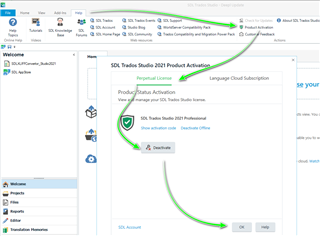
Please click on the DEACTIVATE button and then click OK. Your existing license is now deactivated and ready to be reused.

2) Deactivating your Trados Studio license on a PC that is no longer available

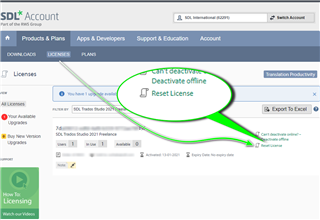
If you are no longer able to access the PC where you have Trados Studio installed, you also have the ability to force return the license via your SDL Account

To do this, log into your SDL Account and click on the licenses TAB.

Now select the license you wish to return and select Reset License
 

03) Licensing support

If for some reason, you are still unable to reset your license, please let us know in the Translation Productivity Forum, and we will assist you further

https://community.sdl.com/product-groups/translationproductivity/f/studio


TIP

 ***If you have purchased a subscription license, you do not need to activate or deactivate your Trados Studio/Live Essentials as this happens automatically each time you connect to the Internet.


  • Our Terms of Use
  • Copyright
  • Privacy
  • Security
  • Anti-slavery Statement
  • Cookie Notice
  • YouTube