
 Translate




Documentation projects follow phases like planning, design, authoring, review, publishing, and maintenance. Each involves multiple parallel tasks - making efficiency critical.
For subsequent iterations, the cycle repeats with scoped changes, impact analysis, updates, review, localization, publishing, and monitoring.
With so many parallel activities, how do you ensure efficiency?
Metrics provide clarity. Tracking reuse improves quality and reduces creation time, showing ROI on reuse efforts. Productivity metrics reveal team efficiency and help optimize delivery.
To make this easier, Tridion Docs offers a dedicated Metrics feature that helps you monitor all these aspects across your documentation projects. Let’s examine why metrics matter and how Tridion Docs simplifies tracking them.
Why the Metrics feature?
Technical Documentation Leads, Heads of Departments, or Information Architects use the Metrics feature to measure content reuse, identify cost savings provided through structured content, and validate team efficiency and productivity by business unit.
Some key use cases include:
- Identifying reuse levels for the current release to plan improvements.
- Preparing data for the fiscal year budgeting to show cost savings.
- Encouraging departments to invest in reuse based on ROI comparisons.
- Tracking release status for publication outputs.
Did you miss the previous posts?
Now that we’ve covered why metrics matter, let’s look at what we’ve already shared and what this article adds.
We’ve already explored the Metrics feature in earlier blogs, including The long-awaited Tridion Docs Metrics feature , which explained its UI charts and usage examples. In this article, we’ll go deeper and cover the calculation logic, synchronization processes, and technical components behind the feature.
Calculation example
In our example, we have three publications: “Mobile phone basics,” “Functions and capabilities of mobile phones,” and “Technical characteristics and their comparison for mobile phones.”
Publications are using a set of topics, some of which are new, and some are reused. Representation of the publications and topics on the timeline is displayed below.
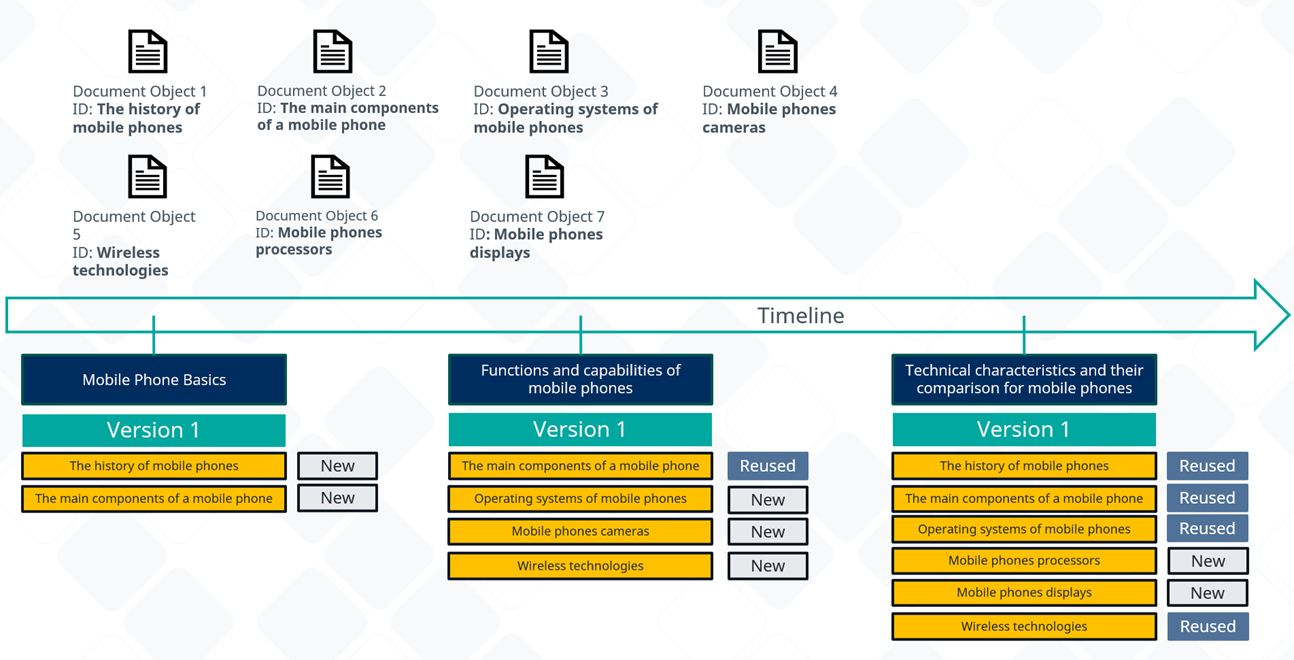
The timeline shows how topics are reused across multiple publications
To calculate the current reuse level for this set of publications, we will use a formula that is explained in detail in a previous blog post: A guide how to understand Tridion Docs’ new Reuse Metrics .
Based on the data we have:
|
New topic references |
7 |
|
Reused topic references |
5 |
|
All topic references |
12 |
|
Reuse degree |
5/12 = 42% |
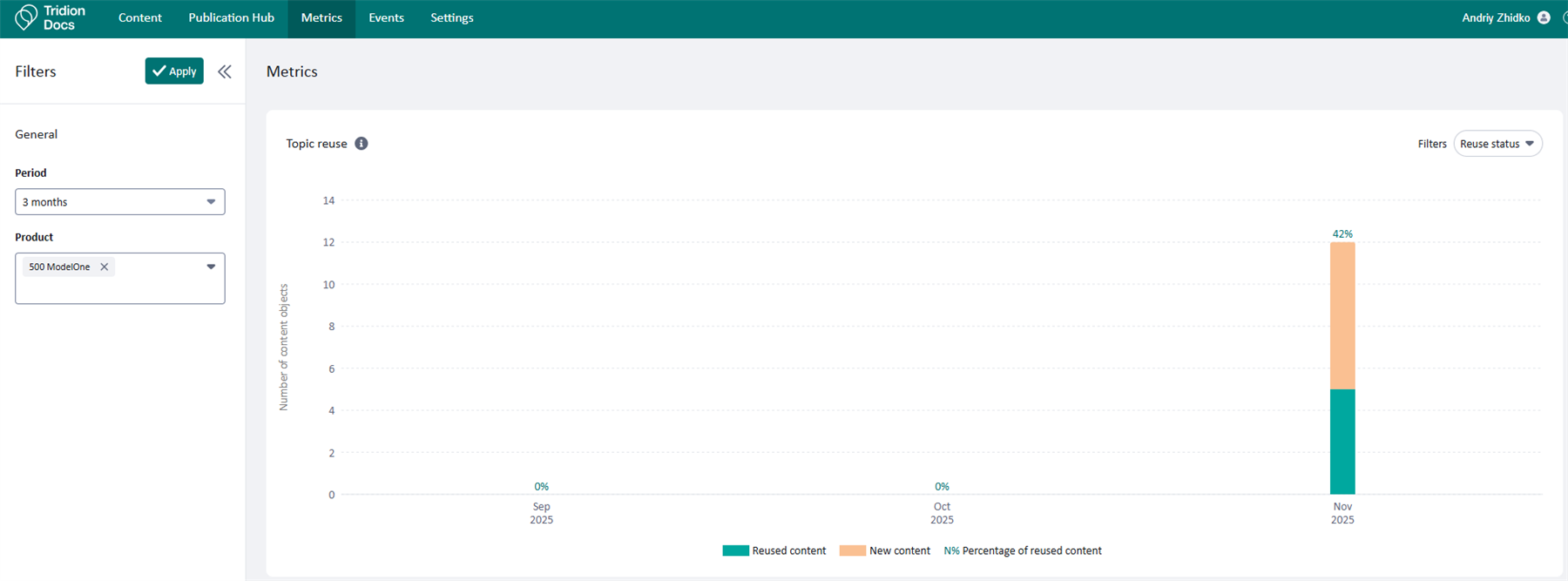
The timeline shows how topics are reused across publications
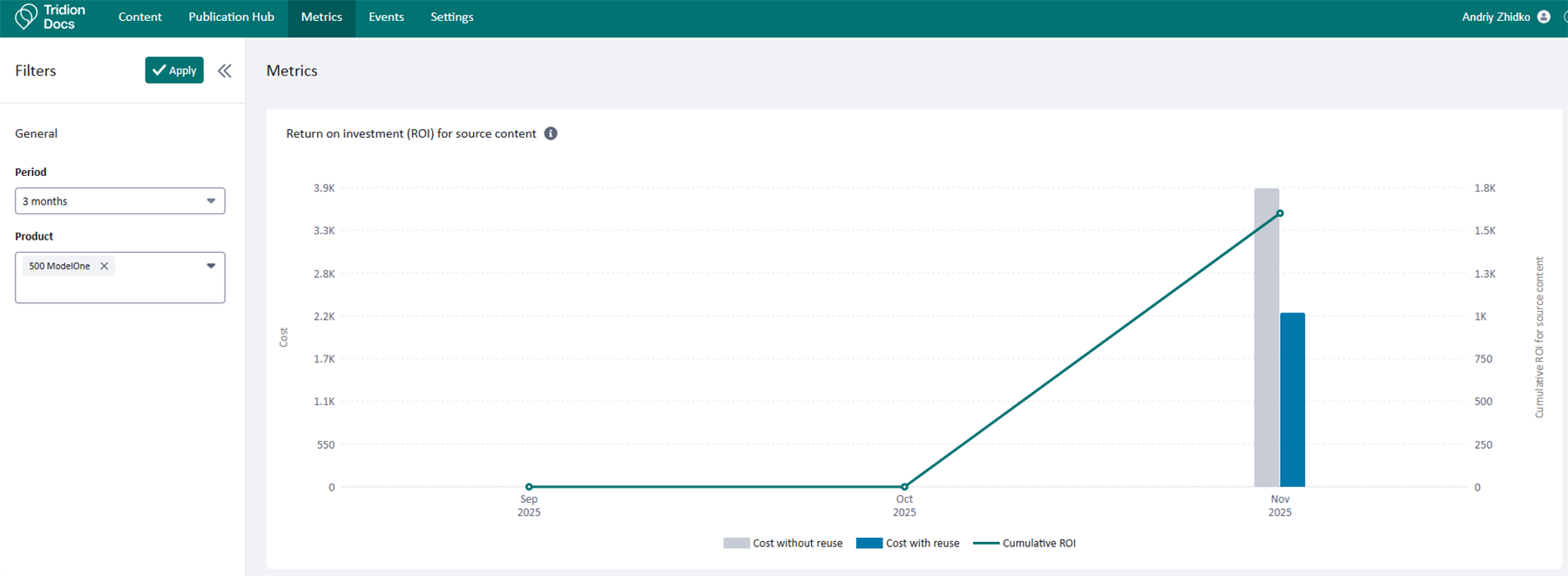
Now, let’s show and explain the corresponding Return on Investment (ROI) chart for the same publications set.
The ROI chart below illustrates how reuse translates into cost savings over time.
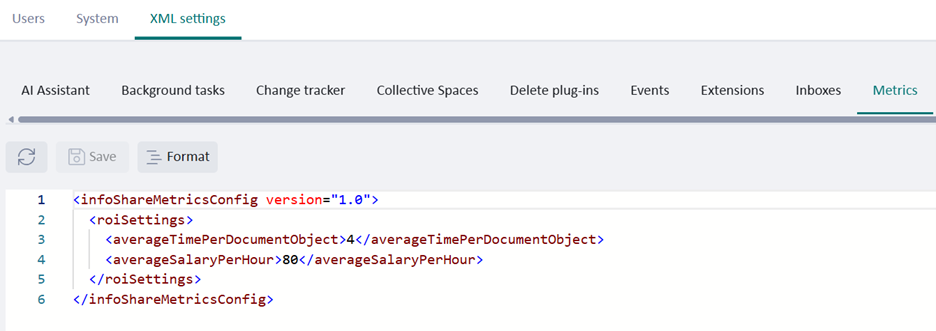
To calculate data for the ROI chart, we use values for average time spent per document object (in hours) and average salary per hour. Both should be set in Settings > XML settings > Metrics area.
Let’s validate the calculation that is displayed in the ROI chart.
Formulas that are used:
|
Formula |
Explanation |
|
The cost of creating content: Count * AverageSalaryPerHour * AverageTimePerDocumentObject |
Count is either “all topic references” or “new.” AverageSalaryPerHour and AverageTimePerDocumentObject are taken from the Metrics configuration.
|
|
ROI: Total Cost of Content Without Reuse - Total Cost of Content With Reuse |
For “Cost of Content Without Reuse,” we are assuming that all content was created from scratch, which means no reuse; “Cost of Content With Reuse” considers the current reuse level and excludes reused references.
|
|
Cumulative ROI: ROI for previous periods + (Total Cost of Content Without Reuse - Total Cost of Content With Reuse)
|
ROI for previous periods is a summary of the ROI savings before the current period. |
Applying the numbers from our example:
|
New topic references |
7 |
|
Reused topic references |
5 |
|
All topic references |
12 |
|
Total Cost of Content Without Reuse |
12 * 80 * 4 = 3840 |
|
Total Cost of Content With Reuse |
7 * 80 * 4 = 2240 |
|
ROI |
3840 – 2240 = 1600 |
|
Cumulative ROI |
0 + 1600 = 1600 |
The publishing activity chart below displays publishing activity for a selected period, indicating the status of published outputs.
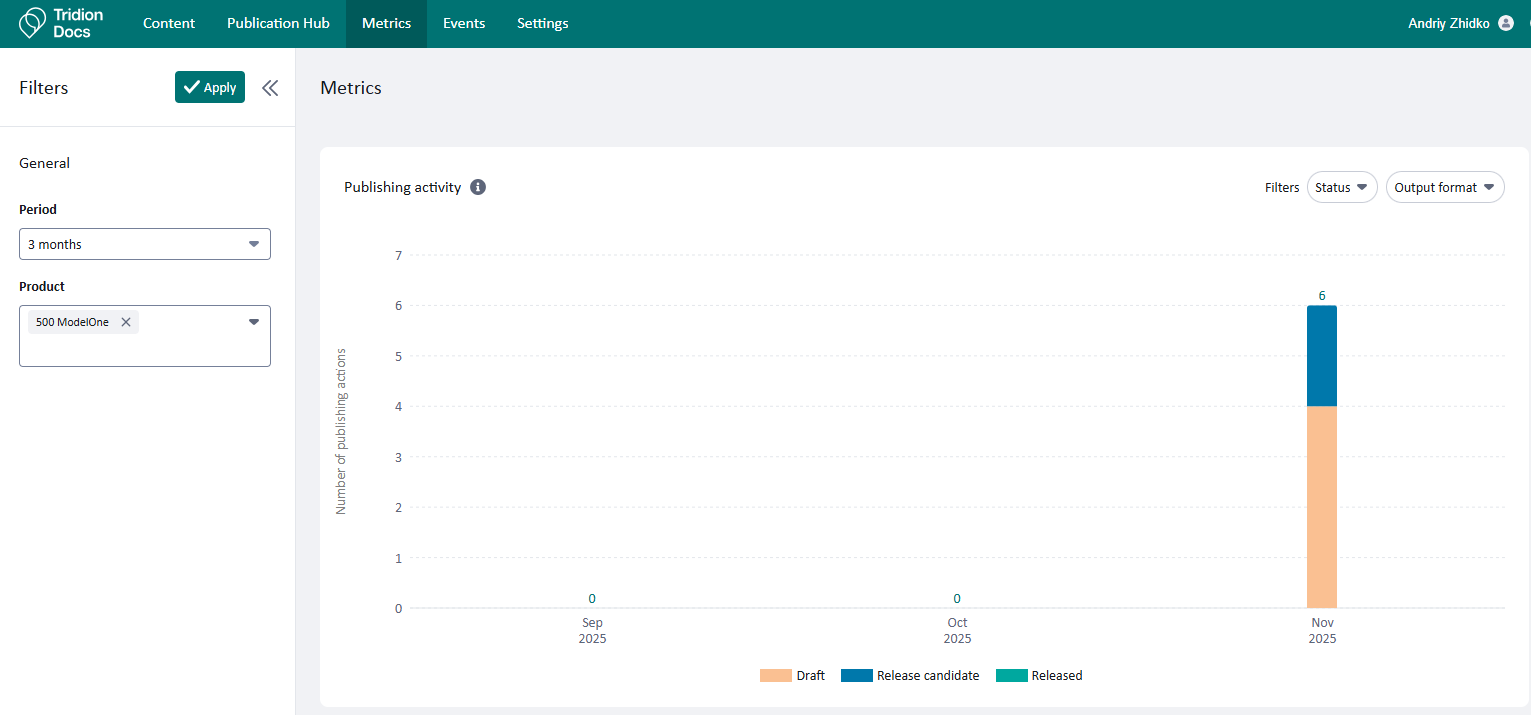
The above screenshots demonstrate how the Product filter enables you to zoom in on specific data. For a detailed guide on filtering and automation, check out Tridion Docs Metrics: How to zoom-in on data? , which includes practical examples for setting the Product field automatically.
Technical solution
Here’s how the feature works behind the scenes for those interested in technical details.
The solution diagram below illustrates how Metrics integrates with Tridion Docs components.
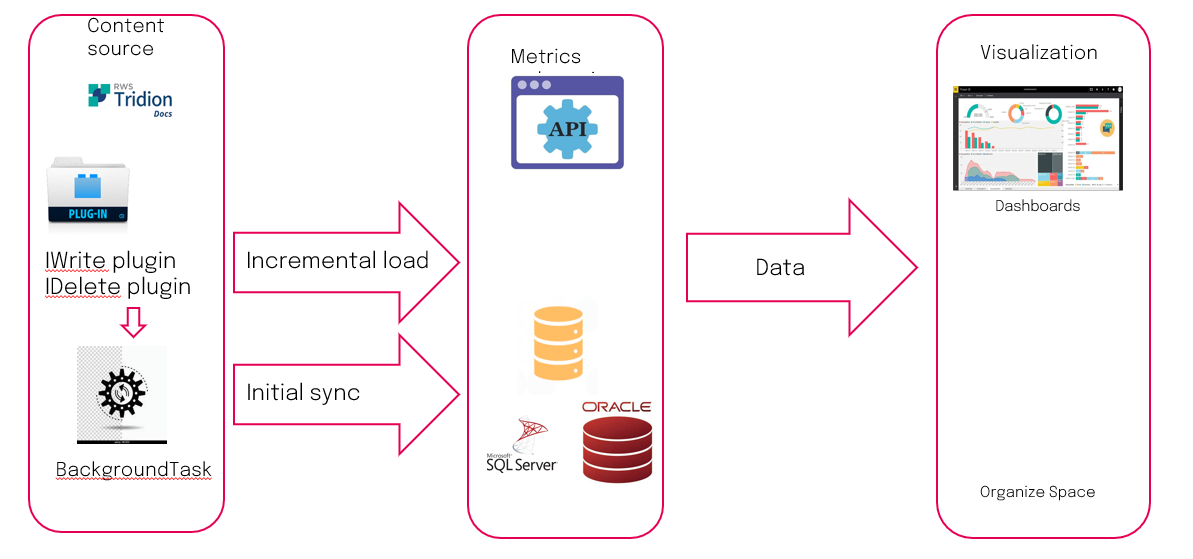
Content source is the Tridion Docs Content Manager that includes a set of IWrite and IDelete plugins that fire respective events for creating/updating actions or deleting actions. IBackgroundTask plugins process events and read extra data from Tridion Docs that is required for the reporting model and push data using Metrics API, the internal API of the product. The Metrics webservice has a separate Metrics storage that has a database job that is triggered on a scheduled interval to calculate reuse status and cleanup expired objects. Metrics API has a set of endpoints to support data synchronization, as well as endpoints to read required data to visualize Metrics charts in Organize Space.
Metrics data flow can be visualized with the following diagram.
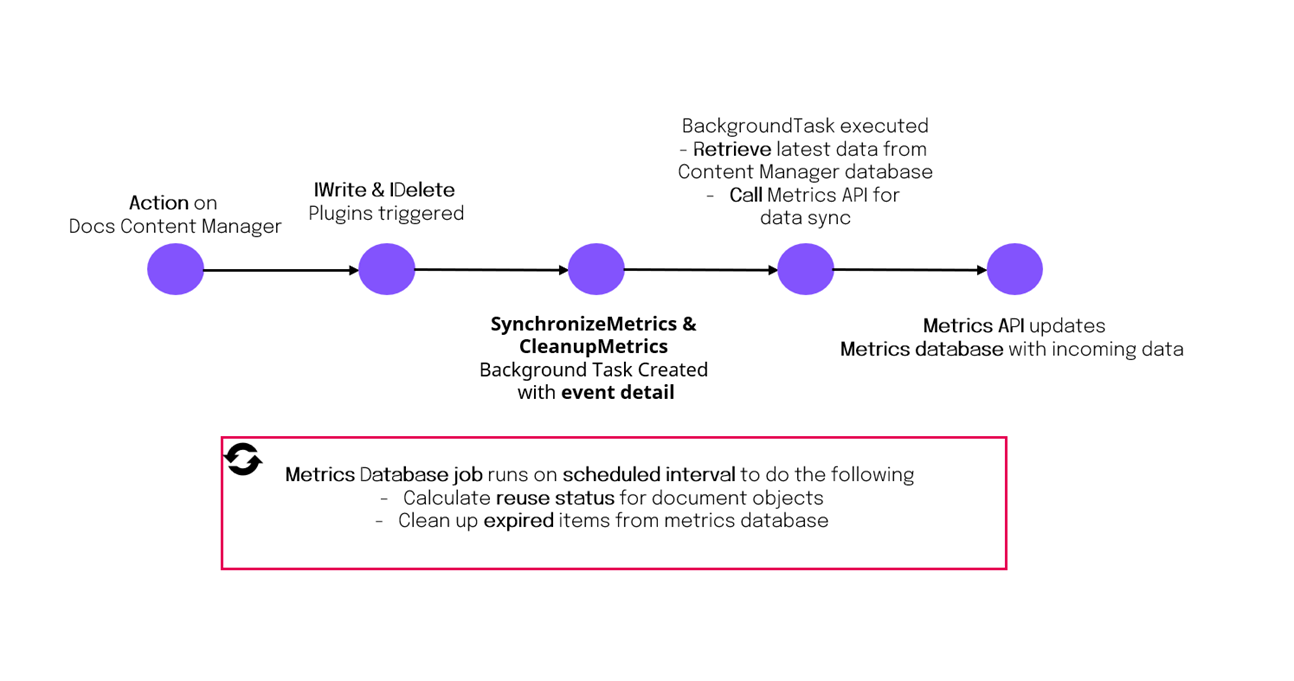
Overview of product components that are used in Metrics
IWrite Plugins
Metrics uses a set of IWrite plugins for topic, illustration, publication, publication output, baseline, whose main responsibility is to keep synchronization between Metrics storage and Tridion Docs Content Manager. These plugins trigger the SYNCHRONIZEMETRICS background task that retrieves the latest data from the Content Manager database and calls corresponding Metrics API endpoints to synchronize data with Metrics storage.
|
IWrite plugin |
Description |
|
RAISETOPICSYNCUPDATEEVENT |
Raises an event when the TITLE field on the topic is changed or a new version is created. Triggers SYNCHRONIZEMETRICS background task. |
|
RAISEILLUSTRATIONSYNCUPDATEEVENT |
Raises an event when the TITLE field on the illustration is changed or a new version is created. Triggers SYNCHRONIZEMETRICS background task. |
|
RAISEPUBLICATIONSYNCUPDATEEVENT |
Sends an event when the publication is being created or updated. Plugin configuration has an out-of-the-box delay to postpone synchronization. This is done to allow synchronization of dependent items like topics, illustrations, and baseline. Triggers SYNCHRONIZEMETRICS background task. |
|
RAISEBASELINESYNCUPDATEEVENT |
Sends an event when the baseline is being updated. Plugin configuration has an out-of-the-box delay to postpone synchronization. This is done to allow synchronization of dependent items like topics and illustrations. Triggers SYNCHRONIZEMETRICS background task. |
|
RAISEPUBLICATIONOUTPUTUPDATESYNCEVENT |
Raises an event when the FISHPUBSTATUS field of publication output is changed. Triggers SYNCHRONIZEMETRICS background task. |
IDelete plugins
The Metrics feature has a set of IDelete plugins for topic, illustration, and publication. These plugins keep synchronization up to date between Metrics storage and Tridion Docs Content Manager by marking deleted objects as expired, which are removed later by a scheduled database job. These plugins trigger the CLEANUPMETRICS background task that calls corresponding Metrics API endpoints to synchronize data with Metrics storage.
|
IDelete plugin |
Description |
|
RaiseSyncDeleteDocumentObjectEvent |
Cleans up Metrics storage once the document object or its version is deleted in Tridion Docs Content Manager. Plugin configuration has an out-of-the-box delay to postpone synchronization. Triggers CLEANUPMETRICS background task. |
|
RaiseSyncDeletePublicationEvent |
Cleans up Metrics storage once the publication or its version is deleted in Tridion Docs Content Manager. Plugin configuration has an out-of-the-box delay to postpone synchronization. Triggers CLEANUPMETRICS background task. |
IBackgroundTask plugins
Metrics IBackgroundTask plugins keep synchronization between Metrics storage and Tridion Docs Content Manager. They use events from the IWrite and IDelete plugins, read additional information from Tridion Docs, and trigger respective Metrics API endpoints.
|
IBackgroundTask plugin |
Description |
|
SYNCHRONIZEMETRICS |
Handles create and update events, reads additional information from Tridion Docs, and triggers respective Metrics API endpoints. |
|
CLEANUPMETRICS |
Handles delete events and triggers respective Metrics API endpoints. |
Conclusion
Tracking documentation metrics isn’t just about numbers - it’s about making smarter decisions. With Tridion Docs Metrics, you gain visibility into reuse, ROI, and team productivity, helping you optimize processes and deliver content more efficiently. Start leveraging metrics to turn insights into action.
