SegmentEditDistanceComputer: diagonalOnly == true but sourceTokens.Count != targetTokens.Count

Good afternoon,

after last sw update, when I confirm a segment the following message error appears:

SegmentEditDistanceComputer: diagonalOnly == true but sourceTokens.Count != targetTokens.Count

What does it mean?


Thank you in advance and regards,

Giada

Parents Reply Children
  • Good afternoon,
    now I've completed the project and the error doesn't occur anymore. Anyway, it was possible to confirm the segment (I don't know if TM was updated because no changes were made with respect to previous edition).
    We always work with server-located TMs.
    Thank you,
    Giada
  • I run into this error too. Local TM.


    <SDLErrorDetails time="22.10.2018 11:09:01">
    <ErrorMessage>SegmentEditDistanceComputer: diagonalOnly == true but sourceTokens.Count != targetTokens.Count</ErrorMessage>
    <Exception>
    <Type>System.Exception, mscorlib, Version=4.0.0.0, Culture=neutral, PublicKeyToken=b77a5c561934e089</Type>
    <HelpLink />
    <Source>Sdl.LanguagePlatform.Lingua</Source>
    <HResult>-2146233088</HResult>
    <StackTrace><![CDATA[ bei Sdl.LanguagePlatform.Lingua.SegmentEditDistanceComputer.ComputeEditDistanceImpl_Original(IList`1 sourceTokens, IList`1 targetTokens, Boolean computeDiagonalOnly, BuiltinRecognizers disabledAutoSubstitutions, TagAssociations& alignedTags, Boolean diagonalOnly)
    bei Sdl.LanguagePlatform.TranslationMemoryImpl.AbstractScorer.ComputeScores(SearchResult searchResult, IAnnotatedSegment docSrcSegment, IAnnotatedSegment docTrgSegment, List`1 documentPlaceables, TuContextData TuContextData, Boolean isDuplicateSearch, FuzzyIndexes usedIndex, Boolean scoreDiagonalOnly)
    bei Sdl.LanguagePlatform.TranslationMemoryImpl.Translator.CreateTranslationProposal(TranslationUnit translatedSegment, Segment docSourceSegment, LanguageTools sourceLanguageTools, LanguageTools targetLanguageTools)
    bei Sdl.LanguagePlatform.TranslationMemoryTools.TUOperations.CreateTranslationProposal(TranslationUnit translatedSegment, Segment docSourceSegment, LanguageTools sourceLanguageTools, LanguageTools targetLanguageTools, SearchSettings searchSettings)
    bei Sdl.TranslationStudio.Editor.Autopropagate.RepetitionTableAutopropagationProvider.GetAutopropagatedMatchResult(ISegmentContainerNode segmentNode, List`1 contextSegmentNodes)
    bei Sdl.TranslationStudio.Editor.TranslationEditor.SideBySideDocumentEditingView.AutopropagateSegment(ISegmentContainerNode segment)
    bei Sdl.TranslationStudio.Editor.TranslationEditor.SideBySideDocumentEditingView.CheckConditionsAndAutopropagateSegment()
    bei Sdl.TranslationStudio.Editor.TranslationEditor.SideBySideDocumentEditingView.ConfirmSegment(Nullable`1 segmentNavigationFilter)
    bei Sdl.TranslationStudio.Editor.TranslationEditor.Actions.AbstractConfirmSegmentAction.ExecuteActiveSegment()
    bei Sdl.TranslationStudio.Editor.TranslationEditor.Actions.AbstractConfirmSegmentAction.Execute()
    bei Sdl.Desktop.Platform.Implementation.CommandBars.ActionService.<>c__DisplayClass30_0.<ExecuteAction>b__0()
    bei Sdl.Desktop.Platform.Implementation.Services.Log.Resources(Object message, Action action)
    bei Sdl.Desktop.Platform.Implementation.CommandBars.ActionService.ExecuteAction(IAction action, ActionOrigin origin, Boolean allowToggle)
    bei Sdl.Desktop.Platform.Implementation.CommandBars.ActionService.ExecuteActionForShortcut(Keys shortcut)
    bei Sdl.Desktop.Platform.WinForms.StudioWindowForm.OnKeyDown(KeyEventArgs e)
    bei System.Windows.Forms.Control.ProcessKeyEventArgs(Message& m)
    bei System.Windows.Forms.Form.ProcessKeyPreview(Message& m)
    bei System.Windows.Forms.Control.ProcessKeyPreview(Message& m)
    bei System.Windows.Forms.Control.ProcessKeyPreview(Message& m)
    bei System.Windows.Forms.Control.ProcessKeyPreview(Message& m)
    bei System.Windows.Forms.Control.ProcessKeyPreview(Message& m)
    bei System.Windows.Forms.Control.ProcessKeyPreview(Message& m)
    bei System.Windows.Forms.Control.ProcessKeyPreview(Message& m)
    bei System.Windows.Forms.Control.ProcessKeyPreview(Message& m)
    bei System.Windows.Forms.Control.ProcessKeyPreview(Message& m)
    bei System.Windows.Forms.Control.ProcessKeyPreview(Message& m)
    bei System.Windows.Forms.Control.ProcessKeyPreview(Message& m)
    bei System.Windows.Forms.Control.ProcessKeyPreview(Message& m)
    bei System.Windows.Forms.Control.ProcessKeyPreview(Message& m)
    bei System.Windows.Forms.Control.ProcessKeyPreview(Message& m)
    bei System.Windows.Forms.Control.ProcessKeyPreview(Message& m)
    bei System.Windows.Forms.Control.ProcessKeyPreview(Message& m)
    bei System.Windows.Forms.Control.ProcessKeyPreview(Message& m)
    bei System.Windows.Forms.Control.ProcessKeyMessage(Message& m)
    bei System.Windows.Forms.Control.WmKeyChar(Message& m)
    bei System.Windows.Forms.Control.WndProc(Message& m)
    bei System.Windows.Forms.Control.ControlNativeWindow.OnMessage(Message& m)
    bei System.Windows.Forms.Control.ControlNativeWindow.WndProc(Message& m)
    bei System.Windows.Forms.NativeWindow.Callback(IntPtr hWnd, Int32 msg, IntPtr wparam, IntPtr lparam)]]></StackTrace>
    </Exception>
    <Environment>
    <ProductName>SDL Trados Studio</ProductName>
    <ProductVersion>15.0.0.0</ProductVersion>
    <EntryAssemblyFileVersion>15.0.1.36320</EntryAssemblyFileVersion>
    <OperatingSystem>Microsoft Windows 10 Enterprise</OperatingSystem>
    <ServicePack>NULL</ServicePack>
    <OperatingSystemLanguage>1031</OperatingSystemLanguage>
    <CodePage>1252</CodePage>
    <LoggedOnUser>xxx</LoggedOnUser>
    <DotNetFrameWork>4.0.30319.42000</DotNetFrameWork>
    <ComputerName>xxx</ComputerName>
    <ConnectedToNetwork>True</ConnectedToNetwork>
    <PhysicalMemory>33427760 MB</PhysicalMemory>
    </Environment>
    </SDLErrorDetails>
  • It only occurs for merged files (when opening more than one sdlxliff file in the editor.
  • Hi Steve
    I have just seen it for the first time: it comes up after merging segments across a hard return. The source file is Word and the offending text is in text boxes. The merged segment appears to confirm OK and be saved to the TM.
    Error stack:
    <?xml version="1.0"?>

    -<SDLErrorDetails time="22/10/2018 15:11:43">

    <ErrorMessage>SegmentEditDistanceComputer: diagonalOnly == true but sourceTokens.Count != targetTokens.Count</ErrorMessage>


    -<Exception>

    <Type>System.Exception, mscorlib, Version=4.0.0.0, Culture=neutral, PublicKeyToken=b77a5c561934e089</Type>

    <HelpLink/>

    <Source>Sdl.LanguagePlatform.Lingua</Source>

    <HResult>-2146233088</HResult>


    -<StackTrace>

    -<![CDATA[ at Sdl.LanguagePlatform.Lingua.SegmentEditDistanceComputer.ComputeEditDistanceImpl_Original(IList`1 sourceTokens, IList`1 targetTokens, Boolean computeDiagonalOnly, BuiltinRecognizers disabledAutoSubstitutions, TagAssociations& alignedTags, Boolean diagonalOnly)
    at Sdl.LanguagePlatform.TranslationMemoryImpl.AbstractScorer.ComputeScores(SearchResult searchResult, IAnnotatedSegment docSrcSegment, IAnnotatedSegment docTrgSegment, List`1 documentPlaceables, TuContextData TuContextData, Boolean isDuplicateSearch, FuzzyIndexes usedIndex, Boolean scoreDiagonalOnly)
    at Sdl.LanguagePlatform.TranslationMemoryImpl.Translator.CreateTranslationProposal(TranslationUnit translatedSegment, Segment docSourceSegment, LanguageTools sourceLanguageTools, LanguageTools targetLanguageTools)
    at Sdl.LanguagePlatform.TranslationMemoryTools.TUOperations.CreateTranslationProposal(TranslationUnit translatedSegment, Segment docSourceSegment, LanguageTools sourceLanguageTools, LanguageTools targetLanguageTools, SearchSettings searchSettings)
    at Sdl.TranslationStudio.Editor.Autopropagate.RepetitionTableAutopropagationProvider.GetAutopropagatedMatchResult(ISegmentContainerNode segmentNode, List`1 contextSegmentNodes)
    at Sdl.TranslationStudio.Editor.TranslationEditor.SideBySideDocumentEditingView.AutopropagateSegment(ISegmentContainerNode segment)
    at Sdl.TranslationStudio.Editor.TranslationEditor.SideBySideDocumentEditingView.CheckConditionsAndAutopropagateSegment()
    at Sdl.TranslationStudio.Editor.TranslationEditor.SideBySideDocumentEditingView.ConfirmSegment(Nullable`1 segmentNavigationFilter)
    at Sdl.TranslationStudio.Editor.TranslationEditor.Actions.AbstractConfirmSegmentAction.ExecuteActiveSegment()
    at Sdl.TranslationStudio.Editor.TranslationEditor.Actions.AbstractConfirmSegmentAction.Execute()
    at Sdl.Desktop.Platform.Implementation.CommandBars.ActionService.<>c__DisplayClass30_0.<ExecuteAction>b__0()
    at Sdl.Desktop.Platform.Implementation.Services.Log.Resources(Object message, Action action)
    at Sdl.Desktop.Platform.Implementation.CommandBars.ActionService.ExecuteAction(IAction action, ActionOrigin origin, Boolean allowToggle)
    at Sdl.Desktop.Platform.Implementation.CommandBars.ActionService.ExecuteActionForShortcut(Keys shortcut)
    at Sdl.Desktop.Platform.WinForms.StudioWindowForm.OnKeyDown(KeyEventArgs e)
    at System.Windows.Forms.Control.ProcessKeyEventArgs(Message& m)
    at System.Windows.Forms.Form.ProcessKeyPreview(Message& m)
    at System.Windows.Forms.Control.ProcessKeyPreview(Message& m)
    at System.Windows.Forms.Control.ProcessKeyPreview(Message& m)
    at System.Windows.Forms.Control.ProcessKeyPreview(Message& m)
    at System.Windows.Forms.Control.ProcessKeyPreview(Message& m)
    at System.Windows.Forms.Control.ProcessKeyPreview(Message& m)
    at System.Windows.Forms.Control.ProcessKeyPreview(Message& m)
    at System.Windows.Forms.Control.ProcessKeyPreview(Message& m)
    at System.Windows.Forms.Control.ProcessKeyPreview(Message& m)
    at System.Windows.Forms.Control.ProcessKeyPreview(Message& m)
    at System.Windows.Forms.Control.ProcessKeyPreview(Message& m)
    at System.Windows.Forms.Control.ProcessKeyPreview(Message& m)
    at System.Windows.Forms.Control.ProcessKeyPreview(Message& m)
    at System.Windows.Forms.Control.ProcessKeyPreview(Message& m)
    at System.Windows.Forms.Control.ProcessKeyPreview(Message& m)
    at System.Windows.Forms.Control.ProcessKeyPreview(Message& m)
    at System.Windows.Forms.Control.ProcessKeyPreview(Message& m)
    at System.Windows.Forms.Control.ProcessKeyMessage(Message& m)
    at System.Windows.Forms.Control.WmKeyChar(Message& m)
    at System.Windows.Forms.Control.WndProc(Message& m)
    at System.Windows.Forms.Control.ControlNativeWindow.OnMessage(Message& m)
    at System.Windows.Forms.Control.ControlNativeWindow.WndProc(Message& m)
    at System.Windows.Forms.NativeWindow.Callback(IntPtr hWnd, Int32 msg, IntPtr wparam, IntPtr lparam)]]>
    </StackTrace>

    </Exception>


    -<Environment>

    <ProductName>SDL Trados Studio</ProductName>

    <ProductVersion>15.0.0.0</ProductVersion>

    <EntryAssemblyFileVersion>15.0.1.36320</EntryAssemblyFileVersion>

    <OperatingSystem>Microsoft Windows 10 Pro</OperatingSystem>

    <ServicePack>NULL</ServicePack>

    <OperatingSystemLanguage>1033</OperatingSystemLanguage>

    <CodePage>1252</CodePage>

    <LoggedOnUser>MDF-LENOVO\MDF</LoggedOnUser>

    <DotNetFrameWork>4.0.30319.42000</DotNetFrameWork>

    <ComputerName>MDF-LENOVO</ComputerName>

    <ConnectedToNetwork>True</ConnectedToNetwork>

    <PhysicalMemory>12493796 MB</PhysicalMemory>

    </Environment>

    </SDLErrorDetails>

    ****
    All the best
  • Hi Steve,
    Following on from my earlier post: same file, I have made a couple of merges across hard returns in the main text (not Word text boxes as per my previous post) and there is no error message pop-up.
    Hope this is of some use.
    Best
  • Hello ,

    Looking through the error stacks (which are absolutely identical) it appears the issue is stemming from duplicate searches and missing/incomplete comments- maybe from the embedded text boxes even?
    I would definitely log a support ticket, so the team can look at this in more detail-
    Log in to your account - Support - Then licensing and Installation- Click on Installation issues.
    Please refer back to this thread so the support team can see what been discussed so far.

    Oana Nagy | QA Engineer | RWS Group

  • I ran through the same error today while reviewing, and did not let me accept the segment. Any suggestions?

  • Hello @

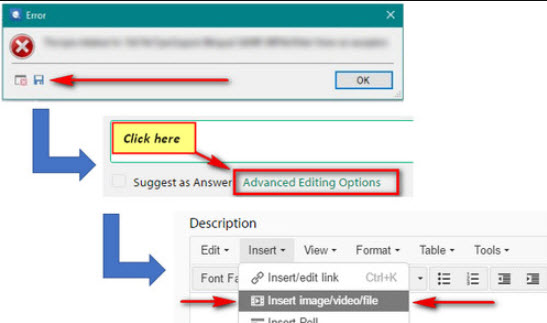
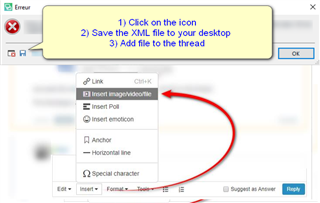
    Are you able to post the full error stack please-

    Error dialog box with instructions to click on the icon, save the XML file to desktop, and add file to the thread in Trados Studio.

    Does this happen with only a specific project or all projects?

    I have looked at the previous logged case, but unfortunately we weren't able to replicate this so any further information you can provide might help.

    Also knowing which apps/versions you have installed might also help.

    Oana Nagy | QA Engineer | RWS Group

    emoji


    Generated Image Alt-Text
    [edited by: Trados AI at 8:53 PM (GMT 0) on 28 Feb 2024]